What is Dropover?
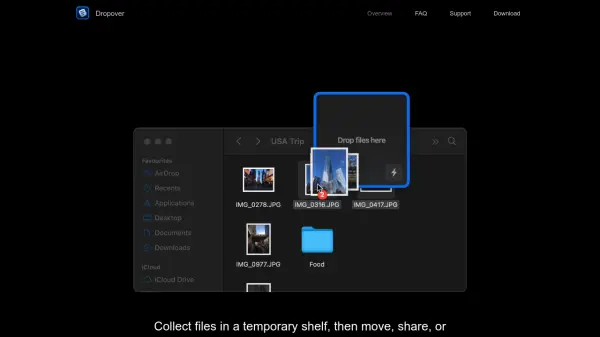
Dropover is a native macOS utility designed to streamline drag and drop workflows. It provides a temporary shelf that appears when you shake your pointer, allowing you to collect files, links, text snippets, and images from any source. Once gathered, you can move, share, or process all items in a single action.
The app integrates deeply with macOS, supporting features like Quick Look, clipboard, share extensions, and menu bar access. It also offers built-in file actions such as image resizing, text extraction, and ZIP creation, plus optional cloud uploads via Dropover Cloud, iCloud Drive, AWS S3, Google Drive, Microsoft OneDrive, or Imgur. Power users can leverage keyboard shortcuts, custom actions, scripts, and extensions for Alfred, Raycast, and Siri Shortcuts.
Features
- Temporary Shelf: Shake your pointer to open a shelf for collecting items
- Native macOS Integration: Works with Finder, Quick Look, clipboard, and share menu
- Batch Actions: Move, share, or process all collected items at once
- Cloud Upload: Upload to Dropover Cloud, iCloud Drive, AWS S3, Google Drive, OneDrive, or Imgur
- Built-in File Actions: Resize images, extract text, create ZIP archives
- Customization: Name, color-code shelves, create custom actions and scripts
- Power User Tools: Keyboard shortcuts, Command Bar, Alfred/Raycast extensions, Siri Shortcuts
Use Cases
- Collecting multiple files from different folders before moving them to a destination
- Gathering images and links from a web browser for a project
- Batch resizing images or extracting text without opening separate apps
- Quickly sharing files via AirDrop, Mail, or Messages
- Uploading files to cloud storage and copying public links
FAQs
-
How do I open a shelf in Dropover?
Shake your pointer (mouse or trackpad) to open a shelf. You can also use a keyboard shortcut or drop files onto the menu bar icon. -
Can I upload files to cloud services?
Yes, Dropover supports uploading to Dropover Cloud (free), iCloud Drive, AWS S3, Google Drive, Microsoft OneDrive, and Imgur. -
Is Dropover compatible with macOS Sequoia?
Yes, Dropover is designed for macOS and is updated regularly to support the latest versions. -
Can I customize the shake sensitivity?
Yes, you can fine-tune the shake gesture sensitivity in the preferences.