
What is Dropzone 4?
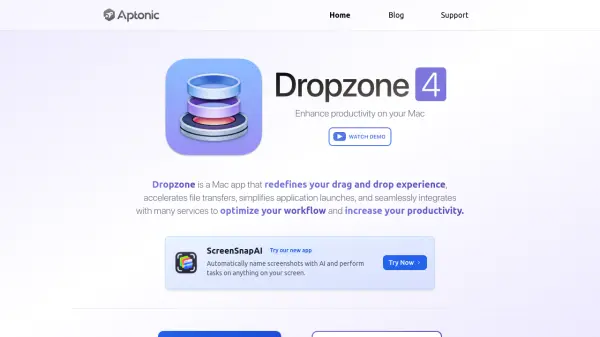
Dropzone 4 is a Mac application designed to streamline workflow by enhancing the drag-and-drop experience. It provides a grid of smart actions that users can access by dragging files to the top of the screen, enabling quick file transfers, application launches, and integration with various services like Imgur, Amazon S3, and FTP. The app supports automation through shortcuts and custom actions, helping users save time and reduce desktop clutter.
With features such as image resizing, URL shortening, and secure file uploads, Dropzone 4 simplifies daily tasks on macOS. It offers a free version with a 14-day Pro trial, and users can unlock advanced capabilities with a one-time purchase. The tool is extensible, allowing installation of additional actions and customization through Ruby or Python scripting.
Features
- Drag-and-Drop Interface: Access smart actions by dragging files to the screen
- File Management: Rename, move, copy, and organize files instantly
- Application Launching: Quickly launch apps and automate workflows
- Cloud Integration: Upload to Imgur, Amazon S3, SFTP, and FTP
- Media Handling: Resize and compress images, shorten URLs
- Custom Actions: Install additional actions or develop your own in Ruby/Python
- Keyboard Shortcuts: Use shortcut keys for faster action execution
- Pro Features: Unlock advanced capabilities with a one-time purchase
Use Cases
- Streamlining file transfers between applications
- Automating repetitive tasks like image resizing or URL shortening
- Quickly launching frequently used apps from a central interface
- Uploading files to cloud storage services without opening browsers
- Organizing desktop files to reduce clutter and improve productivity
- Creating custom workflows with scripting for specialized needs
FAQs
-
What are the system requirements for Dropzone 4?
Dropzone 4 runs on macOS 11 and later, with full support for macOS Tahoe. -
How do I unlock Pro features in Dropzone 4?
Pro features can be unlocked by purchasing Dropzone 4 Pro Lifetime for $35, which includes all advanced capabilities. -
Is there a free trial available for Dropzone 4?
Yes, Dropzone 4 is free to use and includes a 14-day Dropzone 4 Pro trial to test advanced features. -
Can I customize actions in Dropzone 4?
Yes, users can install additional actions, modify existing ones, or develop custom actions using Ruby or Python scripting. -
Where can I purchase Dropzone 4?
Dropzone 4 can be purchased directly from Aptonic for $35, or through Setapp or the Mac App Store.