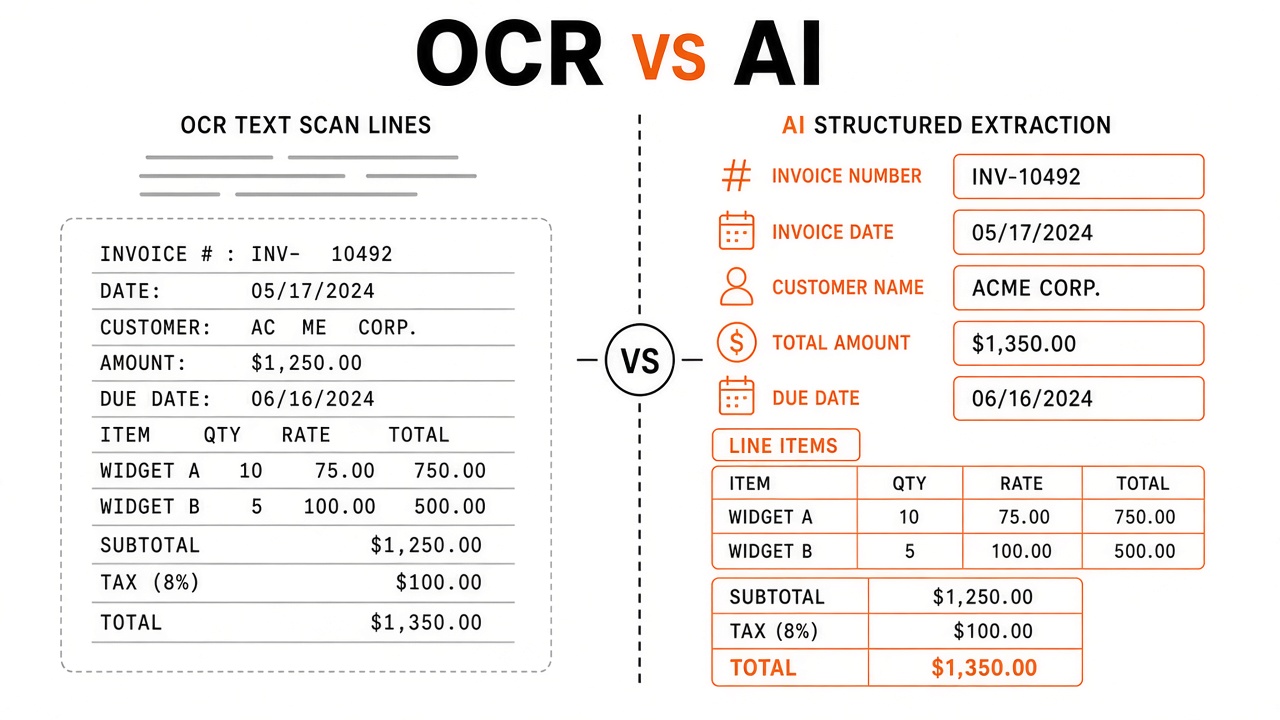
A procurement manager compares two vendors. One promises "99% OCR accuracy." The other sells "document AI" that understands invoices. Both upload the same PDF demo and return impressive screenshots. Six months later, the OCR-only tool still dumps unstructured text your team re-keys into SAP. The document AI platform routes exceptions to a review queue and posts JSON line items automatically. The difference is not scan quality. It is what happens after characters are recognized.
OCR (Optical Character Recognition) converts document images into text; document AI adds layout understanding, field extraction, validation, and business context to produce structured outputs. Google Document AI, Amazon Textract, Azure AI Document Intelligence, and ABBYY Vantage sit on the document AI side; traditional OCR engines like Tesseract or basic scanner SDKs represent the lighter end of the spectrum. This guide defines both approaches, compares capabilities in a matrix, weighs cost and accuracy tradeoffs, describes hybrid pipelines most enterprises actually run, and lists vendor demo questions before you commit budget alongside AI code integrations or private AI chatbot projects that query extracted archives.
Definitions: OCR and Document AI
OCR answers the character recognition problem: given an image, what letters and numbers appear and where on the
page. Output is typically text plus bounding boxes. Document AI answers the comprehension problem: given a
document, what type is it, which regions are tables or signatures, and which values map to business fields like
total_due or clause_termination_date.
| Term | Core function | Typical output |
|---|---|---|
| OCR | Image to text transcription | Plain text, hOCR, ALTO XML |
| Document AI | Parse, classify, extract structured fields | JSON schema, key-value pairs, tables |
| IDP platform | End-to-end capture to ERP workflow | Validated records + HITL queues |
Capability Matrix
Document AI subsumes OCR but adds classification, layout, tables, forms, and pretrained parsers for common document types; plain OCR lacks semantic field mapping without custom engineering.
| Capability | OCR only | Document AI |
|---|---|---|
| Printed text extraction | Strong | Strong (includes OCR) |
| Handwriting | Limited | Improving, domain-dependent |
| Table structure | Weak without add-ons | Native table parsers |
| Invoice / receipt fields | Requires custom rules | Prebuilt processors |
| Contract clause ID | Manual search in text | Custom models + LLM assist |
| Confidence per field | Character-level only | Field-level routing to HITL |
When OCR Is Enough
Choose OCR-only stacks when you need full-text search archives, digitization for compliance retention, or input to downstream systems that already understand structure. Examples: litigation discovery PDFs, book scanning, feeding RAG chatbots that chunk prose without field schemas. If humans never re-type tabular data and no ERP integration requires key-value JSON, paying document AI premiums may waste budget.
When Document AI Is Required
Choose document AI when wrong field mapping costs money: accounts payable automation, mortgage underwriting, insurance claims, customs forms, and contract obligation tracking. These workflows need straight-through processing metrics, not character error rates alone. Multi-page invoices with nested tables break naive OCR-to-regex pipelines within weeks of vendor layout changes.
Cost and Accuracy Tradeoffs
OCR is cheaper per page at scale; document AI costs more per document but saves human re-keying labor when field accuracy is high enough to automate. Build a simple ROI model: (manual minutes per document × hourly labor cost × monthly volume) minus (platform fees + HITL exception handling). Document AI wins when STP rates exceed the breakeven threshold.
| Factor | OCR-only | Document AI |
|---|---|---|
| License/API cost | Low per page | Higher per document or field |
| Implementation time | Days for basic pipeline | Weeks to months with integration |
| Labor savings | Low unless text-only use case | High when STP rates strong |
| Accuracy reporting | CER/WER | Field F1, STP, exception rate |
Accuracy claims require context. A 99% character accuracy OCR pass still produces 0% useful automation if line items land in the wrong columns. Measure end-to-end field correctness on your documents.
Hybrid Pipelines Most Teams Run
Production systems often chain open-source or low-cost OCR with document AI parsers for specific types, then LLM exception handlers for edge cases. A typical hybrid flow:
- Open-source OCR or cloud OCR for baseline text and coordinates.
- Document AI prebuilt processor for invoices or custom trained model for proprietary forms.
- Business rules engine validates totals, tax IDs, and duplicate invoice numbers.
- LLM assists only on low-confidence fields with mandatory citation to OCR spans.
- HITL queue for remaining exceptions; corrections feed retraining.
Teams building AI code pipelines sometimes embed Textract or Document AI SDK calls in microservices while keeping chat interfaces separate. A private AI chatbot can query structured extraction results without re-parsing raw PDFs on every question, saving cost and reducing hallucination risk.
Document Types and Fit
| Document type | OCR sufficiency | Document AI value |
|---|---|---|
| Invoices | Low | High (line items, totals) |
| Contracts | Medium (search only) | High (clause extraction) |
| Government forms | Low | High (checkboxes, IDs) |
| Books / articles | High | Low unless structured metadata needed |
| Email bodies | N/A (already text) | Medium (intent, entities) |
Cloud Document AI Services Compared
Major cloud providers ship overlapping document AI capabilities with different prebuilt processors, pricing models, and regional availability. All include OCR as a foundation layer. Differences appear in prebuilt invoice parsers, custom model training UIs, and enterprise compliance certifications.
| Provider | Product name | Notable prebuilt parsers |
|---|---|---|
| Google Cloud | Document AI | Invoice, expense, W-9, bank statement |
| Amazon Web Services | Amazon Textract | AnalyzeExpense, lending packages, IDs |
| Microsoft Azure | Azure AI Document Intelligence | Invoice, receipt, contract, health insurance |
| ABBYY | Vantage / FlexiCapture | Enterprise capture, custom skills |
Open-source stacks (Tesseract, PaddleOCR, docTR) cover OCR well. Adding layout parsers and field extraction requires engineering investment or wrapping cloud APIs. Teams with AI code expertise sometimes build thin orchestration layers that route documents to the cheapest correct processor per type.
Security and Compliance Considerations
Document processing touches PII, financial records, and attorney-client privileged material; data residency and training opt-out clauses matter as much as extraction accuracy. Ask whether documents leave your VPC, how long vendors retain copies, and whether zero-retention inference tiers exist. Regulated industries may require on-prem or private endpoint deployments that plain OCR SaaS trials do not offer.
Audit trails should link every extracted field to source coordinates. When disputing a tax audit or insurance claim, "the AI said so" is insufficient without provenance. Document AI platforms with field-level citations outperform OCR dumps in compliance reviews.
Vendor Demo Questions
Before signing, run your documents through vendor trials and ask questions that expose OCR-only backends wrapped in document AI marketing.
- Is OCR performed in-house or via a third-party engine? Can we see per-layer confidence scores?
- Which fields are extracted by prebuilt models vs custom training vs LLM prompts?
- What STP rate did similar customers achieve on our document subtype and scan quality?
- How does the product handle layout changes from a major supplier without retraining?
- Are extracted values tied to source bounding boxes for audit defense?
- What is the pricing model: per page, per document, per field, or per successful automation?
- Does document content train shared models, or is tenant data isolated?
- What HITL tooling ships natively vs requires a separate BPM investment?
Frequently Asked Questions
Is Amazon Textract document AI or OCR?
Textract is document AI: it includes OCR plus tables, forms, and specialized APIs like AnalyzeExpense beyond plain text detection. The plain DetectDocumentText API is closer to OCR-only usage.
Can Tesseract replace cloud document AI?
Tesseract handles OCR well for controlled scans but lacks native invoice field extraction, layout classifiers, and managed prebuilt parsers. Engineering teams can build layers on top; total cost of ownership rises with maintenance.
Will GPT-class models replace document AI?
LLMs help on varied layouts and exception reasoning but struggle with provable field accuracy, cost at millions of pages, and regulatory audit trails without OCR grounding. Expect hybrid stacks, not LLM-only replacement.
Do born-digital PDFs need OCR?
Text-native PDFs can skip OCR if text layers are reliable; scanned attachments and image-only PDFs still require OCR before extraction. Document AI pipelines detect which path to use per file.
How does document AI relate to IDP?
Document AI is the intelligence layer; Intelligent Document Processing (IDP) wraps capture, workflow, HITL, and ERP export around document AI and OCR components. You may buy document AI APIs inside a broader IDP platform.
Why do OCR vendors claim 99% accuracy but automation still fails?
Character accuracy on clean scans does not equal field automation success when layout, tables, and business rules break downstream. Always measure end-to-end field correctness on your document population.
Can we migrate from OCR-only to document AI incrementally?
Yes. Start with one high-value document type, run document AI in parallel with existing OCR pipelines, compare field accuracy, then cut over when STP rates justify the switch. Hybrid operation is normal during transition.
Decision Framework: OCR or Document AI?
Choose OCR when the downstream consumer is a human or search index that tolerates unstructured text; choose document AI when downstream systems require validated fields without manual re-keying. If your success metric is "findable PDF text," OCR wins on cost. If your success metric is "invoice posted to ERP without touch," document AI is mandatory. When unsure, run a two-week pilot measuring field-level accuracy on 100 documents per candidate approach.
Organizations deploying private AI chatbots over document archives should extract structured metadata with document AI first, then index both fields and text chunks for retrieval. Chat quality improves when the bot can filter "invoices over $50k from Q2" using structured fields instead of guessing from OCR noise.
Conclusion
Document AI vs OCR is not a branding debate. OCR reads characters; document AI understands layout, fields, and business meaning. Choose OCR when you need searchable text. Choose document AI when automation depends on structured extraction from invoices, contracts, and forms. Most enterprises run hybrid pipelines and measure success on field accuracy and straight-through processing, not demo-page character counts. Ask vendors hard questions, pilot on your files, and connect results to integration work and downstream chat only after structured data exists.