Production AI fails on vendor holidays, during model rollouts, and five minutes before executive demos. The on-call engineer opens the vendor site, finds a chat widget, and waits. The account manager's email bounced last quarter. Nobody knows the enterprise support line or whether you even have a TAM.
Documenting vendor escalation paths for AI tools means one escalation card per vendor: support tiers, required ticket fields, internal relationship owner, and quarterly drill schedule. This guide covers API providers and customer-facing AI platforms your team depends on for revenue workflows.
Include vendor status page URLs, RSS feeds, and third-party status aggregators on each card. Many AI outages appear on community forums before official pages update. On-call runbooks should say when to trust status green versus local error budgets firing.
Document internal escalation when vendor misses SLA: procurement contact, executive sponsor, and legal for material breach notices. External escalation without internal coordination produces duplicate contradictory messages to the vendor account team.
Customer-facing teams using customer service AI need pre-written holding messages when vendors degrade. Holding messages buy time without promising resolution timelines legal has not approved.
Support Tiers: Chat, Ticket, Phone, TAM
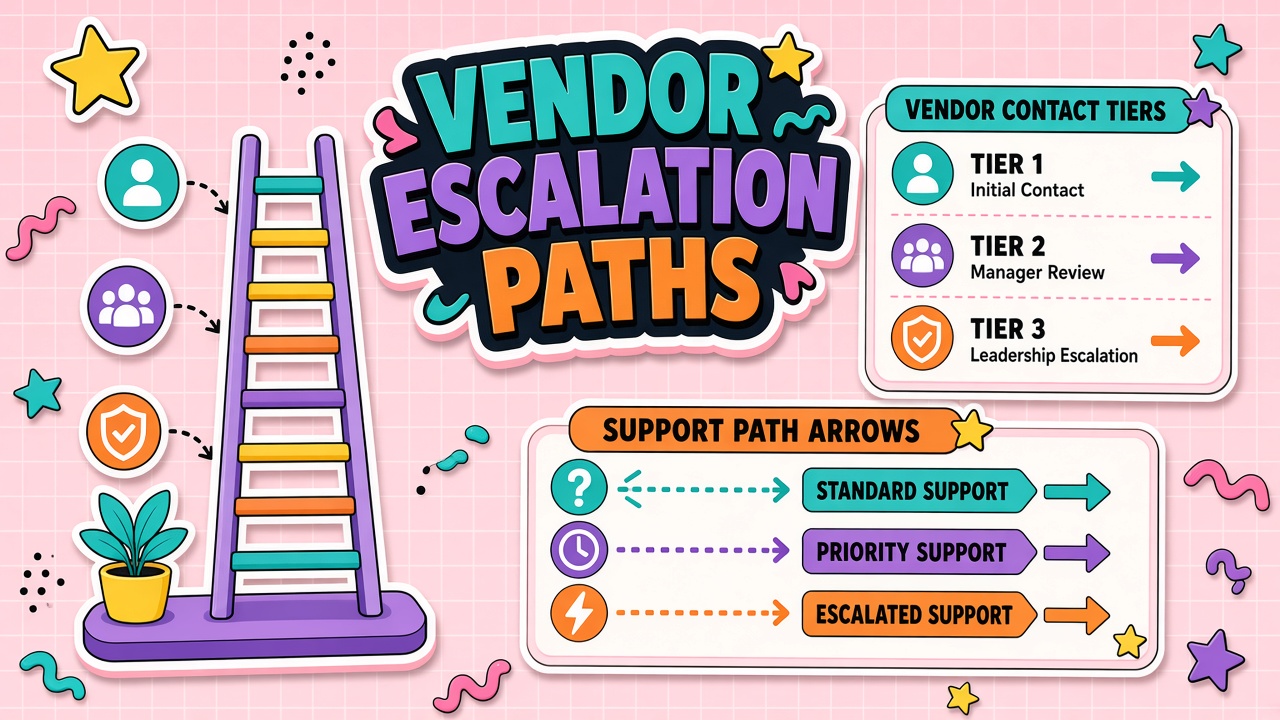
Map each vendor's published support ladder and what your contract actually entitles you to. Free tiers often lack phone support; enterprise agreements may include a named technical account manager (TAM) with a separate escalation alias.
| Tier | Typical channel | When to use |
|---|---|---|
| L1 | Chat, community, docs | How-to questions, known outages on status page |
| L2 | Support portal ticket | Reproducible bugs, billing, API errors with request IDs |
| L3 | Phone or priority queue | Production down, data integrity risk, SLA breach imminent |
| Executive | TAM, CSM, or sales escalation | Multi-hour Sev-1 with no L3 movement |
Store status page URLs and RSS feeds on the same card. Many AI incidents are regional or model-specific before they hit the main status banner.
Note business hours and holiday coverage per region. A US-based TAM may not answer during APAC peak traffic. Document regional escalation paths for vendors with global infrastructure but regional support desks.
Required Info on Escalation Tickets
Incomplete tickets bounce between tiers for days. Standardize a paste block every on-call runbook includes:
- Organization ID, contract tier, and support PIN if applicable
- Environment (production, staging), region, and model or deployment ID
- Timestamp range, request ID, trace ID, or correlation ID from API logs
- Minimal repro steps without customer PII (use synthetic examples)
- Business impact: users affected, revenue at risk, workaround in place or not
For API integrations, redact API keys from screenshots. Vendors need headers and error bodies, not full prompt content containing secrets.
Maintain a sanitized repro library internally. When the same timeout pattern appears monthly, reuse the paste block with updated timestamps rather than rewriting from scratch at 2 a.m. Link paste blocks to runbooks for each integration using AI APIs.
Internal Owner per Vendor Relationship
Assign one internal owner per strategic vendor: program admin, IT lead, or procurement partner. The owner maintains the escalation card, renews contact lists after reorgs, and joins Sev-1 bridges when technical staff need commercial leverage.
Backup owners prevent single-point-of-failure when the primary is on leave. The owner does not replace on-call engineering for triage but ensures tickets reach the right external tier.
Quarterly Escalation Drills
Test escalation paths before you need them. Once per quarter, run a tabletop or live drill: open a priority ticket with the standard paste block, confirm response within SLA, and verify phone numbers still work.
- Pick one production-critical vendor per quarter
- Simulate a non-destructive incident (read-only API failure scenario)
- Time responses at each tier; note gaps in documentation
- Update the escalation card and train on-call rotation
Drills for customer service AI should include a comms template for status updates to support leaders and customers if chatbots fail open or closed incorrectly.
Escalation Card Template
Keep one page per vendor in your internal wiki: logo, contract dates, tier, all contact channels, account identifiers, internal owner, backup, last drill date, and links to DPA and subprocessors. Version the card when contracts renew.
Attach the standard paste block and last drill results to each card. New on-call engineers should find everything needed for a Sev-1 open in under two minutes without searching email.
Severity Definitions and Bridge Protocol
Align internal Sev-1 through Sev-3 definitions with vendor severity language. If your Sev-1 means "customer cannot complete purchase" but the vendor's priority queue requires "complete outage," on-call will mis-tier tickets and wait hours for wrong-queue responses. Publish a mapping table on each escalation card.
Sev-1 bridges should name incident commander, scribe, vendor liaison, and comms lead. The vendor liaison owns external ticket updates; engineering owns internal mitigation. For customer service AI outages, pre-draft customer status messages before the bridge so comms is not writing from zero during impact.
Post-Incident Vendor Follow-Up
After resolution, request root cause and corrective action from the vendor within five business days. Store RCA summaries on the escalation card. Recurring themes (rate limit misconfiguration, silent model deprecation) feed renewal negotiations and architecture decisions.
Update paste blocks and runbooks when vendor support asks for new fields. Post-incident learning is wasted if the next on-call engineer repeats the same bounced ticket pattern.
Store escalation cards in the same wiki space as incident runbooks and on-call schedules. Link from PagerDuty or Opsgenie service pages so engineers do not search Confluence during Sev-1. Include vendor account manager mobile numbers only if contract permits; otherwise use official support queues.
Multi-region deployments need escalation cards per region when support tiers differ. A EU enterprise agreement may not cover US inference endpoints added later without contract amendment.
Vendor Scorecard From Escalation History
Track mean time to first meaningful response and resolution by vendor and tier. Scorecards feed renewal decisions: a vendor with brilliant features but repeated Sev-1 delays may need architectural exit planning. Share scorecards with procurement before auto-renew windows.
Escalation for Regulated Customers
When customers impose notification SLAs on subprocessor or outage events, map those SLAs to internal escalation timelines. Customer success may need vendor updates before your internal Sev-2 closes. Document who translates vendor RCA into customer-safe language and within what hours.
Regulated accounts may require named vendor contacts stored under NDA. Escalation cards for those accounts should live in restricted wiki spaces with access logging. Generic support queues may violate customer contract if used instead of named contacts during material incidents.
Integration With Incident Management
Link escalation cards from PagerDuty, ServiceNow, or Jira incident templates so fields pre-populate from the paste block. Integration reduces human error when engineers paste wrong account IDs under stress. Update template links when card versions change.
Post-incident reviews should verify escalation path was followed and note vendor tier response times versus SLA. Repeated tier misclassification triggers card rewrite and on-call retraining.
Frequently Asked Questions
What about multi-vendor incidents?
Name an incident commander who opens parallel tickets with each vendor and shares a single internal timeline. Cross-vendor failures (embedding provider plus vector DB plus LLM) need a dependency map on the escalation wiki.
How do status pages fit escalation?
Subscribe the on-call rotation to vendor status feeds. If status shows green but you see errors, open L2 with request IDs anyway; partial outages often lag public pages.
What if the vendor only offers email support?
Document expected response times from the contract or terms. Escalate through your procurement owner to sales leadership for Sev-1. Consider that risk in vendor selection for critical paths.
Who can authorize after-hours vendor calls?
Pre-authorize on-call engineers to open Sev-1 tickets without manager approval when production customer impact is confirmed. Finance approval can follow; customer impact cannot wait.
Contract SLA Alignment
Extract SLA commitments from order forms into escalation cards: response time, resolution target, credit eligibility. On-call should not hunt PDFs during incidents. When SLAs differ by product line within one vendor, maintain separate cards per product.
Procurement renewals should update SLA tables before signature. Vendors sometimes downgrade support tiers while keeping the same logo on the website. Mismatch between contract and card causes false confidence during executive escalations.
For API providers, note rate-limit support paths separately from outage support. Throttling during launch week feels like an outage to product teams but may not qualify for Sev-1 under vendor definitions.
On-Call Training for Escalation Cards
New on-call engineers complete a walkthrough of top five vendor cards before first pager shift. Walkthrough includes opening a test ticket, locating account IDs, and verbalizing Sev mapping. Training records attach to on-call roster entries for audit.
Rotate mock pages quarterly using historical incident summaries sanitized of customer data. Mock pages reveal stale phone numbers and missing fields faster than wiki review alone. Update cards within 48 hours of any mock failure.
Review escalation cards when vendor account teams change after acquisition or reorg. New account managers may invalidate old executive escalation paths documented last year. Procurement should confirm contacts within 30 days of vendor M and A announcements affecting your tier.
Include vendor security incident history summaries on escalation cards when vendors provide them under NDA. History informs whether Sev-1 pages are routine noise or signs of systemic instability requiring architecture review.
Rehearse executive escalation paths once per year with procurement and sponsor participation so commercial leverage is exercised correctly during real incidents, not invented under panic.
Document Before the Pager Fires
Escalation paths are insurance. Build the card when the vendor is onboarded, assign an internal owner, and drill quarterly. Teams relying on AI APIs and customer service AI should treat escalation documentation as part of go-live, not post-incident paperwork.