What is Swift To-Do List 11?
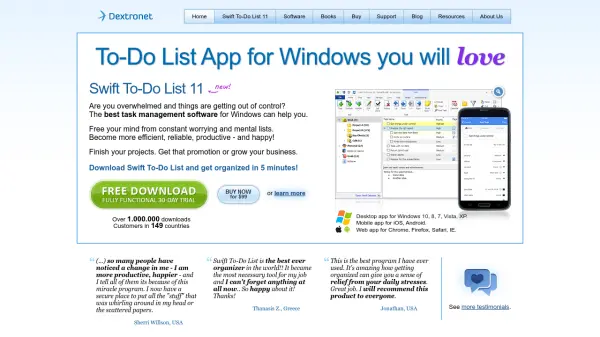
Swift To-Do List 11 is a desktop application designed for Windows operating systems, providing users with a powerful tool to manage tasks and organize their daily activities. It helps individuals free their minds from constant worrying by offering a secure place to store all their tasks and mental lists, enabling them to become more efficient, reliable, and productive.
The software supports cloud synchronization across multiple platforms, including mobile apps for iOS and Android, as well as web apps for popular browsers like Chrome, Firefox, Safari, and IE. With over 1,000,000 downloads and customers in 149 countries, it has established itself as a trusted solution for personal and professional task management.
Features
- Task Management: Organize and manage daily tasks and projects
- Cloud Sync: Synchronize data across Windows desktop, mobile apps, and web browsers
- Multi-Platform Support: Available for Windows, iOS, Android, and web browsers
- Free Trial: Fully functional 30-day trial version
- Desktop Application: Native Windows software for task organization
Use Cases
- Managing daily to-do lists for personal organization
- Tracking project tasks for business or professional use
- Synchronizing tasks across multiple devices for accessibility
- Reducing mental clutter by storing tasks digitally
- Improving productivity through structured task management