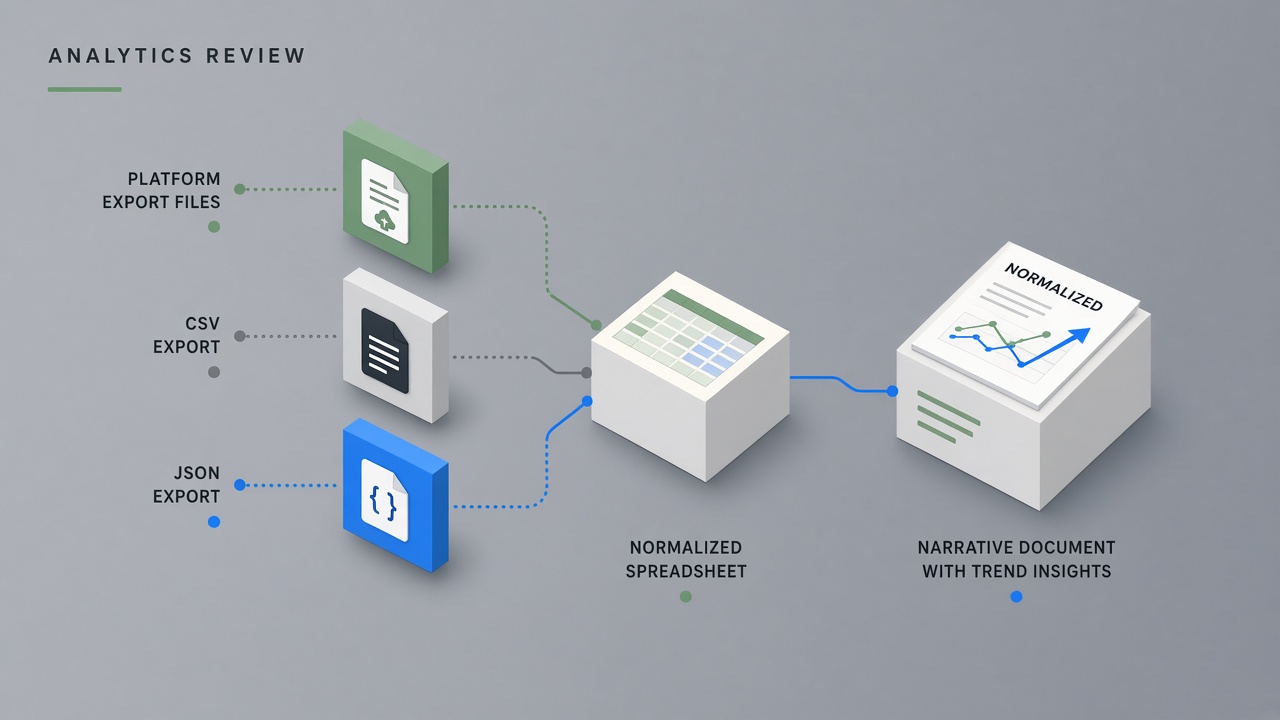
Platform dashboards show spikes and dips, but they rarely explain what changed, why it matters, or what to publish next. Creators who react to single-day swings burn out. Teams who skip written reviews repeat the same format mistakes quarter after quarter. An ai workflow creator analytics review pipeline exports metrics from each channel, normalizes definitions across tools, drafts trend narratives and anomaly callouts, and routes every strategic conclusion through human validation before calendars move. AI accelerates pattern spotting; creators own the story and the decisions.
This guide targets YouTubers, newsletter operators, podcast hosts, and multi-platform creators who review performance monthly or quarterly. Pair narrative drafting with AI code helpers when you automate CSV merges from analytics exports, and AI voice tools only after written narratives are approved, for optional audio summaries to collaborators, never as a substitute for verified numbers.
Export Metrics From Each Platform
Monthly analytics reviews start with dated exports from every active platform, not screenshots of live dashboards that change before you finish the write-up. YouTube Studio, Instagram Insights, TikTok Analytics, newsletter dashboards, and podcast hosting panels each define reach, views, and engagement differently. Download CSV or PDF reports on the same calendar day each month. Store files in a versioned folder with platform name and date range in the filename.
- Pick consistent windows: last 28 days, last 90 days, and year-to-date where available.
- Export audience, content, and traffic tabs separately when platforms split them.
- Capture subscriber or follower counts with an as-of timestamp.
- Save sponsor-facing metrics only from reports you are allowed to share externally.
- Log export date and account handle in a cover sheet for audit trails.
| Platform | Primary export source | Metrics to pull monthly |
|---|---|---|
| YouTube | YouTube Studio Analytics, Advanced mode | Impressions, CTR, watch time, average view duration, net subs, returning viewers |
| Professional dashboard or Meta Business Suite | Reach, non-follower reach, saves, shares, profile visits, Reels plays | |
| Newsletter | Beehiiv, Substack, MailerLite, or ConvertKit reports | List size, open rate, click rate, growth, unsubscribes, top links |
| Podcast | Spotify for Podcasters, Apple Podcasts Connect, hosting panel | Downloads per episode, completion rate, audience geography, referral sources |
Export Hygiene and Access Control
Redact advertiser names, private audience segments, and revenue lines from copies you paste into external AI tools when contracts or platform terms require confidentiality. Keep a local master spreadsheet with full detail for internal use. Never upload raw exports to public links. If a manager or editor needs access, share read-only folders with expiration dates.
TikTok and Short-Form Platform Exports
TikTok Analytics, LinkedIn Creator analytics, and Pinterest Trends each report video views, profile views, and follower growth on different cadences, so short-form exports belong in the same monthly folder as long-form YouTube data. TikTok's overview tab shows traffic source splits that explain discovery versus profile-driven views. Capture average watch time and completion rate for Reels-length content separately from feed posts on Instagram. When one clip spikes, export that post's detail page before the 60-day window closes on some platforms.
Normalize Definitions Across Tools
Before AI drafts a narrative, map each metric to a single internal definition so YouTube views are not compared directly to Instagram reach or newsletter opens without a translation layer. A creator metrics review ai workflow fails when the model treats unlike numbers as peers. Build a glossary tab: metric name, platform source, formula, and whether the number is cumulative or rate-based.
- List headline KPIs for the review period (three to five, not thirty).
- Document numerator and denominator for every rate metric.
- Flag metrics that shifted definition after a platform update.
- Convert currencies and time zones to one standard before month-over-month tables.
- Separate organic performance from paid boosts in sponsor-facing summaries.
| Internal metric | YouTube label | Instagram label | Normalization note |
|---|---|---|---|
| Top-of-funnel exposure | Impressions | Reach (accounts) | Do not sum; compare trend direction only |
| Depth signal | Average view duration | Saves-to-reach ratio | Report separately; both indicate intent |
| Audience growth | Net subscribers | Follows minus unfollows | Use net, not gross follows |
| Loyalty proxy | Returning viewers | Repeat profile visits | Qualitative narrative, not blended score |
Benchmark Rows Without Fake Industry Averages
Compare each metric to your own prior month and trailing three-month baseline, not to generic industry benchmarks AI might invent. If you lack three months of history on a new platform, label the column "baseline forming" and restrict conclusions to format experiments, not channel-wide strategy pivots.
AI Draft of Trends and Anomalies
Feed AI normalized tables and top-five content lists, then ask for a youtube analytics narrative ai style summary: what rose, what fell, which formats outperformed, and which outliers deserve investigation, with every claim tied to a row in your spreadsheet. Prompt for plain language paragraphs a brand manager or editor could read in five minutes. Ban causal language AI cannot support from exports alone, such as "audience got bored" without comment or retention evidence.
- Paste month-over-month delta table with percent change and absolute values.
- Attach ranked content list with title, format, publish date, and primary metric.
- Request three sections: headline trends, anomalies, open questions for human review.
- Ask AI to flag metrics that moved more than one standard deviation from your baseline.
- Require citation format: metric name, platform, window, and value in parentheses.
| Narrative block | AI can draft | Human must verify |
|---|---|---|
| Month-over-month summary | Sentence flow from delta table | Numbers match source export |
| Top content patterns | Theme clustering from titles | Outliers excluded per your policy |
| Anomaly callouts | Threshold-based flags | External events (news, platform bug) |
| Recommended experiments | Hypothesis list from patterns | Feasibility and brand fit |
Narrative Tone for Internal and Sponsor Audiences
Produce two narrative lengths from the same verified data: a short internal memo for your team and a sponsor-safe excerpt with redacted revenue and contract-sensitive campaigns. AI can reformat; you choose what sponsors may see. Never let the model add performance claims not present in approved exports.
Human Validation Before Strategy Shifts
No calendar change, format pivot, or posting frequency adjustment ships until a human confirms the underlying metrics, rules out one-off viral spikes, and agrees the story matches lived creator context. A content strategy data workflow treats AI narrative as a draft brief, not a decision engine. Schedule a 45 to 60 minute review block monthly: read the draft, open source exports side by side, and mark each paragraph validated or rejected.
- Check top and bottom content against memory: packaging, topic news, technical issues.
- Compare AI causal language to retention curves or comment themes when available.
- Reject strategy shifts based on a single metric move without corroboration.
- Document rejected AI paragraphs so the next prompt improves.
- Sign off with name and date in the review doc header.
YouTube's new, casual, and regular viewer segments illustrate why humans stay in the loop. A dip in regular viewers may reflect a posting gap, not audience fatigue. Instagram non-follower reach may rise when one Reel hits discovery without changing core follower engagement. AI highlights the delta; you explain the mechanism.
Validation Checklist Before Publishing the Review
Before sharing the monthly review internally or with a manager, confirm every number in the narrative appears in an export pulled this cycle, every percentage uses the same denominator as last month, and every content example link still resolves. Broken links and stale screenshots undermine trust faster than a flat growth month.
Action Items With Owners and Dates
End every analytics narrative with one to three action items that name an owner, a due date, and the metric each action is meant to influence, so reviews change the content calendar instead of living in a forgotten doc. AI can propose experiments from patterns; humans assign capacity. Prefer one focused test per month over three simultaneous pivots that muddy attribution.
- Link each action to a KPI from your normalized glossary.
- Set review date four weeks out to measure impact.
- Assign owner: creator, editor, thumbnail designer, or community manager.
- State success criteria in advance (e.g., CTR +0.5 points on next four uploads).
- Archive completed actions with outcome notes for the next AI prompt context.
| Action | Owner | Due | Target metric |
|---|---|---|---|
| Test shorter hooks on tutorials | Creator + editor | Next 4 videos | Average view duration |
| Shift 2 posts to peak activity window | Social manager | Week 2 of next month | Non-follower reach |
| Add chapter markers to search videos | Creator | Back catalog batch | Watch time from search |
Connect Actions to the Content Calendar
Visible calendar entries for each action item prevent reviews from becoming performance theater. If the narrative recommends more carousels, the next month's content plan should show increased carousel slots with owners tagged. AI code scripts can push action rows into Notion, Airtable, or Google Sheets; creators still attend the monthly readout.
Monthly Review Meeting Agenda Template
A 45-minute review agenda keeps teams aligned: ten minutes on headline KPI deltas, fifteen on top and bottom content, ten on AI narrative validation, and ten on action item assignment with calendar updates. Send the AI draft 24 hours before the meeting so editors arrive with questions. Record decisions in the same doc as the narrative so next month's AI prompt includes outcome notes from completed experiments. Managers who receive sponsor-facing excerpts should get the redacted version only, never the internal hypothesis list.
Frequently Asked Questions
Should I use third-party analytics tools instead of native exports?
Third-party dashboards like TubeBuddy, vidIQ, Later, or DashThis help visualize cross-platform data, but your narrative should still anchor to native exports when numbers appear in sponsor reports or legal disputes. Use third-party tools for alerting and charts; store platform CSVs as source of truth. If tools disagree, document which definition you adopt in your glossary and stay consistent month to month.
How do I turn monthly narratives into sponsor reporting?
Sponsor reporting pulls verified metrics and permitted case outcomes from the same normalized tables, with contract-approved windows and redacted competitor campaigns, never from AI-generated estimates. Build a sponsor appendix template: reach definitions, date range, top content links, and audience geography only when exports allow. AI formats prose; you confirm brand sign-off on every public stat. Match language to insertion order reporting requirements.
How often should I run this workflow?
Active channels benefit from lightweight weekly metric checks and a full narrative review monthly; slower channels can run quarterly deep reviews with monthly export archives. Consistency matters more than frequency. Comparing like windows beats reacting to daily noise in YouTube Studio or Instagram Insights.
What if my numbers are too small for trend stories?
Low-volume channels should narrow KPIs to format tests and audience quality signals, such as comment depth or newsletter click clusters, rather than forcing month-over-month percentage swings from tiny bases. AI can still draft structure; humans label confidence low and extend baselines before major strategy shifts.
Exports First, Narrative Second, Actions Last
An ai workflow creator analytics review that improves content strategy exports metrics from every platform, normalizes definitions, drafts trend and anomaly narratives with citations, validates every claim against source files, and closes with owned action items tied to calendar dates. AI reduces spreadsheet friction; accountability stays human.
Start with one platform you neglected in past reviews. Pull this month's export, build a five-row glossary, and run a single AI draft against your own prior month baseline. Reject one unsupported causal sentence. Assign one experiment with a named owner. Repeat next month with a fuller stack. Narratives compound when data hygiene does.