

What is Toodledo?
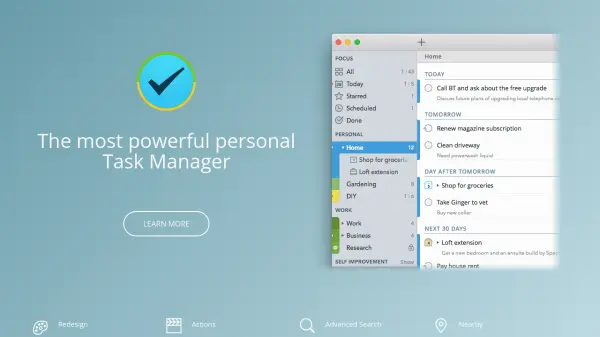
Toodledo provides a versatile platform for enhancing personal and professional productivity through a suite of integrated tools. It enables users to create detailed to-do lists with organizational features like folders, tags, contexts, and subtasks, while also offering note-taking capabilities, customizable multi-column lists, hierarchical outlines, and habit tracking with progress monitoring.
The tool supports collaboration by allowing users to share tasks, outlines, and lists with others, assign tasks within teams, and use individual workspaces. With automatic sync across iOS, Android, and desktop devices, location-based reminders, and extensive customization options, Toodledo ensures data is accessible and adaptable to various workflows, making it suitable for both beginners and experts seeking to streamline their daily activities.
Features
- Tasks: Create to-do lists with folders, tags, contexts, subtasks, and due date alerts
- Notes: Write and format notes for journaling, recipes, or ideas with folder organization
- Lists: Build custom multi-column lists for packing, inventory, or other purposes with selectable fields
- Outlines: Organize ideas hierarchically for project planning or genealogy tracking
- Habits: Track daily habits with progress graphs and charts to monitor self-improvement
- Collaboration: Share tasks, outlines, and lists with others, assign tasks, and use workspaces
- Sync: Automatic data synchronization across iOS, Android, and desktop devices
- Alarms/Reminders: Set customizable alarms via email or mobile apps, including location-based reminders
Use Cases
- Managing personal to-do lists and daily tasks for improved productivity
- Journaling or recording recipes and trip notes in a formatted note editor
- Creating packing lists for vacations or inventory lists for collections
- Outlining projects or family genealogy in a structured hierarchical format
- Tracking habits like exercise or reading to build and maintain good behaviors
- Collaborating on team projects by sharing tasks and assigning responsibilities
- Scheduling tasks with reminders and viewing them on a calendar for time management
- Using location-based alarms to get reminders when near task-related places