What is PDF Beast?
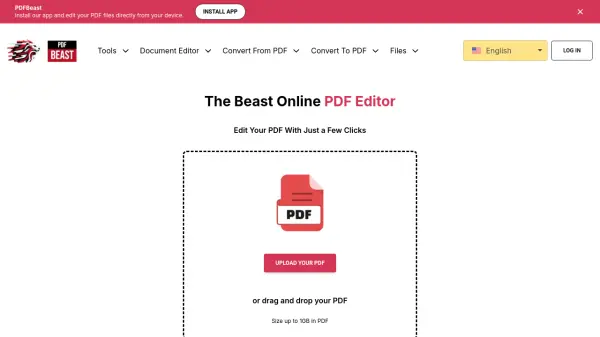
PDF Beast is an online PDF editor designed to simplify document management through an intuitive platform. Users can upload PDF files up to 1GB in size and perform various editing tasks, including text modifications, image insertions, and page rearrangements. The tool supports multiple formats for conversion, such as Word, Excel, and PNG, and offers features like password protection and form filling.
Operating without setup requirements, PDF Beast is accessible on Windows, macOS, Linux, Android, and iPhone devices. It prioritizes security with HTTPS encryption and temporary file storage, ensuring data privacy during processing. The platform caters to both beginners and experienced users by combining ease of use with advanced editing capabilities.
Features
- Fast Speed: Quickly generate and download PDF files with instant processing.
- Security First: Safeguard data with HTTPS encryption and clear privacy policies.
- Advanced Editor: Edit text, insert elements, and perform tasks from a single interface.
- Easy to Use: Navigate with an intuitive design for hassle-free PDF management.
- No Setup Required: Upload and edit PDFs directly on Windows, macOS, Linux, Android, or iPhone.
- Password Protection: Secure files with locks or restrictions to prevent unauthorized access.
Use Cases
- Editing text and images in PDF documents
- Converting PDF files to formats like Word or Excel
- Rearranging or extracting pages from PDFs
- Filling out forms within PDF documents
- Securing PDFs with password protection
- Compressing PDF files to reduce file size
FAQs
-
Is PDF Beast free to use?
The pricing structure is not specified on the homepage; users should check the website for details on free or paid features. -
What file formats can PDF Beast convert PDFs to?
PDF Beast supports conversion to formats including Word, Excel, Text, PowerPoint, PNG, JPG, CSV, HTML, RTF, and JSON. -
How does PDF Beast ensure the security of uploaded files?
PDF Beast uses HTTPS encryption for data transmission and offers temporary storage with automatic file deletion after processing to enhance safety. -
What devices and operating systems are compatible with PDF Beast?
PDF Beast is compatible with Windows, macOS, Linux, Android, and iPhone devices, requiring no setup for use. -
What should I do if I encounter problems while using PDF Beast?
Contact support at [email protected] for assistance with any issues or errors.