What is Humanize AI?
Transforming robotic, machine-generated drafts into authentic and relatable writing is the primary focus of Humanize AI. Utilizing proprietary algorithms, the platform rephrases content from sources such as ChatGPT, Google Bard, Microsoft Bing, QuillBot, Grammarly, Jasper.ai, and Copy.ai. Throughout the conversion process, the tool preserves the original meaning, context, and Search Engine Optimization (SEO) value by retaining essential keywords while eliminating unnatural phrasing and grammatical errors.
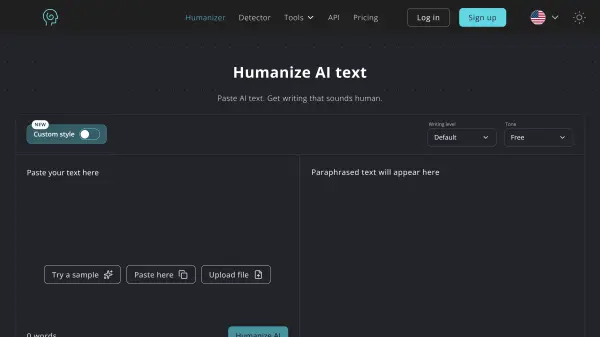
Beyond basic text humanization, the platform provides an integrated suite of writing utilities, including an AI detector, paraphraser, plagiarism checker, grammar checker, and essay writer. Users can customize their output by adjusting writing readability levels, selecting specific tones such as Academic, Formal, Simple, or Flowing, and uploading writing samples to train a custom personal voice style. The web-based interface supports direct text input as well as document uploads in TXT, DOCX, PDF, and MD formats across all major browsers and devices.
Features
- AI-to-Human Text Conversion: Rewrites content from ChatGPT, Bard, Jasper, and other AI generators into natural, human-sounding text.
- AI Detector Bypass: Crafts output designed to bypass AI detection systems including Originality.ai, GPTZero, Turnitin, Copyleaks, and ZeroGPT.
- Customizable Writing Modes and Tones: Offers Standard, Academic, Simple, Flowing, Informal, Formal, Expand, Shorten, and Ultra run modes.
- Adjustable Rewrite Strength and Readability: Provides Quality, Balanced, and Max rewrite levels alongside customizable reading difficulty settings.
- Custom Style Matching: Allows users to upload writing samples so future humanizations match their personal voice and phrasing.
- Integrated Writing Suite: Includes a built-in AI Detector, Plagiarism Checker, Grammar Checker, Paraphraser, and Essay Writer.
- File-to-File Document Upload: Supports uploading and processing documents directly in .txt, .docx, .pdf, and .md formats.
- Multilingual Support: Processes and humanizes text across multiple languages, including English, Spanish, French, German, Chinese, Russian, Arabic, and Japanese.
- SEO and Context Preservation: Retains essential keywords and contextual meaning to ensure content remains optimized for search engines.
Use Cases
- Refining AI-generated drafts into natural, human-written articles and blog posts.
- Enhancing marketing copy, advertisements, and e-commerce product descriptions for emotional engagement.
- Polishing academic essays, assignments, and research papers while maintaining original meaning.
- Improving the tone and clarity of business emails, reports, and internal HR communications.
- Simplifying complex legal jargon into client-friendly language.
- Crafting conversational scripts for podcasts, YouTube videos, and social media posts.
- Scanning documents for plagiarism and AI probability scores prior to submission.
How It Works
Step 1: Visit the Website
Open https://www.humanizeai.pro in any preferred web browser.
Step 2: Input AI Text
Paste the AI-generated text into the input area or upload a supported document (.txt, .docx, .pdf, .md).
Step 3: Complete Verification
Complete the Captcha verification to confirm human usage and optionally select your desired tone, writing level, and rewrite strength.
Step 4: Initiate Conversion
Click the 'Humanize AI' button to start rewriting the content into natural language.
Step 5: Review and Copy Output
Review the humanized, plagiarism-free output, repeat the process or revise selected sections if needed, and copy the final text.
FAQs
-
Is registration required to use the Humanize AI text tool?
No, registration or sign-up is not required to access the basic tool, allowing users to convert text directly. -
How does Humanize AI ensure the confidentiality of my content?
The platform employs security measures to process text privately and never shares, publishes, or uses submitted content to train public models. -
Do unused word credits accumulate from month to month?
No, word credits are provided on a monthly basis and reset with each subscription renewal. -
What is the cancellation and refund policy for paid plans?
Users can cancel their subscription at any time and retain access until the end of the current billing cycle. Paid plans also include a 7-day money-back guarantee. -
Does the tool work on all browsers and devices?
Yes, the platform is compatible with all major browsers, including Chrome, Firefox, Explorer, and Safari, and is optimized for desktops, laptops, tablets, and smartphones.