What is HeartbeatRM?
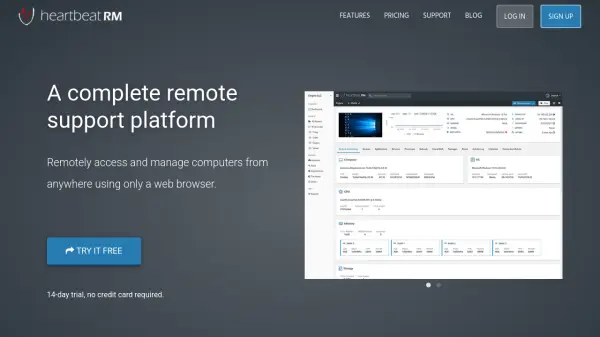
HeartbeatRM is a robust remote support platform designed to help users access, manage, and support computers from anywhere using only a web browser. It offers a seamless interface for remote desktop control, device cataloging with location tracking, file transfer, system information, and device control without requiring any viewer software installation.
Security is a key feature, with 256-bit TLS v1.2 AES encryption and two-factor authentication ensuring protection and compliance. HeartbeatRM's flexible pricing plans cater to individuals and large enterprises alike, while its always-on availability, automatic updates, and responsive in-house support ensure uninterrupted IT operations and peace of mind.
Features
- Remote Desktop: Fast, low-latency remote control via a web client
- Device Catalog & Tracking: Organize and monitor multiple computers with global location accuracy
- File Transfer: Reliable and quick file system browsing and file transfers
- System Information: Access detailed hardware, software, and health metrics
- Device Control: Automate and apply system changes without user interruption
- Security: 256-bit TLS v1.2 AES encryption and two-factor authentication
- Automatic Updates: Platform stays current with regular, no-interruption updates
- Browser-Based Access: No need to install viewer software on your device
- Multi-Plan Support: Pricing tiers for individuals, professionals, and enterprises
Use Cases
- Providing IT support for remote employees
- Managing and updating devices across a distributed organization
- Troubleshooting computer issues for clients without onsite visits
- Monitoring the health and performance of remote machines
- Efficiently transferring large files to/from computers in different locations
FAQs
-
What is required to start using HeartbeatRM?
Users need to sign up for an account online and install the HeartbeatRM agent on the computers they wish to manage. -
Is viewer software installation necessary?
No, users can access and control devices directly through the web browser without installing any additional viewer software. -
How does HeartbeatRM secure remote sessions?
All traffic is protected by 256-bit TLS v1.2 AES encryption, and users can enable two-factor authentication for added security. -
Can HeartbeatRM handle large-scale deployments?
Yes, HeartbeatRM offers plans that support management of hundreds or thousands of computers with scalable pricing. -
Does HeartbeatRM support regular updates and improvements?
Yes, the platform is regularly updated automatically and customer feedback is incorporated into the roadmap.