
What is Breveto?
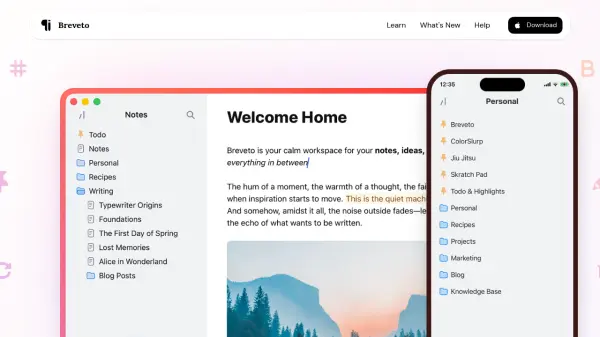
Breveto is a beautifully designed writing application that provides a sanctuary for thoughts, notes, ideas, and stories. Available exclusively for Mac, iPhone, and iPad, this app offers a delightful writing experience with a focus on productivity and organization. Users can drag, drop, and organize files using Breveto's intuitive folder system, creating dedicated workspaces for different projects and nesting folders within folders for optimal organization.
The application features a distraction-free Focus Mode, effortless text formatting with markdown support, and seamless iCloud synchronization across all Apple devices. Breveto includes built-in dictionary, thesaurus, and rhyme book functionality, along with export options to markdown and HTML formats. The app also offers beautiful customizable themes, LaTeX math support, syntax-highlighted code blocks, task lists, and automatic backups for peace of mind.
Features
- Focus Mode: Distraction-free writing environment for maximum productivity
- Markdown Support: First-class markdown shortcuts without editing syntax clutter
- Built-in Dictionary: Instant definitions, synonyms, and rhyme discovery
- Seamless Sync: iCloud synchronization across Mac, iPhone, and iPad devices
- LaTeX Math: Beautiful mathematical equations and formulas using LaTeX notation
- Code Blocks: Syntax-highlighted code blocks with support for numerous programming languages
- Task Lists: Drag-and-drop to-do lists for better organization
- Automatic Backups: Peace of mind with automatic work backups
- AI Spelling Correction: Fix spelling mistakes with artificial intelligence assistance
- Conflict-Free Sync: Automatic merging of changes from multiple devices
Use Cases
- Organizing personal notes and ideas across Apple devices
- Writing stories and creative content with distraction-free environments
- Managing project workspaces with nested folder structures
- Creating mathematical documents with LaTeX equation support
- Documenting code with syntax-highlighted code blocks
- Writing poetry and lyrics with built-in rhyme discovery
- Managing daily to-do lists and task organization
- Exporting documents to markdown or HTML for cross-platform use
- Printing beautiful documents and saving as PDF files
- Customizing writing environments with personalized themes