Wiederhol favicon

Wiederhol
Run, manage and share repeatable checklists.

What is Wiederhol?

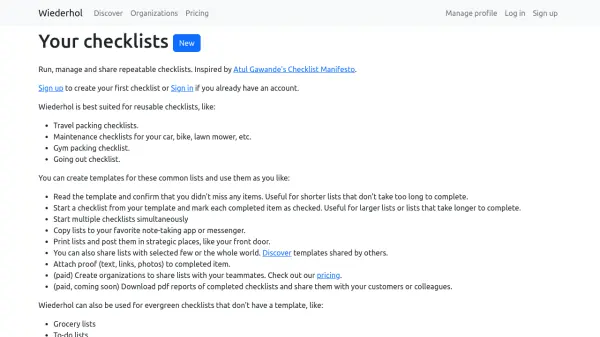
Wiederhol is a checklist application designed for creating, managing, and sharing repeatable checklists. Inspired by Atul Gawande's Checklist Manifesto, it helps users stay organized with reusable templates for tasks like travel packing, maintenance, gym packing, and more. Users can either read templates and confirm items or start a checklist and mark items as completed. The tool supports multiple simultaneous checklists, sharing via links, printing, and attaching proof such as text, links, or photos. Paid plans offer organization features and upcoming PDF reports. Wiederhol does not support scheduling or deadlines, focusing instead on repeatable checklists.

Features

  • Reusable Templates: Create templates for repeatable checklists like travel, maintenance, or gym.
  • Two Modes: Quickly confirm items on a list or mark completion for longer tasks.
  • Multiple Checklists: Run several checklists at the same time.
  • Sharing: Share lists with specific users or publicly, and copy to notes or messengers.
  • Attach Proof: Add text, links, or photos to completed items.
  • Organizations: Paid feature for teams to share and manage lists collaboratively.

Use Cases

  • Creating travel packing checklists
  • Managing maintenance tasks for car, bike, or appliances
  • Organizing gym packing lists
  • Running going-out checklists
  • Collaborating on team checklists with organizations

FAQs

  • Can I set deadlines for checklist items?
    No, Wiederhol does not support deadlines or scheduling.
  • Can I sync Wiederhol with my calendar?
    No, Wiederhol does not sync with calendars.
  • Is there a free plan?
    Yes, the Individual plan is free with unlimited public and private lists, sharing with up to 5 users, and access to community templates.
  • Can I print my checklists?
    Yes, you can print lists and post them in strategic places.

Related Queries

Helpful for people in the following professions

Related Tools:

Blogs:

  • Best AI Tools For Startups

    Best AI Tools For Startups

    we've compiled a straightforward list of user-friendly AI tools designed to give startups a boost. Discover practical solutions to streamline everyday tasks, enhance productivity, and gain valuable insights without the need for a tech expert. Learn where and how these tools can be applied in your startup journey, from automating repetitive tasks to unlocking powerful data analysis. Join us as we explore the features that make these AI tools accessible and beneficial for startups in various industries. Elevate your business with technology that works for you!

  • Chat with PDF AI Tools

    Chat with PDF AI Tools

    Easily interact with your PDF documents using our advanced AI-powered tool. Whether you're reading lengthy reports, research papers, contracts, or eBooks, our platform lets you chat directly with your PDF files, ask questions, extract insights, and get summaries in real-time.

  • Top 6 AI note-taking tools for 2026: in-person, online, and hybrid use cases

    Top 6 AI note-taking tools for 2026: in-person, online, and hybrid use cases

    Most AI note-taking lists are really lists of meeting bots, which join your video call and transcribe it. That's useful, but it's half the picture. Decisions happen in hallway conversations, client dinners, on-site visits, and hybrid rooms where nobody is on a video link. This guide covers different parts of the note-taking workflow: hardware capture for in-person settings, platform-native tools for online calls, and AI layers for organizing and synthesizing what you've captured. It compares six tools by capture context, workflow fit, pricing, and limitations.

Didn't find tool you were looking for?

Be as detailed as possible for better results