toddle favicon

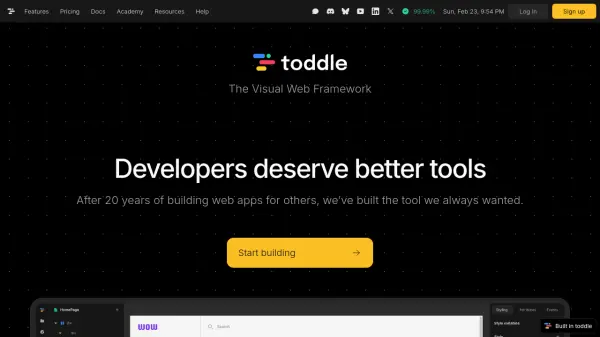
toddle
The Visual Web Framework

What is toddle?

toddle offers a visual approach to web development, streamlining the process of creating dynamic user interfaces. Developers can leverage their existing knowledge of HTML, CSS, and JavaScript to build professional web applications, benefitting from instant visual feedback and a next-level developer experience.

The platform provides tools for setting up advanced workflows, transforming data with pure functions, and building components and packages. It allows teams to build powerful application without traditional coding limitations.

Features

  • Visual Development: Build dynamic UIs with HTML, CSS, and JavaScript using a visual editor.
  • Workflow Editor: Set up advanced workflows with sequential actions.
  • Formula Editor: Transform data using pure functions.
  • Component-Based: Build reusable UI components.
  • API Connector: Connect easily with APIs.
  • Packages: Build reusable packages.
  • Web Component Export: Export your code to any codebase, website, or app.
  • Server-side rendering: Provides Server-side rendering.

Use Cases

  • Building complex web applications.
  • Creating dynamic user interfaces.
  • Developing interactive dashboards.
  • Rapid prototyping of web projects.
  • Building internal tools for businesses.
  • Creating reusable UI component libraries.

FAQs

  • How do I sign up?
    You can sign up on the toddle website.
  • Do I pay per project?
    No, toddle offers unlimited projects with one fixed fee.
  • Can I export my code to an external codebase?
    Yes, you can export your code to any codebase, website, or app.
  • Do I need to know how to code?
    If you know HTML, CSS, and JavaScript, you already know toddle.
  • Can I work with my team?
    Yes, toddle offers team collaboration features with different plans based on the number of editors.

Related Queries

Helpful for people in the following professions

Related Tools:

Blogs:

  • Top 6 AI note-taking tools for 2026: in-person, online, and hybrid use cases

    Top 6 AI note-taking tools for 2026: in-person, online, and hybrid use cases

    Most AI note-taking lists are really lists of meeting bots, which join your video call and transcribe it. That's useful, but it's half the picture. Decisions happen in hallway conversations, client dinners, on-site visits, and hybrid rooms where nobody is on a video link. This guide covers different parts of the note-taking workflow: hardware capture for in-person settings, platform-native tools for online calls, and AI layers for organizing and synthesizing what you've captured. It compares six tools by capture context, workflow fit, pricing, and limitations.

  • AI tools for video voice overs

    AI tools for video voice overs

    Discover the next level of video production with AI-powered voiceover tools. Enhance your content effortlessly, ensuring professional-quality narration for your videos.

  • Best AI Tools For Startups

    Best AI Tools For Startups

    we've compiled a straightforward list of user-friendly AI tools designed to give startups a boost. Discover practical solutions to streamline everyday tasks, enhance productivity, and gain valuable insights without the need for a tech expert. Learn where and how these tools can be applied in your startup journey, from automating repetitive tasks to unlocking powerful data analysis. Join us as we explore the features that make these AI tools accessible and beneficial for startups in various industries. Elevate your business with technology that works for you!

Didn't find tool you were looking for?

Be as detailed as possible for better results