What is Recollectr?
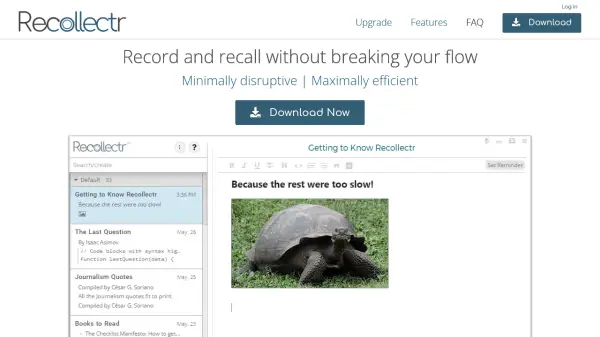
Recollectr is a note-taking application engineered to minimize workflow interruptions while maximizing efficiency. It operates with a global hotkey that can be customized, allowing users to quickly access and hide the application from any location. The tool is designed with a keyboard-centric approach, enabling users to perform various functions without needing a mouse, such as editing links or switching between the editor and Omnibox.
The application supports intuitive inline markdown, allowing users to mix and match markdown within notes and export to .md files. It includes features like natural language reminders, import/export capabilities for Markdown or HTML, automatic updates, syntax highlighting for 27 languages, and smart checklists. Recollectr is available on Windows, macOS, and Linux, with mobile versions in private alpha testing, and offers a Premium version with additional features like zero-knowledge encryption and secure syncing.
Features
- Global Hotkey: Customizable hotkey (default Ctrl+Shift+Z) for instant access from anywhere
- Keyboard-First Design: Full functionality accessible via keyboard shortcuts without mouse usage
- Inline Markdown: Intuitive markdown editing with export to .md files
- Search/Create Omnibox: Prevents duplicate notes by searching and creating in one interface
- Natural Language Reminders: Set reminders using everyday language to avoid missing important tasks
- Import/Export: Effortlessly import from Markdown or HTML and export to portable formats
- Syntax Highlighting: Supports 27 programming languages within code blocks
- Smart Checklists: Easy tracking and management of tasks within notes
Use Cases
- Quick note-taking during work sessions without switching applications
- Organizing complex ideas with linked notes and navigation history
- Tracking tasks and reminders using natural language and smart checklists
- Writing and editing documents with inline markdown for formatting flexibility
- Coding and technical documentation with syntax highlighting in code blocks
FAQs
-
Who could use Recollectr?
Anyone who takes notes with the aim of getting more done could use Recollectr; especially if you find that other note-taking apps counter-intuitively reduce your productivity. Recollectr lets you record and recall without interrupting your workflow, so you can focus on producing results. -
Can Recollectr really save me time?
We feel confident Recollectr will save you time. Recollectr was created because we felt like other apps were limiting our productivity and keeping us from reaching our full potential. -
Do you offer a free trial?
We don’t offer a trial, but we do have a 60 day refund policy, so you can buy with confidence. -
How does Recollectr's encryption work?
Recollectr Premium optionally employs AES-GCM 256 bit encryption for all of your private data, making it unreadable to anyone but you, both on your local device and in the cloud. -
Is there a Recollectr mobile app?
Recollectr Mobile is currently in alpha testing for Premium users. We don’t showcase the mobile app right now because it’s not ready for prime time yet. We think that Recollectr Premium is a great value even without the mobile app – so consider it a bonus for now. Premium users will receive an invitation to help us test the mobile app shortly after upgrading.