What is OnCallClerk?
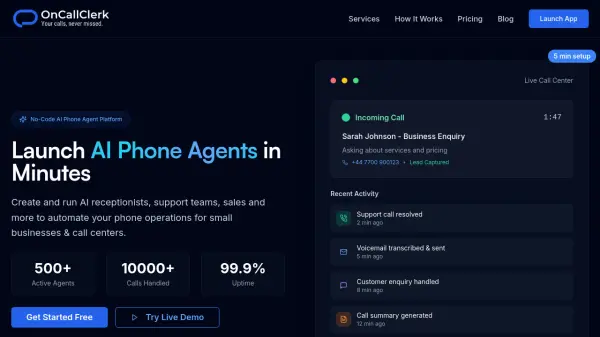
OnCallClerk provides a comprehensive no-code platform for building and deploying AI phone agents that handle incoming calls automatically. The platform features a visual agent builder that allows users to customize voice, personality, and responses without any programming knowledge. With instant phone number provisioning, businesses can start receiving calls within minutes of setup.
The platform includes smart call routing, real-time analytics dashboards, and pre-built integrations for booking meetings, capturing data, and sending emails. Designed for industries ranging from professional services to home trades, it offers enterprise-grade security with GDPR compliance and 99.9% uptime SLA. The infrastructure automatically scales to handle anywhere from one to thousands of calls per day, with continuously improving AI models that ensure agents become smarter over time.
Features
- Visual Agent Builder: Customize AI agent's voice, personality, and responses with intuitive no-code interface
- Instant Phone Numbers: Access thousands of phone numbers instantly and start receiving calls in minutes
- Smart Call Routing: Set up intelligent call flows, transfers, and escalations based on time, caller, or conversation context
- Pre-Built Integrations: One-click connections to book meetings, capture data, and send emails without API knowledge
- Real-Time Analytics: Monitor calls and track performance with comprehensive dashboards and data export capabilities
- Enterprise Security: High-level encryption, GDPR compliance, and 99.9% uptime SLA
- Automatic Scaling: Infrastructure handles from 1 to 10,000+ calls per day with pay-per-use pricing
- Continuous AI Improvements: Automatic updates to AI models for enhanced performance over time
Use Cases
- Automating receptionist duties for small businesses to handle incoming calls 24/7
- Creating custom call centers for agency clients without managing servers
- Replacing expensive answering services with cost-effective AI agents
- Handling customer support calls and issue resolution automatically
- Managing appointment booking and scheduling for service-based businesses
- Capturing leads and business inquiries during and after business hours
- Routing calls intelligently based on caller needs and business hours
- Providing multi-location phone support for property management companies
- Automating patient scheduling for dental practices and medical offices
- Handling emergency calls for trades businesses like plumbing and HVAC
How It Works
Choose Your Phone Number
Select from thousands of available phone numbers and get it provisioned instantly to start receiving calls within minutes.
Build Your AI Agent
Use the visual no-code builder to customize your AI agent's voice, personality, and responses. Configure call flows and routing rules without any programming.
Connect Integrations
Set up one-click integrations to connect with your existing tools for booking meetings, capturing leads, sending emails, and managing data.
Go Live and Monitor
Launch your AI phone agent and monitor performance in real-time through analytics dashboards. Track calls, issues resolved, and key metrics as your agent handles incoming calls automatically.
FAQs
-
How long does it take to set up an AI phone agent on OnCallClerk?
OnCallClerk allows you to set up and launch your AI phone agent in approximately 5 minutes. The platform provides instant phone number provisioning and a visual builder that requires no coding knowledge, enabling you to go from idea to live calls in under an hour. -
Do I need technical or coding skills to use OnCallClerk?
No technical skills or coding knowledge are required to use OnCallClerk. The platform features a visual agent builder with simple interfaces and pre-built templates that allow anyone to create professional AI phone agents without programming. -
How many calls can OnCallClerk handle?
OnCallClerk's infrastructure automatically scales to handle anywhere from 1 call to 10,000+ calls per day. The platform adjusts to your needs without requiring manual configuration, and you only pay for what you use. -
Is OnCallClerk secure and compliant?
Yes, OnCallClerk provides enterprise-level security with high-level encryption, GDPR compliance, and a 99.9% uptime SLA. Your data and calls are protected with industry-standard security measures. -
Can I try OnCallClerk before committing to a paid plan?
Yes, OnCallClerk offers a 14-day free trial with no credit card required. You can also try their live demo agent without signing up to experience the platform's capabilities firsthand.