What is Katch AI?
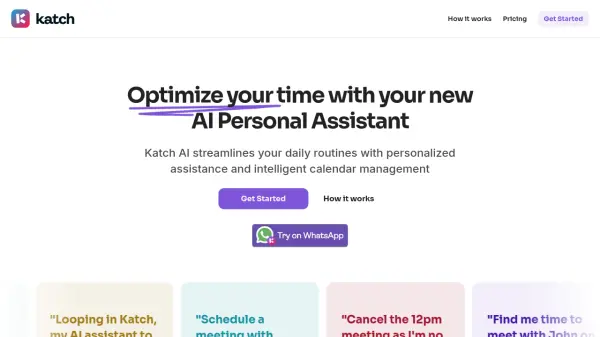
Katch AI serves as an intelligent personal assistant focused on optimizing users' time by automating calendar management and meeting scheduling. It integrates with communication channels like email and WhatsApp, allowing users to delegate scheduling tasks simply by messaging their AI assistant. Users can request new meetings, reschedule existing ones, or cancel appointments through natural language commands.
The tool connects directly with Google Calendar to access real-time availability, effectively preventing double bookings. Katch AI analyzes the user's schedule and coordinates with other participants to find mutually suitable meeting times. Upon confirmation, it automatically generates and sends calendar invitations to all attendees, often including necessary conferencing links, thereby streamlining the entire scheduling process.
Features
- AI Assistant Interaction: Manage your schedule by messaging the AI via email or WhatsApp (text/audio).
- Intelligent Calendar Management: Checks Google Calendar availability to find optimal meeting times.
- Automated Meeting Scheduling: Books meetings and automatically sends calendar invites upon confirmation.
- Rescheduling & Cancellation: Easily modify or cancel meetings through AI commands.
- Double Booking Prevention: Syncs with Google Calendar to avoid scheduling conflicts.
- Email Integration: Loop the AI assistant into email threads to handle scheduling.
- WhatsApp Integration: Communicate directly with the assistant via WhatsApp.
- Automatic Calendar Invites: Sends invites with details like conferencing links to all participants.
Use Cases
- Scheduling meetings involving multiple participants.
- Quickly rescheduling appointments via messages.
- Managing a busy professional calendar.
- Finding suitable meeting times across schedules.
- Delegating scheduling tasks to an AI.
- Booking recurring meetings automatically.
- Checking availability and scheduling on the go via WhatsApp.
- Streamlining client meeting coordination for consultants.
- Optimizing time management for executives.
FAQs
-
Who is Katch AI for?
Katch AI is designed for individuals seeking to optimize their time by automating meeting scheduling, such as freelance consultants and busy executives. -
Can the AI Assistant reschedule or cancel meetings?
Yes, you can instruct the Katch AI Assistant via email or WhatsApp to reschedule or cancel meetings on your behalf. -
How does Katch AI prevent double bookings?
Katch AI syncs directly with your Google Calendar to check your availability in real-time and only suggests or books time slots when you are free. -
How can I interact with the Katch AI Assistant?
You can interact with the Katch AI Assistant by looping it into emails, emailing it directly, or sending messages via WhatsApp text or audio notes. -
Does Katch AI offer a free trial?
Yes, Katch AI offers a 14-day free trial for new users to test its features.