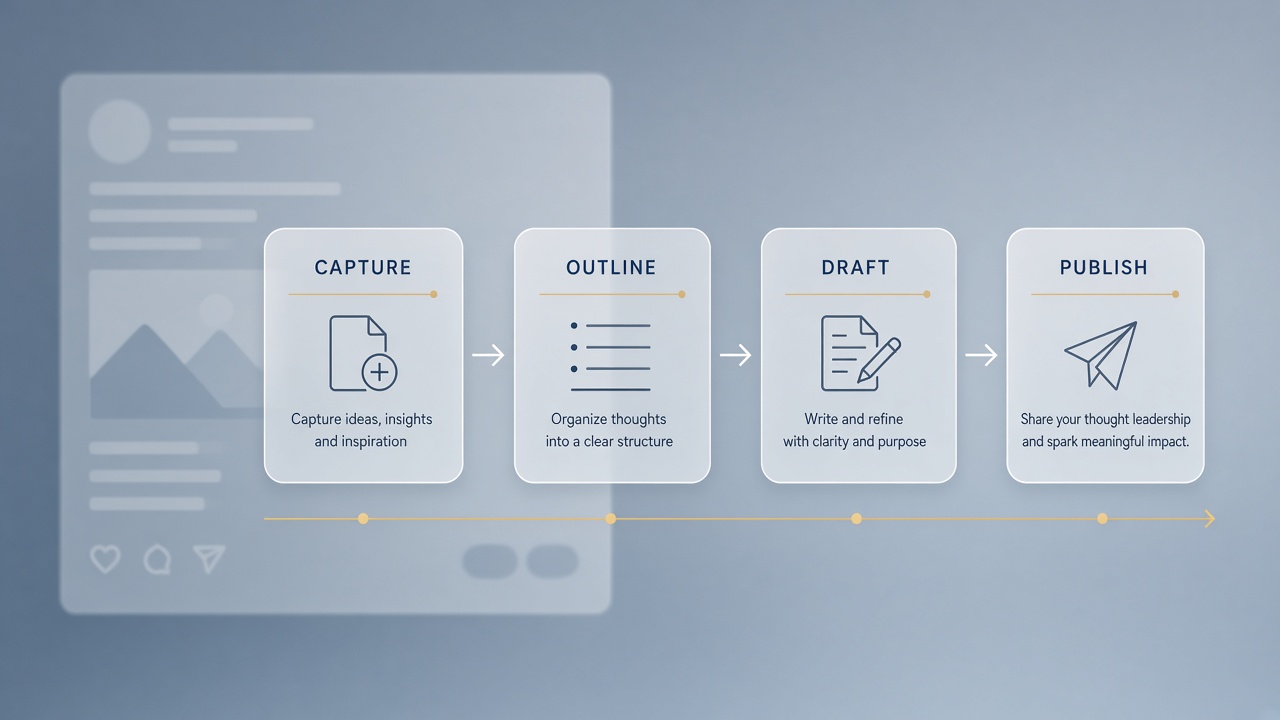
Executives and subject-matter experts know LinkedIn rewards specificity, but most posts still read like generic motivation posters. The gap is not ideas. The gap is a repeatable process that turns meeting takeaways into posts that sound human on a Tuesday morning. An ai workflow linkedin posts pipeline captures raw insights, forces one takeaway per post, drafts in a guarded voice, fact-checks every claim, and prepares comment responses before publish. AI handles structure and first drafts; the named expert owns the argument.
This guide targets founders, VPs, and consultants who post under their own names, not ghostwritten corporate feeds. Combine drafting with AI chatbot tools for outline iteration and AI writing assistant products for tone edits, always with a banned phrase list and human final read.
Capture Raw Insights From Meetings and Notes
Thought leadership starts with captured raw material: customer call notes, internal meeting bullets, Slack threads, and voice memos, stored in one inbox before any AI touches a publishable draft. Posts fail when writers open a blank LinkedIn composer. Capture systems make ideas searchable weeks later. After a customer call, spend five minutes dumping three observations: what surprised you, what pattern you saw twice this month, what you would tell a peer over coffee.
- End every external meeting with a "LinkedIn-worthy?" field in your CRM or notes app.
- Record 60-second voice memos after conferences while details are fresh.
- Tag captures by theme (pricing, hiring, product, culture) for batch outlining later.
- Redact client names and confidential metrics before pasting notes into AI tools.
- Review the inbox weekly; promote two items to outline stage, archive the rest.
| Capture source | Best for | Watch out for |
|---|---|---|
| Customer calls | Contrarian market takes | Identifiable quotes without permission |
| Board or leadership meetings | Strategy framing | Material nonpublic information |
| Team retros | Operational lessons | Blaming individuals by name |
| Industry reading | Commentary with attribution | Hot takes without original angle |
Insight Quality Filter
Not every note deserves a post; promote only insights where you can name a specific example, a tradeoff you accepted, or a mistake you made. AI amplifies weak ideas into polished slop. Ask: would a skeptical peer in my industry nod or roll their eyes? If the capture is only a buzzword, keep it in the inbox until you attach a story.
Outline One Clear Takeaway Per Post
Each LinkedIn post should express one takeaway, supported by a short narrative arc: tension, insight, implication, and optional ask. AI excels at turning a bullet capture into an outline with line-level intent. Feed the model your raw note plus audience (peers, buyers, candidates) and desired length (short post under 1,300 characters or long post with line breaks). Reject outlines that try to teach five lessons at once.
- State the single sentence thesis at the top of the outline.
- Add two to three supporting points, each with a placeholder for a concrete example.
- Plan the opening line: story hook, bold claim, or question (not "I'm excited to announce").
- End with one CTA: question for comments, link to resource, or invitation to disagree.
- Executive approves outline before full draft generation.
Carousels and long posts share the same rule: slide one or paragraph one must earn the scroll. Outlines for carousels add slide titles only; body copy comes in the draft step. Keep a swipe file of your top ten posts by engagement and paste one as a structural example when prompting, not for content reuse.
Before and After Post Structure
Before-and-after framing works on LinkedIn when the "before" is a specific failure mode and the "after" is a behavior change, not a product pitch. Outline format: old belief, what broke, new approach, one metric or anecdote. AI drafts the skeleton; you supply the real before state from your capture notes.
Draft With a Banned Phrase List
Generate the first draft from the approved outline using a banned phrase list that blocks LinkedIn slop: "game-changer," "in today's landscape," "humbled and honored," and hollow "agree?" endings. Include three samples of your past writing so the model mimics sentence length and punctuation habits. Draft in your voice means you still rewrite the opening and closing by hand even when the middle is usable.
- Load banned phrases and preferred phrases ("we shipped," "I was wrong about") into the prompt.
- Request short paragraphs and line breaks for mobile readability.
- Generate two variants; merge the stronger paragraphs manually.
- Read aloud; cut any sentence you would not say in a panel Q&A.
- Run a second AI pass only for tightening, not for new claims.
| Slop signal | Replace with |
|---|---|
| "Leverage synergies" | Name the two teams and what each did |
| "Thoughts?" | Specific question ("Would you cap pilot size at 5 seats?") |
| Stacked emojis every line | One emoji or none; let prose carry tone |
| Anonymous "a client told me" | Composite story labeled as pattern, or ask permission |
Anti-Slop Editing Checklist
After draft generation, run a human edit pass: first line punch, one concrete number or name, cut 20 percent of words, verify the post still makes sense if the last paragraph is removed. LinkedIn rewards density in the feed. Slop survives when busy executives publish AI output without this pass.
Fact-Check Claims and Add Specific Examples
Every statistic, customer outcome, and market claim must trace to a source, your direct experience, or be removed before publish. AI invents plausible percentages. Thought leadership credibility dies on one bad number. Maintain a fact sheet the comms team or EA can verify: headcount, revenue bands, launch dates, and approved customer logos for public mention.
- Highlight every number in the draft; confirm or delete.
- Replace vague "many teams" with "three portfolio companies this quarter" when true.
- Add one named tool, framework, or role title to anchor expertise.
- Legal or PR review for regulated industries and public company executives.
- Screenshot or link supporting data in an internal file; not always in the post.
Examples beat abstractions. Instead of "culture matters," write what you changed in the interview rubric last month. Instead of "AI is transforming sales," describe one workflow your team actually adopted and what failed first. AI can suggest example placeholders; you fill them with real events from your capture inbox.
Engagement Metric Review (Post-Publish)
Track comments per impression, saves, and profile visits seven days after publish, not just likes. Comments signal depth; saves signal reference value. AI can summarize which post themes correlated with comments when you export analytics monthly. Adjust outline themes toward posts that sparked professional debate, not vanity metrics alone.
Scheduling and Comment Response Prep
Schedule posts for audience peak windows and pre-draft three comment responses for predictable objections before you hit publish. Thought leaders who reply in the first hour extend distribution. AI drafts reply templates; you personalize names and add nuance. Never auto-post replies without human review.
- Schedule Tuesday through Thursday mornings in the author's time zone unless data says otherwise.
- Prepare replies for "how did you measure that?", "what about [competitor]?", and "any advice for SMBs?".
- Block 20 minutes post-publish for genuine comment engagement.
- Escalate hostile or misinformation threads to comms playbook; do not debate trolls.
- Log strong comment questions as future capture inbox items.
Employee advocacy programs can amplify executive posts, but coordinated sharing should look organic. Stagger reshares, add unique commentary per employee, and avoid copy-paste engagement pods that violate platform authenticity expectations. Executives should still be the primary voice on their own profiles.
Document Version Control
Store capture note, outline, draft v1, final, and performance snapshot in one folder per post so ghostwriters and EAs hand off cleanly. Version control prevents an old draft with unverified claims from going live. Name files with publish date and thesis slug for searchability.
Executive Time Boxing
Block 45 minutes weekly: 15 minutes on capture review, 15 on outline approval, 15 on final edit and schedule. Busy executives skip steps when posting feels like a second job. AI compresses drafting time so the scarce resource is judgment, not typing. Assistants prepare two outline options before the block so the executive chooses direction, not structure from scratch. Consistency compounds: audiences follow leaders who show up with one sharp idea, not quarterly manifestos.
Thought Leadership Versus Promotion
Separate educational posts from product launches in your workflow so AI does not blend helpful advice with unprompted sales copy. Maintain two brief templates: "insight" (no product mention unless the story requires it) and "announcement" (clear news, approved claims, link). Mixing them trains the feed to ignore you. When a launch post is necessary, lead with customer outcome, not feature bullets. The capture inbox helps: promote launch news only when you have a concrete customer story attached.
Frequently Asked Questions
Should I use carousels or text-only posts?
Carousels suit step-by-step frameworks and before/after breakdowns; text-only posts often win for story and opinion when the author has a strong voice. Use the same one-takeaway rule: one carousel equals one thesis with five to eight slides, not a mini ebook. AI can draft slide titles and bullet bodies from an approved outline; design templates keep visual brand consistent. Test both formats quarterly and follow your analytics, not generic "carousels always win" advice.
How does employee advocacy fit without sounding corporate?
Employee advocacy works when staff share posts with a personal sentence about why the idea matters to their role, not when marketing blasts identical copy. Provide executives with a final post and optional quote-tweet prompts. AI can generate role-specific intro lines for sales, engineering, and HR advocates. Cap coordinated bursts to avoid feed spam flags.
Do I need to disclose AI help on LinkedIn posts?
Disclosure expectations vary by employer policy and jurisdiction; many B2B leaders add a light note when AI drafted structure but the expert verified every claim. LinkedIn's professional audience cares more about authenticity than tooling. Never use AI to simulate other people's voices or fake engagement. If your company publishes AI content guidelines, follow them on every post.
Can AI replace a ghostwriter for executives?
AI reduces ghostwriter hours on outlines and first drafts but does not replace interviews that extract real stories from the executive's week. The best hybrid: EA or writer runs capture and outline, AI accelerates draft, executive rewrites opening and closing, comms fact-checks. Posts fail when no one talks to the executive between capture and publish.
Human Insight First, AI Second
An ai workflow linkedin posts practice that sounds human captures specific insights before drafting, enforces one takeaway per post, edits with a banned phrase list, fact-checks every claim, and prepares thoughtful comment engagement. AI is the assistant in the middle of the pipeline, not the author on the byline. Consistency beats virality: publish on rhythm, learn from comments and saves, and promote only ideas you would defend in a live room.
Start with one post this week using only the capture and outline steps. Add AI drafting once the outline feels sharp. Measure comment quality, not vanity likes, after thirty days. The workflow pays off when readers recognize your name before they read the headline.