A support engineer types "refund order 88421 and email the customer" into a chat window. A plain chatbot might draft a polite email but cannot touch the billing system. An agentic assistant parses the goal, looks up the order, calls a refund API, verifies the ledger entry, drafts the message, and stops only when each subtask succeeds or hits a defined limit. Agentic AI explained in one line: software that plans, uses tools, remembers intermediate results, and iterates in a loop rather than answering in a single completion. The pattern powers autonomous copilots in AI code environments that edit files across a repository and AI chatbot products that book meetings, query databases, and file tickets on behalf of users.
Agentic Loop vs Single-Shot Chat
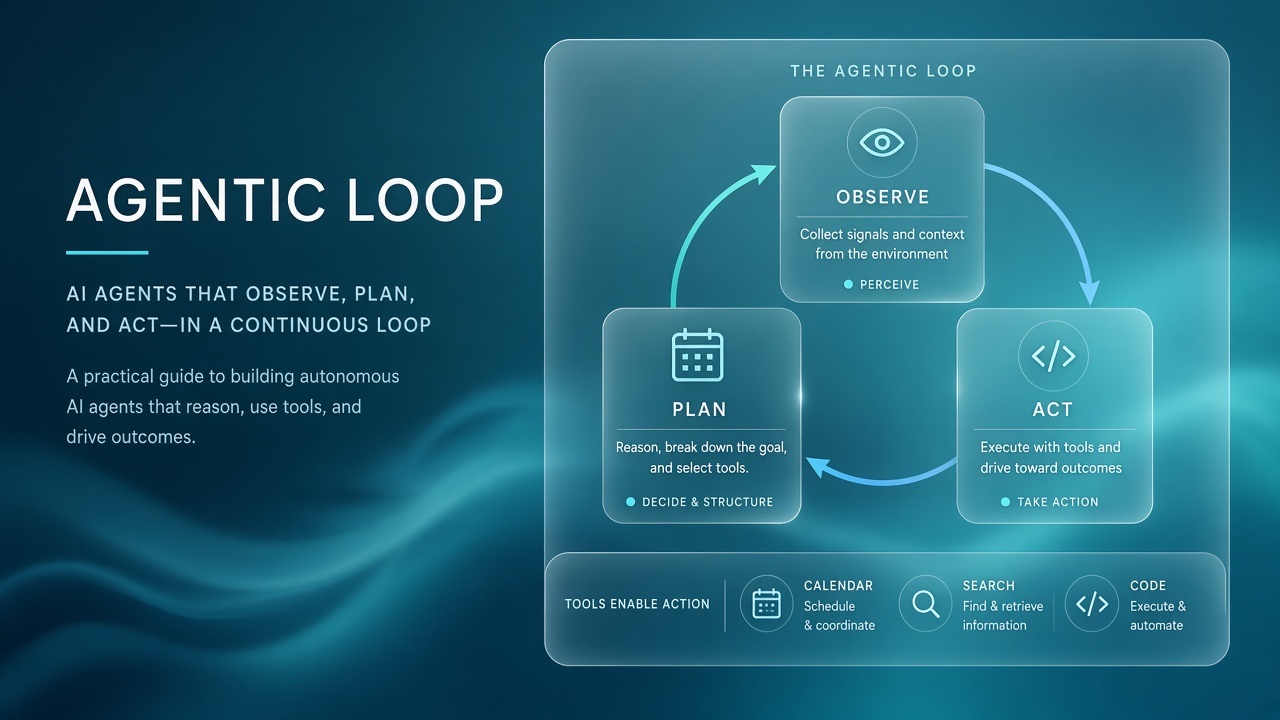
Single-shot chat maps one user message to one model response; agentic systems run repeated observe-plan-act cycles until a termination condition fires. Each cycle typically reads current context (user goal, tool outputs, memory), decides the next action (call a tool, ask a clarifying question, or return a final answer), executes that action, and appends results to working memory before the next iteration. The loop continues until the planner marks the task complete, the user cancels, or a step or token budget is exhausted.
Chat excels at explanation, brainstorming, and draft text. Agentic flows excel when the outcome requires side effects in external systems: creating records, running queries, deploying code, or chaining five API calls with error handling. Buyers should not label every chatbot "agentic" because a product exposes function calling once; true agentic behavior implies multi-step pursuit of a goal with state carried between steps.
Tools, Memory, and Planning
Agentic stacks combine tool schemas the model can invoke, short-term working memory for the current task, and optional long-term memory for user preferences or prior sessions. Tools are described with names, parameters, and return shapes so the model emits structured calls your runtime validates and executes. Working memory holds conversation turns, tool JSON responses, and planner notes. Long-term memory may use vector search over past interactions, though many production agents keep persistence minimal for privacy and audit simplicity.
Planning ranges from implicit ("think step by step" inside each turn) to explicit graphs where a router model assigns subtasks to specialist agents. ReAct-style prompting interleaves reasoning traces with tool calls. Plan-and-execute patterns generate a full checklist first, then run tools in sequence with replanning when a step fails. Strong planners name success criteria up front so the loop knows when to stop instead of hallucinating completion.
| Component | Role in the loop | Common pitfall |
|---|---|---|
| Tool registry | Defines callable APIs and parameters | Over-broad tools the model misuses |
| Working memory | Stores observations between steps | Context window overflow on long runs |
| Planner | Chooses next action toward the goal | Infinite replanning without progress |
| Terminator | Ends loop on success or budget | Premature stop before side effects finish |
Autonomy Levels and Where to Stop
Not every workflow should run fully autonomous; maturity models map from suggest-only copilots to supervised agents to high-autonomy loops with hard guardrails. Level 0 suggests actions the human clicks. Level 1 drafts tool calls but requires approval per call. Level 2 auto-runs low-risk read tools and asks before writes. Level 3 executes write paths within allowlisted scopes. Level 4 pursues multi-hour goals with minimal human touch, common only in sandboxed dev environments today.
| Autonomy level | Typical use case | Risk profile |
|---|---|---|
| Suggest only | Code completion, email drafts | Low; human commits every change |
| Approve each tool | Finance refunds, HR updates | Medium; user sees parameters |
| Auto read, gated write | Research agents, ticket triage | Medium; mis-read still possible |
| Scoped auto write | CI fix bots in one repo | High without tight allowlists |
Product teams should default to lower autonomy for customer-facing flows and raise it only where rollback is cheap and monitoring is strong. A coding agent that opens pull requests in a feature branch is safer than one that pushes directly to main. An operations agent that restarts staging pods differs materially from one that terminates production databases.
Safety Budgets and Tool Allowlists
Production agentic systems cap loop iterations, token spend, wall-clock time, and which tools may run without human approval. A step budget of ten tool calls prevents runaway loops when the planner keeps retrying a failing API. Dollar budgets stop a research agent from fanning out fifty parallel web searches. Allowlists restrict destructive capabilities: delete_file might be disabled in production, send_email might require a confirmed recipient domain.
Parameter validators should run outside the model. Never trust the LLM to self-limit SQL scope; enforce row limits and read-only roles at the database driver. Dual-control patterns queue high-impact actions (wire transfers, privilege grants) for a second approver even when the agent proposed them correctly. Log every tool invocation with inputs, outputs, and the planner rationale string for post-incident review.
Prompt injection in agentic systems
Agents that browse the web or read user-uploaded files inherit prompt injection risk: untrusted content can instruct the model to exfiltrate secrets or call tools maliciously. Sandboxed browsers, output filters, and separation between "data plane" tool results and "instruction plane" system prompts reduce but do not eliminate the threat. Treat agent tool credentials as production secrets with least privilege per agent role.
Observability for Agentic Workflows
You cannot debug a multi-step agent from the final chat bubble alone; traces must capture each plan step, tool call, latency, and error with a shared correlation ID. OpenTelemetry-style spans per tool invocation help teams see whether failures cluster on one API or one planner decision. Store structured events: `plan_created`, `tool_called`, `tool_failed`, `replan_triggered`, `task_completed`. Dashboards should show average steps per task, cost per successful outcome, and human escalation rate.
Replay fixtures from production traces (redacted) in CI when upgrading models. A planner that worked on GPT-4 class models may over-call tools or skip verification on a smaller model. Golden tasks assert not only final answers but also that the agent called `get_order` before `issue_refund`. User thumbs-down should link to the full trace, not just the last assistant message.
Human-in-the-Loop Patterns
Effective agentic products treat humans as supervisors who can edit plans, reject tool calls, and rewind state rather than passive spectators of a black box. Show the proposed plan before execution on high-impact workflows. Let users remove individual steps or change parameters inline. When an agent fails, surface the last successful observation so the user can continue manually without restarting the entire thread. Resume checkpoints let long-running agents pick up after network blips without duplicating side effects.
Escalation paths matter: if three consecutive tool errors occur, route to a human queue with full trace context. Support agents should see the same JSON the planner saw, not a summarized paraphrase that hides wrong assumptions. Feedback buttons tied to trace IDs create training signal for prompt and tool schema improvements without blaming users for agent mistakes.
Building Agentic Products in 2026
Frameworks such as LangGraph, OpenAI Assistants, Google ADK, and Microsoft Agent Framework supply graph primitives, tool wiring, and checkpointing, but product quality still depends on narrow task scope and crisp termination rules. Start with one vertical workflow (expense report submission, not "run my company"). Instrument before expanding tool count. Each new tool doubles the failure modes the planner can reach.
Hybrid UX patterns work well: the agent shows its plan as a checklist, executes read steps silently, and pauses on write steps with editable parameters. Users trust agents more when they see intermediate observations ("Order 88421 status: shipped, refund eligible: true") before money moves. For developer-facing AI code agents, diff previews and test runs before merge mirror the same trust pattern.
Comparing Agent Frameworks
Framework selection should prioritize trace export, checkpoint persistence, human approval hooks, and how cleanly tool errors propagate back to the planner. LangGraph models agents as state machines with explicit nodes and edges. Vendor-native assistants bundle memory and code interpreter sandboxes with less portability. CrewAI emphasizes role-based multi-agent teams. Evaluate lock-in: can you export traces to your existing observability stack? Can you swap models without rewriting the entire graph?
Smaller teams often prototype in a hosted agent builder, then migrate critical workflows to self-managed graphs when compliance requires VPC deployment. Regardless of framework, keep business logic in ordinary code that validates tool inputs; the LLM proposes, your runtime disposes.
Frequently Asked Questions
Is every AI chatbot agentic?
No. A chatbot that only generates text is not agentic unless it runs a multi-step loop with tools or environment side effects. Many products market "agents" for marketing reasons; verify whether the system actually plans, calls APIs, and iterates toward a measurable goal.
How reliable are autonomous agents today?
Reliability varies by domain; narrow workflows with strong validators outperform open-ended "do anything" agents. Expect higher success on structured internal APIs than on arbitrary web automation. Human oversight remains standard for high-stakes outcomes in 2026.
Do agentic loops cost more than chat?
Yes, multi-step loops consume more tokens and API calls than a single reply, though they can reduce human labor when tasks are well scoped. Measure cost per completed task, not cost per message. Caching tool results and routing planning to smaller models lowers average spend.
How do you evaluate an agent before launch?
Run a golden set of tasks with expected tool sequences and final states; track success rate, steps to completion, and safety violations. Include adversarial prompts that attempt unauthorized tool use. Review traces manually for the first hundred production tasks in a new domain.
What about agent memory and privacy?
Persistent memory across sessions must respect retention policies, user deletion requests, and tenant isolation. Store memories with user IDs and expirations. Avoid writing credentials or health data into long-term memory blobs the planner can echo later. GDPR erasure should delete associated memory keys, not only chat transcripts.
Agentic AI Maturity for Enterprises
Level 1 enterprises experiment with internal coding agents; Level 2 deploys supervised customer workflows with approval gates; Level 3 operates centralized agent platforms with shared tool registries and compliance review. Jumping to Level 3 marketing before Level 1 incident retrospectives produces headline-grabbing failures. Security teams should inventory every API key agents can reach and rotate keys independently of human SSO sessions.
Conclusion
Agentic AI explained for builders is the observe-plan-act loop: tools turn language into action, memory carries state across steps, planners choose what happens next, and safety budgets define where autonomy must stop. Single-shot chat remains the right tool for advice and drafting; agentic patterns fit when the product promise includes completing work in external systems. Invest in traces, allowlists, and graduated autonomy before marketing full autonomy to enterprise buyers evaluating chatbot and coding copilots.