What is Frontender?
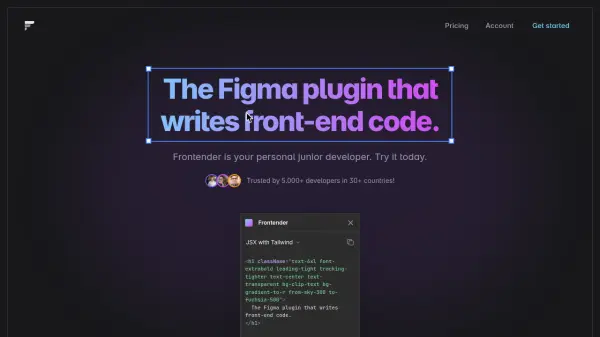
Frontender operates as an integrated front-end assistant within Figma, designed to streamline the design-to-code workflow. Users can select any design layer in their Figma file, and the plugin automatically generates the corresponding front-end code. It intelligently interprets the design elements, figuring out order, hierarchy, and meaning, even if the layers are not meticulously organized or utilize autolayout.
The tool supports various output formats, including HTML with standard CSS or Tailwind CSS, and JSX compatible with CSS-in-JS libraries or Tailwind CSS. This makes it suitable for projects using popular frameworks like Next.js, React, Vue, and Svelte. Frontender also accommodates custom Tailwind configurations, allowing developers to paste their specific setup for production-ready code generation that adheres to their project's styling standards.
The tool supports various output formats, including HTML with standard CSS or Tailwind CSS, and JSX compatible with CSS-in-JS libraries or Tailwind CSS. This makes it suitable for projects using popular frameworks like Next.js, React, Vue, and Svelte. Frontender also accommodates custom Tailwind configurations, allowing developers to paste their specific setup for production-ready code generation that adheres to their project's styling standards.
Features
- Figma Design to Code Conversion: Automatically translates Figma layers into front-end code.
- Multiple Code Formats: Supports HTML/CSS, HTML/Tailwind, JSX/CSS-in-JS, JSX/Tailwind.
- Framework Compatibility: Generates code compatible with Next.js, React, Vue, and Svelte.
- Handles Messy Files: Interprets layer structure and meaning without requiring autolayout or perfect organization.
- Tailwind CSS Support: Understands Tailwind, including arbitrary values and config-based class matching.
- Custom Tailwind Config: Allows users to input their custom Tailwind configuration for personalized code.
- Instant Code Generation: Provides code rapidly upon selection (Professional plan feature).
- React & Vue Components: Generates structured components for React and Vue (Professional plan feature).
Use Cases
- Accelerating front-end development from Figma designs.
- Converting Figma prototypes into functional code snippets.
- Streamlining the handoff between designers and developers.
- Generating boilerplate code for web components quickly.
- Ensuring design consistency in code implementation using Tailwind CSS.
- Translating complex Figma layouts into corresponding code structures.
FAQs
-
Do I need a Figma account to use Frontender?
Yes, Frontender is a Figma plugin and requires installation and use within the Figma application. -
How many free conversions do I get per month?
The free plan includes 15 conversions every month. -
Does Frontender require perfectly organized Figma layers?
No, Frontender is designed to interpret layer order, hierarchy, and meaning even for messy files and does not depend on autolayout or strict organization. -
Can I use my custom Tailwind CSS configuration?
Yes, the Professional plan allows you to paste your custom Tailwind config for Frontender to use when generating code. -
What coding frameworks does Frontender support?
Frontender generates code compatible with frameworks like Next.js and React (using JSX) as well as Vue and Svelte (using HTML).