Devolutions favicon

Devolutions
Centralized platform for secure remote connection, password, and privileged access management

What is Devolutions?

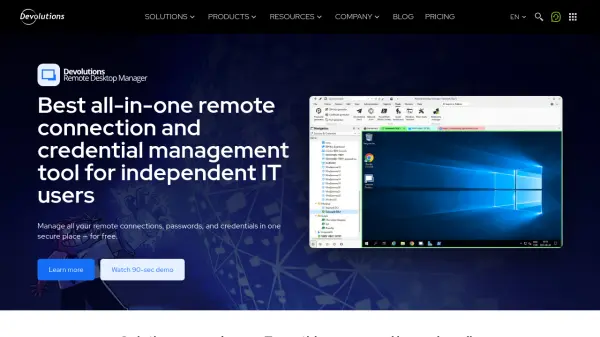
Devolutions offers a suite of IT management solutions designed to centralize remote connections, credentials, and access controls in a secure platform. The platform helps organizations manage various remote connections and tools from one centralized location, improving productivity while reducing costs and increasing security.

The solutions include remote desktop management, workforce password management, privileged access management, remote access management, and IT automation with PowerShell Universal. These tools provide features such as centralized remote access management, secure credential storage, access policy enforcement, and workflow automation for IT professionals.

Features

  • Remote Connection Management: Centralize and manage all remote connections in one secure platform
  • Password Management: Securely store and share workforce passwords with authentication policies
  • Privileged Access Management: Control and monitor high-risk accounts with least privilege enforcement
  • IT Automation: Streamline routine tasks with integrated scripting, orchestration, and reporting
  • Secure Remote Access: Establish secure entry points for segmented networks without traditional VPNs

Use Cases

  • Centralizing remote desktop connections for IT teams
  • Managing workforce passwords and credentials securely
  • Controlling privileged access to critical systems and resources
  • Automating routine IT tasks and administrative workflows
  • Providing secure remote access to segmented networks

Related Tools:

Blogs:

  • Best text to speech AI tools

    Best text to speech AI tools

    Text-to-speech (TTS) AI tools are designed to convert written or text-based content into natural-sounding spoken audio. These tools utilize various deep learning and neural network architectures to generate human-like speech from textual input.

  • Top 6 AI note-taking tools for 2026: in-person, online, and hybrid use cases

    Top 6 AI note-taking tools for 2026: in-person, online, and hybrid use cases

    Most AI note-taking lists are really lists of meeting bots, which join your video call and transcribe it. That's useful, but it's half the picture. Decisions happen in hallway conversations, client dinners, on-site visits, and hybrid rooms where nobody is on a video link. This guide covers different parts of the note-taking workflow: hardware capture for in-person settings, platform-native tools for online calls, and AI layers for organizing and synthesizing what you've captured. It compares six tools by capture context, workflow fit, pricing, and limitations.

  • Best AI tools for trip planning

    Best AI tools for trip planning

    These tools analyze user preferences, budget constraints, and destination details to provide personalized itineraries, suggest optimal routes, recommend accommodations, and even offer real-time updates on weather and local events.

Didn't find tool you were looking for?

Be as detailed as possible for better results