If you’ve spent more than ten minutes scrolling through Instagram Reels or TikTok lately, you’ve probably noticed a frustrating pattern. You’ll see a creator post a deceptively simple video, maybe a quick outfit transition or a comedic reaction, and it effortlessly pulls in two million views. Yet, when you try to recreate the exact same concept for your own brand or page, it barely scrapes 300 views.
Why does that happen? Because viral short-form video isn't luck; it’s structural engineering.
Behind almost every trending Reel is a strict formula of micro-pacing, visual hooks, and beat-synced transitions. The problem for most creators, marketers, and small business owners isn't a lack of ideas. It's the hours of tedious frame-by-frame editing required to nail that exact rhythm before the trend dies out.
To see if AI could actually bridge that gap without making my content look robotic, I decided to put the EaseMate AI Viral Video Remaker to the test. Here is an honest look at how modern viral trends actually work, and how this tool handles the heavy lifting of recreating them.
Why Current Viral Trends Are So Hard to Replicate Manually
Before diving into the test, it helps to look at what is actually dominating feeds right now. The biggest trends aren't just people talking to a camera; they rely on tight visual choreography and instant payoffs:
- The "Loading..." Buffering Trend: Creators start at "0%" in pajamas and eye patches, cutting rapidly on every beat as a percentage bar climbs until the final, polished look drops at 100%. It demands razor-sharp timing.
- The "Upside Down, Inside Out" Transition: Syncing specific hand gestures to Diana Ross’s classic track to trigger an instant before-and-after transformation. If your camera angle is off by a fraction of a second, the illusion breaks.
- "That Plane Was So Low" Guerrilla Edits: A clever visual bait-and-switch where viewers expect a jet flying overhead, only for the camera to reveal a paper airplane carrying a punchy marketing message.
- Surreal AI Character & Dance Remixes: Trends like the Skull Cap edits, Hotel Lobby cinematic walks, or dropping historical figures and pets into modern viral dances.
Trying to shoot, light, and edit these from scratch takes hours. By the time you finish keyframing your transitions in Premiere or CapCut, the audio is already old news.
What Is EaseMate AI Viral Video Remaker?
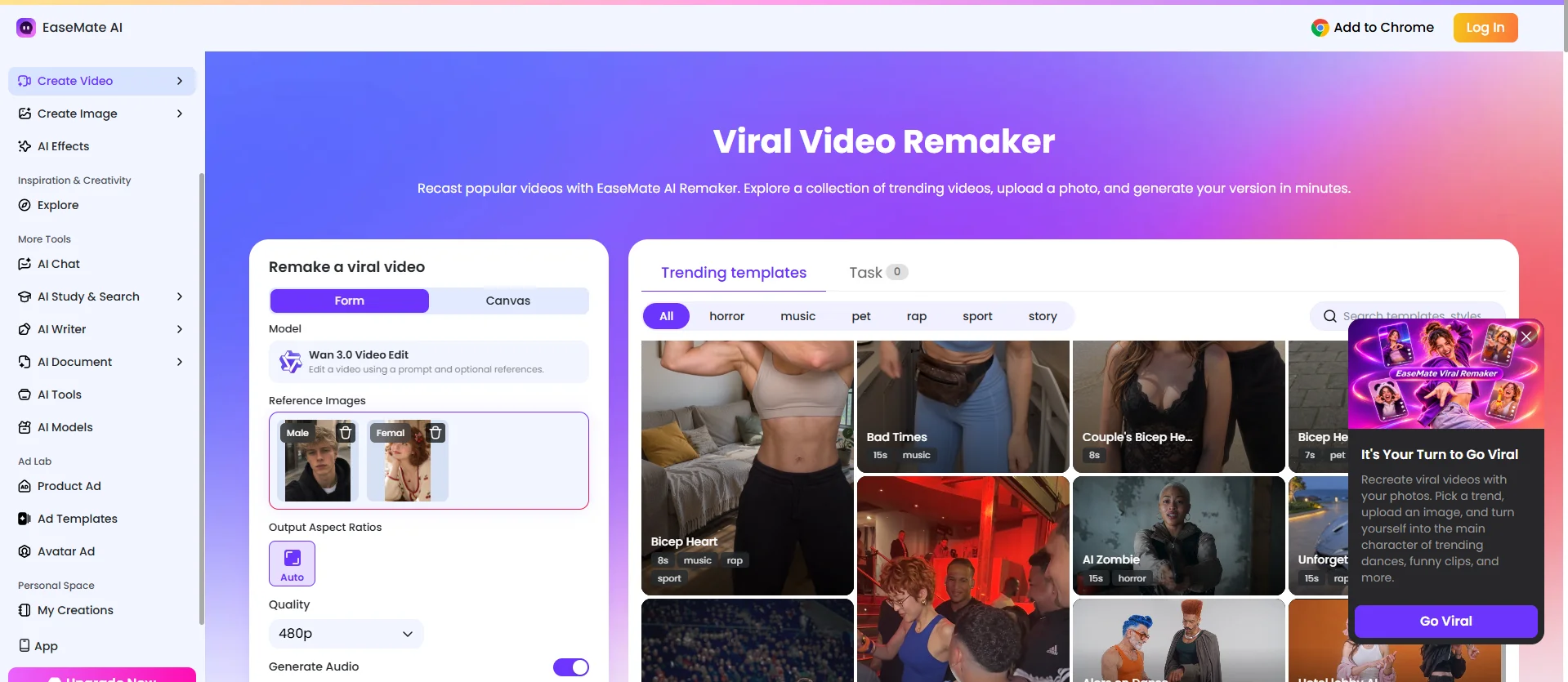
Unlike standard AI video generators that ask you to conjure a scene out of thin air from a blank text box, the EaseMate AI Viral Video Remaker works on a reference-based engine.
Instead of guessing what the algorithm wants, you start with a proven viral template or trending video structure. The AI analyzes the original video’s camera movement, character expressions, pacing, and audio cues, and then lets you swap in your own face, brand mascot, product, or custom character with a single image.
The Hands-On Test: Remaking a Viral Video in 3 Steps
To see if it lived up to the hype, I decided to take a trending high-energy transformation/dance format and adapt it without filming a single second of new footage.
Step 1: Picking a Proven Viral Trend
Inside the EaseMate AI dashboard, there’s a curated library of active social media trends, ranging from cinematic car jumps and Tiny Desk style setups to viral dance challenges and comedic skits. I selected a dynamic, beat-heavy movement template that relies heavily on smooth camera tracking and expressive motion. That usually requires a tripod and ten takes to get right.
Step 2: Uploading a Photo & Customizing the Prompt
This was the easiest part. The platform simply asks for one clear photo of the subject you want to put into the video. To really test its limits, I didn't just use a standard selfie; I tested a stylized brand avatar first, followed by a regular portrait.
From there, I used the custom prompt box to tweak the background vibe and outfit details so it wouldn't look like a carbon copy of the original clip.
Step 3: Generating and Reviewing the Output
Within a couple of minutes, the remade video was ready. What stood out immediately wasn't just the face or character swap. It was the motion retention. The AI accurately mapped the original video's exact head tilts, hand gestures, and camera zoom rhythm onto my static image. The pacing hit the audio beats cleanly, preserving the exact "hook" that made the original Reel go viral in the first place.
3 Standout Features That Actually Matter for Creators
After running a few different tests (including a quirky product showcase and a meme-style reaction clip), three specific things stood out:
- Zero Filming or Editing Bottlenecks: You don't need lighting gear, a clean studio background, or video editing skills. Turning a single static photo into a fully animated, beat-synced short cuts production time down by roughly 90%.
- Built-In "Algorithm Safety" via Creative Recasting: Social platforms actively throttle unoriginal reposts. Because EaseMate AI completely rebuilds the visual layer using your specific photo and custom prompt instructions, you get the psychological hook of a trending format while publishing a visually unique asset.
- Creative Flexibility Beyond Selfies: You aren't limited to putting yourself in the video. Marketers and meme pages can drop pets, illustrated mascots, or even classic paintings into modern TikTok trends, which naturally drives higher share rates and comment engagement.
Best Practices: How to Use AI Remakes Without Losing Your Brand Voice
Having a shortcut to viral formats is great, but blindly churning out templates won't build a loyal audience. If you decide to integrate this into your workflow, keep these three rules in mind:
- Match the Trend to Your Niche: Don't jump on a chaotic dance trend if you run a B2B SaaS brand, unless you’re doing it ironically with a funny, self-aware caption. Pick templates whose energy matches your audience's humor.
- Write a Sharp On-Screen Hook: Even when the AI nails the visual motion, the text overlay you add before publishing does half the work. Pair the generated video with a relatable pain point or a curiosity-gap headline in the first two seconds.
- Use It for A/B Testing Ads: If you run paid social campaigns, use the tool to generate three or four visual variations of the same high-performing hook. It’s one of the fastest ways to beat ad fatigue without blowing your production budget.
Final Verdict: Who Is It For?
If you are a filmmaker shooting high-end cinematic documentaries, you obviously don't need a trend remaker. However, if you are a solo content creator fighting daily burnout, an e-commerce marketer needing fresh scroll-stopping creatives, or a social media manager trying to keep up with fast-moving Reels trends on a tight schedule, this tool is a massive unfair advantage.
Viral videos rarely happen by accident. They happen when great timing meets a proven structure. If you’re tired of spending hours editing videos that barely move the needle, take five minutes to test out the EaseMate AI Viral Video Remaker (https://www.easemate.ai/viral-video-remaker) and see how fast you can turn today's top trends into your own.