What is Transfonic?
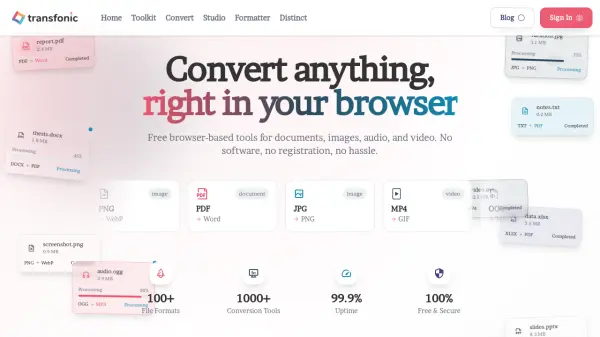
Transfonic is a comprehensive online file conversion platform that enables users to convert documents, images, audio, and video files directly in their web browser. The tool supports over 100 file formats and 1000+ conversion tools, offering a secure, cloud-based processing environment that requires no software installation or registration. With features like batch processing, customizable settings, and real-time sync, Transfonic provides a fast and efficient solution for handling file format changes across various media types.
The platform includes specialized engines for different file categories, such as Document Engine for PDF to DOCX conversion and text extraction, Image Engine for background removal and enhancement, Audio Engine for noise reduction and transcription, and Video Engine for format compatibility. Additional tools like Studio for image editing and audio recording, Formatter for text manipulation, and Distinct for professional conversion utilities make Transfonic a versatile workspace for managing and transforming files with end-to-end encryption and automatic file deletion for privacy.
Features
- Document Conversion: Convert PDF to editable DOCX and other document formats with high compatibility
- Image Enhancement: Use AI to enhance image clarity, contrast, and color for polished results
- Audio to Text: Convert spoken audio into accurate text transcripts using advanced speech recognition
- Background Remover: Easily remove backgrounds from images for clear and polished outcomes
- Batch Processing: Convert multiple files at once to save time without compromising quality
- Cloud-Based Processing: Upload and convert files directly in the cloud with no software installation required
- End-to-End Encryption: Ensure total privacy with encrypted file processing and automatic deletion
- Comprehensive Format Support: Convert between over 20 file formats for documents, images, audio, and video
Use Cases
- Converting PDF documents to editable Word files for easy editing
- Removing backgrounds from product images for e-commerce listings
- Transcribing podcast audio into text for content creation or accessibility
- Compressing audio files to reduce size for faster uploads and sharing
- Enhancing photo quality for professional presentations or social media
- Merging multiple PDF files into a single document for organized reporting
- Converting video formats for compatibility with different platforms or devices
- Extracting text from scanned documents using OCR for digital archiving
FAQs
-
What file formats does Transfonic support?
Transfonic supports over 100 file formats, including common ones for documents (e.g., PDF, DOCX), images (e.g., JPG, PNG), audio (e.g., MP3, WAV), and video (e.g., MP4, AVI). Users can check the format list for a complete overview. -
Is there a file size limit for conversions?
There is no hard limit on file sizes, but processing times may increase for very large files. Users can try reducing file size or contact support for assistance if issues arise. -
How long does it take to convert a file?
Most conversions are completed in a few seconds, though the exact time may vary based on file size and format. The platform aims for fast and efficient processing. -
How does Transfonic ensure data security?
Transfonic prioritizes data security by using end-to-end encryption during processing and automatically deleting uploaded and converted files after completion to protect user privacy. -
Can I convert multiple files at once?
Yes, Transfonic offers batch processing to convert several files simultaneously, saving time without sacrificing quality.