What is Tiki-Toki Timeline Maker?
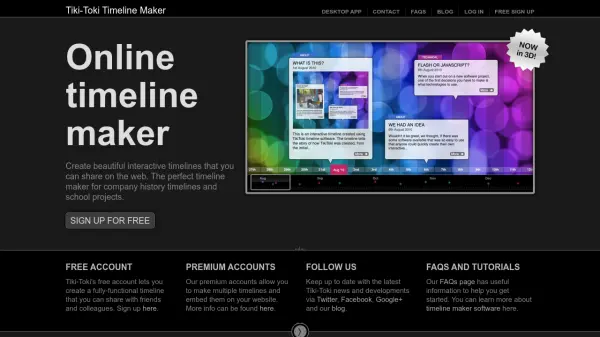
Tiki-Toki Timeline Maker is a web-based application that enables users to create visually engaging and interactive timelines. It operates directly in the browser without requiring any downloads, allowing immediate access upon signing up for a free account. The tool supports various media types, including text, images, videos from YouTube and Vimeo, and audio, transforming them into interactive galleries for an enriched viewer experience.
One of its standout features is the 3D timeline view, which offers extensive customization options such as zooming, adjusting panel sizes, and setting time directions. Users can organize timelines with color-coded categories, customizable time spans, and background images. While the free account allows creation of one fully functional timeline, premium accounts provide additional capabilities like embedding timelines on websites, group editing, and creating multiple timelines, catering to professionals, educators, and businesses.
Features
- 3D Timeline View: Display timelines in three dimensions with zoom and customization options
- Multimedia Integration: Include images, videos from YouTube/Vimeo, and audio in interactive galleries
- Customization Options: Color-code stories, set categories, and customize time spans with background images
- Sharing Capabilities: Each timeline has a unique URL for easy sharing with others
- Embedding Functionality: Embed timelines on websites or blogs with premium accounts
Use Cases
- Creating company history timelines for business anniversaries
- Developing educational history timelines for school projects
- Building personal diaries or family history timelines with photos and videos
- Designing legal timelines for court case presentations
- Making timelines for charity organizations to highlight achievements
FAQs
-
What are the limitations of the free account?
The free account is limited to creating one timeline but includes full functionality for that timeline, including multimedia integration and sharing. -
Can I embed timelines on my website with a free account?
No, embedding timelines on websites is only available with premium accounts such as Bronze, Silver, or Education plans. -
What types of media can I include in my timelines?
You can include text, images, videos from YouTube and Vimeo, and audio to create interactive multimedia experiences. -
Is there a discount for students on premium accounts?
Yes, school and university students can purchase the Bronze account at a reduced rate of $7.50 per month. -
How do I sign up for Tiki-Toki?
You can sign up for free by entering a username, email, password, and age, and agreeing to the terms and conditions on the website.