What is Spacebar Counter?
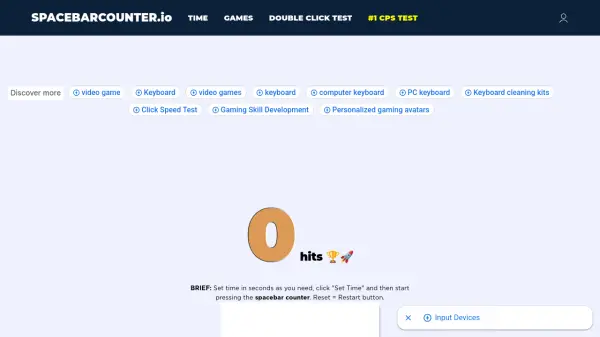
Spacebar Counter is an interactive online tool designed to measure and improve spacebar clicking speed. Users can select various time intervals from 1 second to 2 minutes, then press the spacebar as many times as possible within that timeframe. The tool accurately counts each press and displays the results instantly, allowing users to track their performance and progress over time.
The platform features a competitive Top-500 Challenge where users can log in with their Google account to compete against thousands of other players worldwide. The system includes anti-cheat filters to ensure fair competition and maintains leaderboards for different time intervals. Spacebar Counter also offers additional gaming tools like CPS tests and double-click tests to help users enhance their overall gaming performance.
Features
- Time Interval Selection: Choose from 1 second to 2 minutes for testing sessions
- Accurate Counting: Precisely measures each spacebar press in real-time
- Top-500 Challenge: Compete globally with leaderboards for different time intervals
- Anti-Cheat System: Filters out fraudulent results to ensure fair competition
- No Registration Required: Start testing immediately without creating an account
- Instant Results: View your clicking speed immediately after each test
- Additional Gaming Tools: Includes CPS tests and double-click tests
Use Cases
- Improving gaming performance by increasing spacebar clicking speed
- Competing in online spacebar clicking challenges and tournaments
- Practicing typing speed and accuracy for better keyboard skills
- Entertaining friends with spacebar clicking competitions
- Participating in TikTok spacebar challenge trends
- Testing endurance and patience through extended clicking sessions
- Training for gaming tournaments that require rapid spacebar usage
FAQs
-
What is considered a good CPS (clicks per second) score on the spacebar counter?
According to the latest statistics, 6 to 7 clicks per second is considered a decent spacebar clicking CPS. The highest recorded score is 14.5 CPS, achieved by pressing the spacebar 58 times in 5 seconds. -
How can I improve my spacebar clicking speed?
To improve your speed, use proper posture, maintain consistency in daily training, vary time intervals during practice, ensure your keyboard works smoothly, and try different hand movements. Regular practice with the tool will help increase your clicking speed over time. -
What are the benefits of using the spacebar counter?
Benefits include improved typing speed and accuracy, reduced physical strain on fingers and hands, enhanced gaming performance, immediate score viewing, easy gameplay without registration, browser-based functionality, and free access with regular updates. -
How does the Top-500 Challenge work?
To join the Top-500 Challenge, log in with your Google account so the system can record your nickname and scores. Then compete online with thousands of players to reach the top of the leaderboard. The top 3 champions and top 10 winners are displayed on the main page. -
Can I use this tool on any device?
Yes, the spacebar counter works in web browsers on computers, laptops, and other devices with keyboards. It's an online tool that requires no downloads or installations.