Nullity AI favicon

Nullity AI
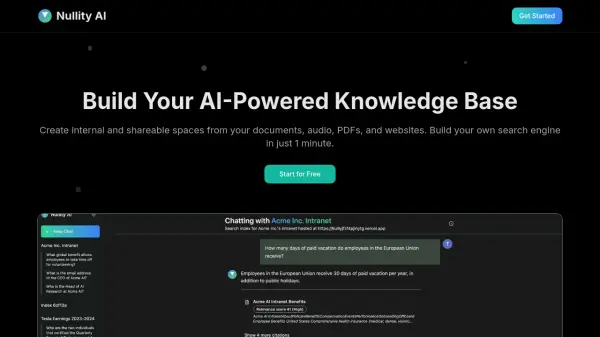
Build Your AI-Powered Knowledge Base

What is Nullity AI?

Nullity AI is a platform designed to help users build and manage AI-powered knowledge bases. It enables the creation of internal and shareable spaces from a variety of sources, including documents, audio files, PDFs, and websites.

With Nullity AI, users can create their own search engine in approximately one minute. The platform supports integration with popular tools like Slack, Discord, and website widgets, ensuring easy access to the knowledge base across different platforms. The platform incorporates advanced OCR technology for scanned documents and AI-powered transcription services supporting multiple languages and accents.

Features

  • Document Integration: Easily import and process PDFs and text documents, with advanced OCR technology for scanned documents.
  • Audio Processing: Convert audio files into searchable text content with AI-powered transcription.
  • Website Indexing: Crawl and index websites to include in your knowledge base.
  • Slack Integration: Chat with your Nullity Space directly in Slack.
  • Discord Bot: Add your Nullity Space as a Discord bot.
  • Website Widget: Embed your Nullity Space on your website.

Use Cases

  • Create internal knowledge bases for teams and organizations.
  • Build shareable knowledge spaces for specific topics or communities.
  • Develop custom search engines for specific datasets.
  • Integrate knowledge access into existing workflows via Slack, Discord, or websites.

Helpful for people in the following professions

Related Tools:

Blogs:

  • Top 6 AI note-taking tools for 2026: in-person, online, and hybrid use cases

    Top 6 AI note-taking tools for 2026: in-person, online, and hybrid use cases

    Most AI note-taking lists are really lists of meeting bots, which join your video call and transcribe it. That's useful, but it's half the picture. Decisions happen in hallway conversations, client dinners, on-site visits, and hybrid rooms where nobody is on a video link. This guide covers different parts of the note-taking workflow: hardware capture for in-person settings, platform-native tools for online calls, and AI layers for organizing and synthesizing what you've captured. It compares six tools by capture context, workflow fit, pricing, and limitations.

  • Chat with PDF AI Tools

    Chat with PDF AI Tools

    Easily interact with your PDF documents using our advanced AI-powered tool. Whether you're reading lengthy reports, research papers, contracts, or eBooks, our platform lets you chat directly with your PDF files, ask questions, extract insights, and get summaries in real-time.

  • Top AI tools for Teachers

    Top AI tools for Teachers

    Explore the top AI tools designed for teachers, revolutionizing the education landscape. These innovative tools leverage artificial intelligence to enhance teaching efficiency, personalize learning experiences, automate administrative tasks, and provide valuable insights, empowering educators to create engaging and effective educational environments.

Didn't find tool you were looking for?

Be as detailed as possible for better results