What is MarkdowntoWord?
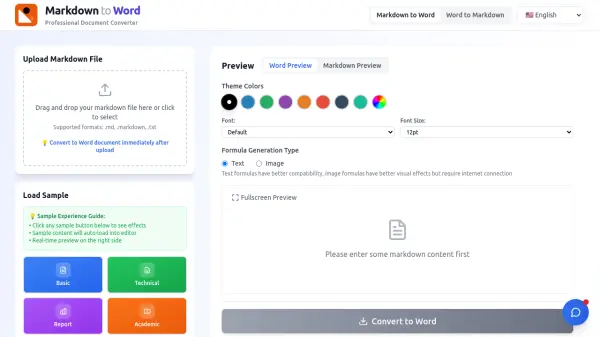
MarkdowntoWord provides a seamless solution for converting Markdown content into professionally formatted Word documents. The tool operates entirely in the browser, eliminating the need for software installation or user registration. It supports various input methods, including file uploads for .md, .markdown, and .txt formats, as well as direct text pasting into an integrated editor.
Real-time preview functionality allows users to visualize their Markdown-to-Word conversion results instantly, ensuring formatting accuracy before finalizing the document. The converter maintains complex elements such as headers, lists, code blocks, tables, footnotes, and images, delivering high-quality .docx files suitable for professional, academic, and technical use. All conversions are secured with HTTPS encryption, and files are automatically deleted post-download to protect user privacy.
Features
- Real-Time Preview: Live preview of Markdown-to-Word conversion results as users type or edit content
- Format Preservation: Maintains headers, lists, code blocks, tables, footnotes, and other complex formatting during conversion
- Multiple Input Methods: Supports file uploads (.md, .markdown, .txt) and direct text pasting into an integrated editor
- Customizable Styling: Offers theme colors, font selections, and font size adjustments for personalized document output
- Security & Privacy: Uses HTTPS encryption and automatically deletes all files after conversion to ensure data protection
Use Cases
- Converting technical documentation like API docs or README files to Word for sharing with non-technical teams
- Preparing academic papers, theses, or lab reports in .docx format to meet university submission requirements
- Editing blog drafts or content in Word for collaboration with editors or final adjustments
- Creating meeting materials, presentations, or slide scripts from Markdown notes for printing or distribution
- Managing corporate documents such as policy manuals, training materials, or SOPs with consistent formatting
FAQs
-
Is the tool completely free to use?
Yes, the service is 100% free, unlimited, and ad-free, with no hidden costs or subscription fees. -
What Markdown syntax does the converter support?
It supports all standard syntax including headers, lists, tables, code blocks, blockquotes, footnotes, and task lists, along with common extensions. -
Can I use this tool on mobile devices?
Yes, the interface is fully responsive and works on iOS and Android browsers as well as desktop platforms. -
How secure is the conversion process?
All conversions use HTTPS encryption, and files are automatically deleted from servers immediately after download to ensure data privacy. -
What file formats can I import and export?
You can import .md, .markdown, or .txt files and export .docx or .doc files, with future updates planned for additional formats.