What is Kanmail?
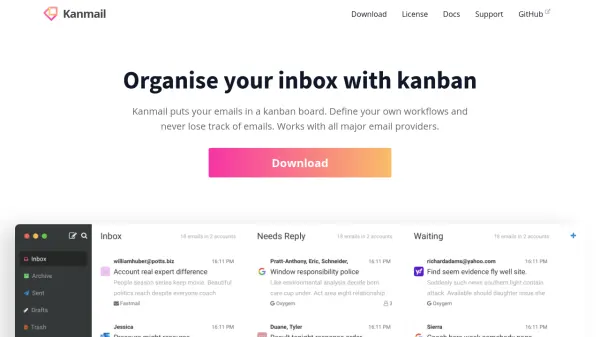
Kanmail is an innovative email client that reimagines inbox management by presenting emails in a kanban board format. This unique approach allows users to define personal workflows and stay on top of ongoing conversations, making it easy to manage multiple accounts from a unified interface. Kanmail integrates with all major email providers through IMAP and SMTP, supporting features such as Gmail-style search and full label support.
Designed for efficiency and privacy, Kanmail offers comprehensive keyboard shortcuts, intelligent thread bundling, and robust privacy features including blocking tracking pixels and storing all emails on your device. Its lightweight, intuitive design ensures a smooth user experience without slowing down your computer, and its source-available model emphasizes transparency and security. With a pay-once pricing model, users can enjoy years of productivity without subscription fees.
Features
- Kanban Board Interface: Organize emails using a customizable kanban board.
- Unified Inbox: Manage multiple email accounts from one place.
- IMAP & SMTP Integration: Supports all major email providers.
- Gmail-Style Search: Quickly find emails with advanced search options.
- Full Label and Folder Support: Utilize provider labels and folders effectively.
- Keyboard Shortcuts: Efficient navigation and email management.
- Thread Bundling: Combines related emails in a single thread.
- Privacy Protection: Blocks tracking pixels and stores emails only on your device.
- Lightweight Design: Minimal resource usage for fast performance.
- Source Available: Code available for review and transparency.
Use Cases
- Managing high volumes of email conversations across several accounts.
- Organizing business communications for small teams or solo entrepreneurs.
- Streamlining workflow for professionals who rely heavily on email.
- Improving personal productivity with advanced email organization methods.
- Enhancing email privacy and security for sensitive communication.
FAQs
-
Does Kanmail work with my existing email provider?
Yes, Kanmail integrates with nearly all major email providers through IMAP and SMTP protocols. -
Is there a subscription fee?
No, Kanmail offers a pay-once pricing model for long-term use without recurring fees. -
How does Kanmail protect my privacy?
Kanmail blocks tracking pixels, does not display ads, and stores emails only on your local device. -
Is the source code available for review?
Yes, Kanmail's source code is available on GitHub, ensuring transparency and security.