What is Hot Virtual Keyboard?
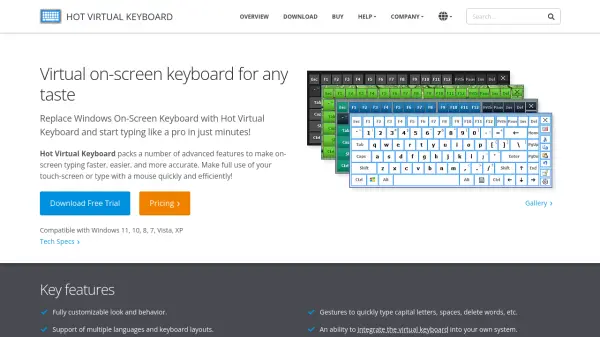
Hot Virtual Keyboard is a sophisticated on-screen keyboard solution designed for Windows operating systems, offering a comprehensive alternative to the default Windows On-Screen Keyboard. This software provides users with advanced typing capabilities through a fully customizable interface that supports multiple languages and keyboard layouts. It enables efficient typing on touch-screen devices or with a mouse, making it suitable for various computing environments.
The software includes programmable keys and shortcuts that allow users to execute custom actions such as launching applications, opening web pages, or running macros with a single tap. Text suggestion technology enhances typing speed and accuracy by predicting words based on initial input. Gesture support facilitates quick actions like typing capital letters, inserting spaces, or deleting words. Additionally, the tool offers integration options for kiosks and payment terminals, along with multi-touch support in Windows 7 and later versions.
Features
- Customizable Interface: Fully customizable look and behavior with over 60 different keyboard designs
- Multi-language Support: Supports all languages and keyboard layouts installed in Windows
- Programmable Keys: Allows programming keys to perform actions like launching applications, opening web pages, or running macros
- Text Suggestions: Suggests words based on initial taps to improve typing speed and accuracy
- Gesture Support: Enables gestures for typing capital letters, inserting spaces, deleting words, and controlling keyboard visibility and position
Use Cases
- Typing on touch-screen devices like tablets and ultra-mobile PCs
- Accessibility support for users with physical limitations
- Kiosk and payment terminal integration
- Multilingual typing on Windows systems
- Custom keyboard creation for specific workflows
FAQs
-
What operating systems does Hot Virtual Keyboard support?
Hot Virtual Keyboard is compatible with Windows 11, 10, 8, 7, Vista, XP, and various Windows Server versions including 2022, 2019, 2016, 2012, 2008, and 2003. -
How does the text suggestion feature work?
The text suggestion technology predicts words based on just one or two taps, similar to smartphone keyboards, to enable faster and more accurate typing. -
Can I create my own custom keyboard layouts?
Yes, users can modify existing virtual keyboards or create their own by customizing backgrounds, key shapes, colors, fonts, sounds, and other parameters. -
What gestures are supported by Hot Virtual Keyboard?
Supported gestures include three-finger tap to toggle keyboard visibility, two-finger touch and move to reposition the keyboard, and pinch/stretch gestures to resize the keyboard.