What is Harpa Pro?
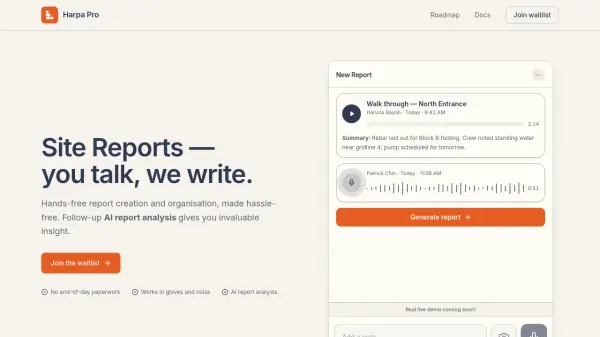
Harpa Pro is an AI-driven mobile application designed for construction foremen and site supervisors to eliminate end-of-day paperwork. It allows users to capture voice notes, photos, and text updates directly from the jobsite, even in gloves or noisy environments, with no internet required during capture. The AI then generates clean, organized daily reports that can be reviewed, edited, and exported as PDFs.
Beyond report generation, Harpa Pro offers AI-powered analysis across projects to identify recurring issues, material overruns, and financial blockers. The tool is built for US residential and light-commercial construction, with a focus on hands-free, fast capture and draft review to keep users in control. Early access is free, with pricing for general availability to be informed by pilot users.
Features
- Voice Notes for Hands-Busy Updates: Talk through site updates while walking; Harpa Pro transcribes and files them.
- Photo-Backed Documentation: Tag photos to projects and sections to keep context attached.
- Project-Based Report History: Every report archived under the right job for easy lookback.
- Clean Report Exports: Share PDFs that match office report formats without extra formatting.
- Built for Jobsite Pace: Glove-friendly, noise-tolerant capture in seconds.
- Drafts You Review: AI drafts reports; user approves before sharing.
Use Cases
- Daily construction site reporting for foremen and supervisors
- Hands-free documentation on active job sites
- Cross-project analysis of recurring issues and cost overruns
- Photo-documented progress tracking for residential and light-commercial construction
FAQs
-
Who is Harpa Pro for?
Foremen and site supervisors who own a daily report and want it done before they leave the jobsite. Today we focus on US residential and light-commercial construction; broader trades come later. -
Do I need internet on the jobsite?
No. Captures (notes, photos, voice) queue locally and sync when you're back on data or Wi-Fi. Generation runs after sync, so you'll see your report once you have signal. -
How is my voice data handled?
Recordings are encrypted in transit, transcribed on our backend, and attached to your project. We do not sell or share captures, and you can delete a recording (or a whole project) at any time. -
When can I try it?
Early access opens in waves on iOS and Android (React Native, so both ship together). Join the waitlist on our website and we'll reach out as your spot opens up. Web comes after the mobile pilot stabilises. -
What does Harpa Pro cost?
Free during the early-access program. Pricing for general availability will be set with input from pilot users — we'll share it well before GA, and pilot teams keep their early-access terms.