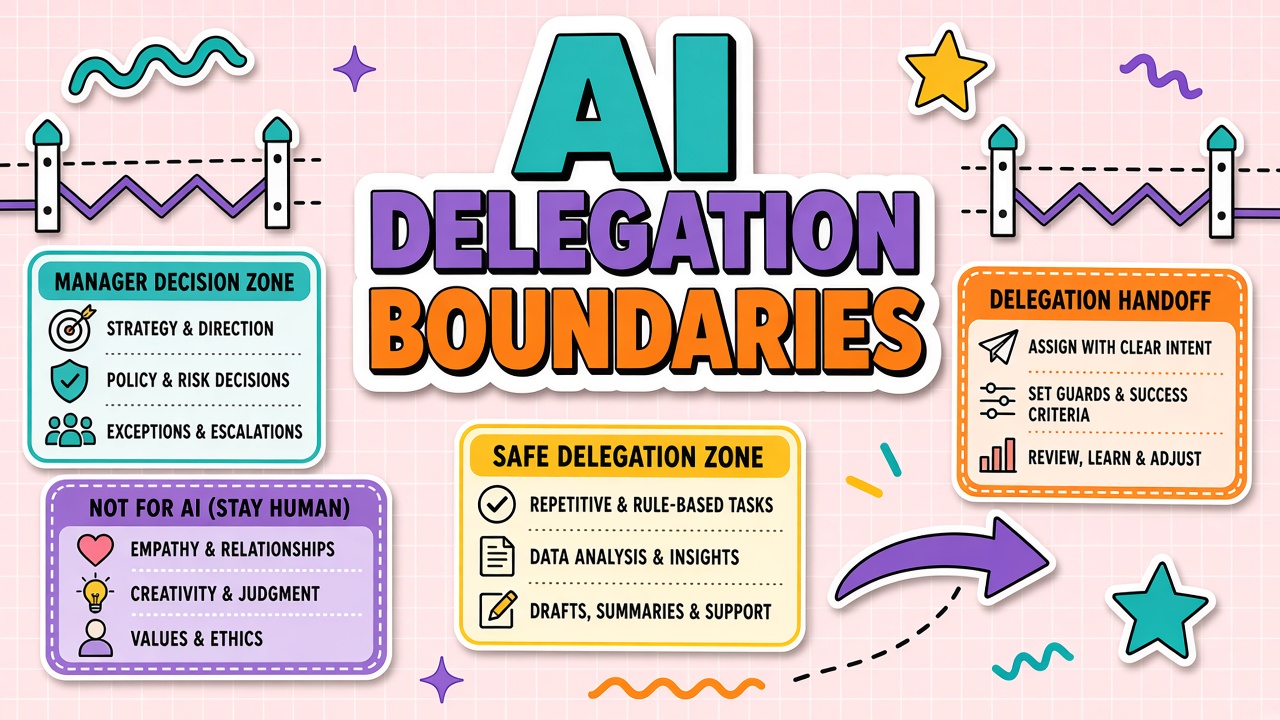
Staff will use AI whether or not managers publish rules. Without boundaries, the fastest person wins and the most cautious person looks slow. With vague boundaries, everyone asks permission for trivial tasks while risky client data slips into a public chatbot. AI delegation boundaries translate company policy into daily decisions: what teammates may delegate to AI on their own, what requires a manager sign-off, and what must never leave human hands.
This guide gives managers a risk-tier matrix, pre-approved task lists, charter language, and review cadences. It complements org-wide policies and applies whether teams rely on AI productivity suites or customer-facing AI chatbot tools.
Risk Tiers for Delegation Decisions
Sort tasks by data sensitivity and downstream impact, not by how clever the AI output looks. Four tiers cover most manager-led teams without a fifty-page policy.
| Tier | Examples | Default delegation rule |
|---|---|---|
| Public | Industry research, generic outlines, public FAQ drafts | Staff may use approved tools without per-task approval |
| Internal | Meeting notes, internal memos, process documentation | Approved tools only; peer review before wide distribution |
| Client | Deliverables, proposals, support replies with customer names | Manager approval on workflow and disclosure before first send |
| Regulated | HR records, health data, financial advice, legal analysis | Human-only or explicit legal/compliance sign-off per use case |
Publish the tier definitions where staff already look for team norms, not buried in a PDF from last year. When in doubt, staff should default to the higher tier and ask. Managers answer within one business day or the default is "no" for client and regulated work.
Pre-Approved vs Ask-First Tasks
Pre-approved lists remove friction on safe work; ask-first lists prevent silent scope creep on sensitive work. Keep each list short enough to memorize in a standup.
Pre-approved examples (adjust to your stack)
- First drafts of internal meeting agendas from bullet notes
- Grammar and clarity passes on text staff already wrote
- Summaries of public webinars into internal learning docs
- Code comment suggestions on non-production repos per engineering policy
- Brainstorm lists for campaigns before brand review
Ask-first examples
- Any output sent externally with client logos, data, or commitments
- Automated replies from a chatbot connected to live ticket queues
- Batch processing of spreadsheets with employee or customer identifiers
- Decisions that affect pricing, refunds, hiring, or legal obligations
- New tool trials that require OAuth to company systems
Managers review ask-first queues weekly in fifteen minutes: approve, deny with reason, or escalate to security. Patterns in denials become updated pre-approved rules or training topics.
Documenting Boundaries in Team Charters
Team charters make delegation rules durable across reorgs and new hires. Include a one-page AI section with owners, not a generic "follow company policy" line.
Charter AI section checklist:
- Approved tool list with links to internal procurement records
- Risk tier definitions in team language (real task examples)
- Pre-approved and ask-first tables with last-updated date
- Escalation path: manager, security, legal
- Review cadence and who may grant exceptions
Charters live next to workflow runbooks for productivity habits so "how we work" and "what AI may do" stay aligned. When a charter conflicts with enterprise policy, enterprise policy wins and the charter gets corrected the same week.
Review Cadence for Boundary Updates
Boundaries stale within a quarter if vendors ship new features and staff discover new shortcuts. Schedule a lightweight review even when nothing feels broken.
- Monthly: Scan ask-first log for repeat requests that should become pre-approved or permanently banned.
- Quarterly: Reconcile charter with security bulletin, new integrations, and incident reports.
- After incidents: Any customer complaint, data leak scare, or quality failure triggers immediate boundary patch.
- At tool changes: New model default, new browser extension, or new API connector requires tier reclassification.
Communicate updates in team channel with a diff summary: "Added X to ask-first because Y." Silent wiki edits do not change behavior.
Conversation Scripts for Boundary Talks
Managers set boundaries in meetings, not only in documents. Use short scripts so language stays consistent across the team. When someone asks to use a new tool: "Happy to explore after we classify the task tier and confirm security reviewed the vendor. What job are you trying to finish?" When someone sends client copy without review: "This is client tier; walk me through the checklist before it leaves."
Scripts reduce favoritism perception. The same ask-first rule applies to top performers and new hires. Praise publicly when staff escalate uncertain cases early; that reinforces the boundary system faster than punishing the first mistake after months of silent waiver.
Measuring Boundary Health
Healthy boundaries show up in metrics, not only in compliance attestations. Track ask-first queue volume (should stabilize after first quarter), repeat question themes (signal unclear charter language), incident count tied to unapproved tools (should trend down), and time-to-approval for legitimate client work (should stay under your published SLA). If ask-first queues grow forever, boundaries may be too tight or training may lag. If incidents rise while queues stay empty, staff may be bypassing the system.
Review metrics monthly in a fifteen-minute manager huddle. Adjust pre-approved lists when the same safe task appears ten times in ask-first logs. Tighten ask-first when a near miss could have been client tier data in a public tool.
Integrating Boundaries With HR and Security
Manager boundaries must align with HR policy and security exceptions. HR owns disciplinary patterns for intentional policy violation; managers own day-to-day coaching. Security owns vendor approval list; managers own task tier decisions inside approved tools. Quarterly sync between manager lead, HR partner, and security prevents contradictory messages ("security said no" vs "manager said try it").
When security blocks a tool staff already used in pre-approved tasks, managers update charter within forty-eight hours and communicate replacement workflow. Silence after a block drives shadow tool use faster than the original gap.
Escalation When Staff Disagree With Tiers
Disagreement usually signals ambiguous task classification, not rebellious staff. When someone pushes back on ask-first for a recurring task, managers run a fifteen-minute tier review: list data types, output destination, reversibility if wrong, and customer visibility. Either reclassify with charter update or explain denial with specific risk reference. Ad hoc exceptions without charter edits teach the team that rules are negotiable by persistence.
Escalate to security when disagreement involves a new vendor, browser extension, or data export path. Escalate to legal when client contract language conflicts with proposed automation. Managers document escalation outcome in ask-first log so identical questions next month get consistent answers.
Onboarding Managers to Boundary Enforcement
New managers inherit teams mid-stream; they must inherit boundary enforcement too. People managers joining from other departments receive a thirty-minute boundary briefing: charter location, recent incidents, top three pre-approved tasks, top three ask-first pain points. Pair with outgoing manager for one ask-first queue review. Inconsistent enforcement across manager rotation is a common source of shadow AI use within the same team.
Thirty-Day Boundary Rollout for Managers
Week one: publish risk tier definitions with team-specific examples, circulate pre-approved and ask-first lists, hold live Q&A, and start ask-first log. Week two: review first ask-first entries daily, clarify denials with written reasons, adjust charter if same question repeats three times. Week three: spot-check outputs in team meetings praise good escalations, coach near misses privately. Week four: review boundary health metrics, sync with HR and security, publish charter v1.1 with changes noted.
Ongoing: monthly fifteen-minute boundary huddle, quarterly charter review, immediate patch after any incident. Managers who skip week one Q&A spend month two answering the same Slack questions individually. Consistency beats perfection; staff forgive strict rules they understand more than vague rules enforced randomly.
Team Charter Examples by Function
Support teams often pre-approve internal ticket summarization and ask-first on customer send. Marketing teams pre-approve brainstorm lists and ask-first on external copy with client logos. Engineering teams pre-approve test data generation and ask-first on production log paste. Customize examples in your charter so staff recognize their daily work in tier language instead of abstract policy.
Review charter examples when headcount grows more than twenty percent or when you add a new approved vendor. Static examples referencing retired tools teach staff to ignore the charter entirely.
Closing the Loop After Incidents
When an incident traces to boundary violation or confusion, managers hold a blameless thirty-minute review within five business days. Outputs: charter patch, LMS quiz question if needed, and one-minute team announcement with what changed. Incidents without loop closure imply the old ambiguous rule still governs behavior. Repeat incidents on same root cause escalate to security and HR with manager accountability for enforcement gaps.
Track incident themes quarterly: wrong tier, unapproved tool, missing review, data in public model. Themes drive training investment instead of generic "be careful" emails that staff ignore.
Frequently Asked Questions
Do interns get the same delegation rules?
Same tiers, tighter pre-approved list. Interns should not connect new integrations or send client-facing AI output without dual review until certified on team workflows.
How do contractors differ from employees?
Time-bound accounts, no admin keys, client tier default for anything that might leave the building. Contract language should reference approved tools; shadow accounts violate both boundary and procurement rules.
Crunch week: can we relax boundaries?
Relax process, not tiers. You may shorten approval SLAs or batch reviews twice daily. Do not move client or regulated work to public tools because deadlines tightened.
Should managers model the same rules?
Yes. Staff copy what leaders do under pressure. Managers who paste confidential decks into unapproved tools undo months of charter work in one screenshot.
The Bottom Line
Managers set AI delegation boundaries with clear risk tiers, short pre-approved and ask-first lists, charter documentation, and scheduled reviews. Boundaries exist so speed and safety pull in the same direction instead of fighting every Friday afternoon.