What is Hallway?
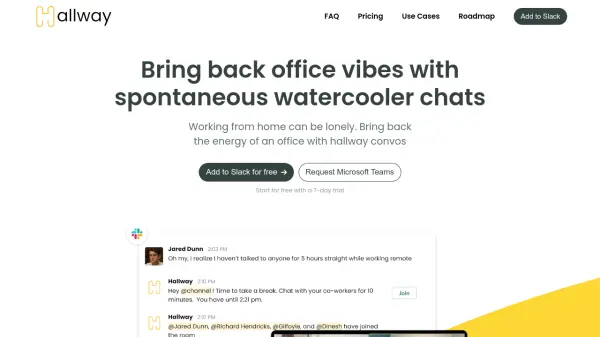
Hallway is designed to make remote work more sociable and engaging by facilitating spontaneous video conversations and group breaks within Slack channels. The platform allows team members to connect in real-time, promoting morale, collaboration, and organic interactions through features such as 1:1 random pairings, group break rooms, and customizable schedules. Hallway's advanced settings enable managers to tailor break times, working hours, and channel participation, ensuring that teams across various time zones can bond effortlessly. Weekly analytics help organizations understand team bonding dynamics, while on-demand video chats encourage social interaction, making remote work less isolating and more vibrant.
Seamlessly integrating with Slack, Hallway offers both scheduled and instant-break options, supporting team building and onboarding initiatives. Whether teams want recurring video chats, roulette-style pairings, or community bonding, Hallway provides flexible tools to foster connection and enhance the remote work experience.
Features
- Spontaneous Video Breaks: Enables instant group or 1:1 video chats within Slack channels
- Customizable Channel Settings: Schedule chat frequency, timing, timezone, and working hours
- On-Demand Breaks: Start a break instantly with a Slack command
- Roulette-Style 1:1 Pairings: Random private pairing for short break conversations
- Weekly Analytics: Provides insights and reports on team bonding activity
- Recurring or Scheduled Chats: Supports both spontaneous and scheduled video room sessions
- Slack Integration: Seamlessly adds functionality directly to existing Slack channels
- Support for External Video Links: Allows use of Zoom or Google Meet links for chats
Use Cases
- Virtual employee break rooms for remote team engagement
- Facilitating random 1:1 introductions to encourage networking within a company
- Enhancing onboarding processes for new hires by pairing them with team members
- Building connections within Slack communities
- Boosting team spirit and morale through regular, informal conversations
FAQs
-
How does Hallway integrate with Slack?
Hallway installs directly into Slack, allowing users to add the app to specific channels and manage settings from within Slack's interface. -
Can I schedule breaks across different time zones?
Yes, Hallway supports scheduling based on timezones, ensuring breaks work for globally distributed teams. -
Is there a limit to the number of video chat rooms?
No, Hallway offers unlimited video chat rooms and supports using external links like Zoom or Google Meet. -
Can breaks be started instantly?
Yes, users can initiate on-demand breaks at any time using a Slack command.