
What is Fontanello?
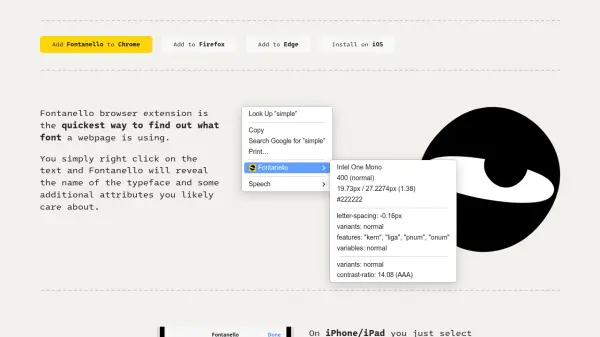
Fontanello is a browser extension designed to streamline font identification on webpages. Users can right-click on any text element to instantly reveal the typeface name and key typographic attributes. The tool displays comprehensive details including font weight, size, line height, color, contrast ratio, letter spacing, variants, and OpenType features, making it invaluable for design and development workflows.
Available for Chrome, Firefox, Edge, and iOS, Fontanello offers a seamless experience across platforms. On iOS devices, users select text and access Fontanello via the address bar menu. The extension enhances productivity by eliminating the need for manual inspection or guesswork, providing accurate, real-time font data directly within the browser environment.
Features
- Font Identification: Instantly reveals typeface names and attributes with a right-click or text selection
- Cross-Platform Support: Available as extensions for Chrome, Firefox, Edge, and iOS devices
- Detailed Typographic Data: Displays weight, size, line height, color, contrast ratio, letter spacing, variants, and OpenType features
- User-Friendly Interface: Simple integration into browser context menus for quick access
- Accessibility Focus: Includes contrast ratio analysis and speech functionality for enhanced usability
Use Cases
- Identifying fonts on competitor websites for design inspiration
- Extracting typographic details for web development projects
- Checking font accessibility by analyzing contrast ratios
- Learning about font variants and OpenType features in real-time
- Streamlining design workflows by quickly copying font attributes