What is Filestack?
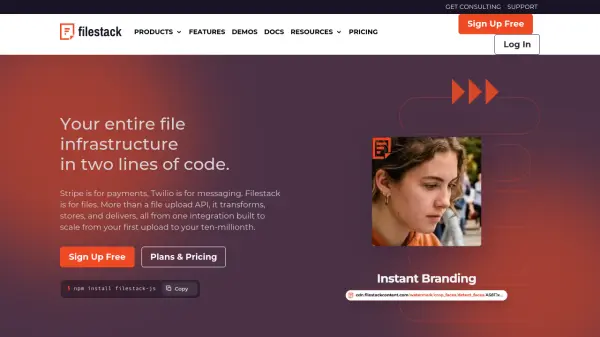
Filestack offers a complete file pipeline through a single integration, handling uploads, transformations, storage, and delivery via a global CDN. The platform includes a drop-in file picker that connects to 20+ sources, a Content Ingestion Network for reliable mobile uploads, and URL-based file transformations. Built-in AI capabilities provide virus and phishing detection, object detection, image captioning, sentiment analysis, and more. Filestack is designed to scale from small projects to enterprise-level operations, with SDKs available for JavaScript, React, Angular, Python, Java, and PHP.
Features
- File Uploads: Drop-in picker with 20+ integrated sources including local device, cloud storage, and social media.
- Content Ingestion Network: 100x more reliable mobile uploads with async storage routing.
- URL-Based Transformations: Crop, convert, and optimize files on the fly via URL parameters.
- Transformations UI: In-browser image editor for cropping, rotating, filters, and document conversion.
- AI Intelligence: Built-in content detection including virus, phishing, object, sentiment, and safe-for-work analysis.
- Global CDN Delivery: Fast content delivery with signed URLs and access policies.
- Multiple SDKs: Native libraries for JavaScript, React, Angular, Python, Java, and PHP.
- Secure Transfer: Protection for sensitive files with encryption and authentication.
Use Cases
- SaaS platforms needing reliable file upload and processing infrastructure.
- EdTech applications requiring secure and scalable content management.
- Print production workflows with automated image transformations.
- Drone and geospatial data pipelines for uploading and processing large files.
- Content management systems needing integrated file handling and CDN delivery.
FAQs
-
How do I upload files using Filestack?
Integrate the Filestack SDK or REST API to handle uploads, processing, and delivery from a single integration. Most teams ship their first upload in under a day. -
What are the benefits of using Filestack?
Filestack covers the full file pipeline through one API. The drop-in picker connects 20+ sources, the Content Ingestion Network delivers 100x more reliable mobile uploads, secure transfer protects sensitive files, and built-in AI handles content classification and moderation. -
How do I get started?
Sign up for a free account and access your Developer Portal to get an API key, install an SDK, and run your first upload. -
What types of files can I upload?
Images (JPEG, PNG, GIF, WebP), documents (PDF, DOCX, TXT), audio (MP3, WAV), and video (MP4, AVI), along with most other common file types. -
Are there any file upload limits?
Limits depend on your subscription plan and cover per-file size and total storage. Review your plan details for specifics.