What is EasyMapMaker?
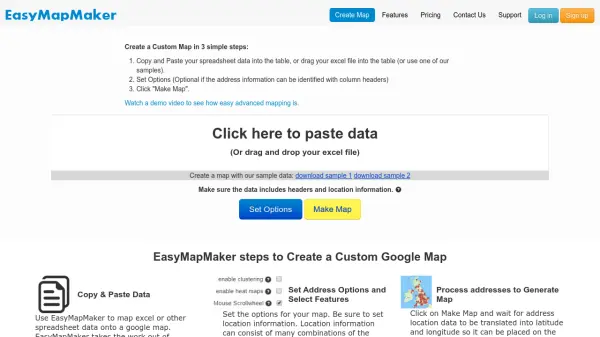
EasyMapMaker enables users to convert spreadsheet data containing location information into fully functional Google Maps through a streamlined three-step process. Users can copy and paste their Excel data or drag files directly into the platform, configure optional settings for address identification, and generate maps with a single click. The tool automatically processes addresses using geocoding technology to translate location data into precise latitude and longitude coordinates for accurate placement on maps.
The platform supports various map customization features including pin labeling, marker grouping with color coding, heat map generation, and clustering for large datasets. Users can apply filters, customize search functionality, and export maps to multiple formats including PDF, PNG, and KML files for use in Google Earth. Subscription plans unlock advanced capabilities such as faster geocoding, larger data set handling, password protection, custom logos, and high-resolution map exports.
Features
- Automatic Geocoding: Converts address data from spreadsheets into latitude/longitude coordinates for accurate map placement
- Custom Map Styles: Offers multiple predefined map styles and allows custom styling through Google's map styling wizard
- Heat Map Generation: Creates visual heat maps based on pin density with adjustable opacity and radius settings
- Clustering Engine: Groups large datasets into clusters for improved map performance and faster loading times
- Data Export Capabilities: Exports maps to PDF, PNG, and KML formats for use in various applications and platforms
Use Cases
- Visualizing customer locations from sales spreadsheets on an interactive map
- Creating heat maps to analyze population density or business concentration in specific areas
- Generating KML files for use in Google Earth with location data from research projects
- Developing password-protected maps for internal business use with sensitive location information
- Producing high-resolution map images for presentations, reports, or printed materials
FAQs
-
What types of data can be used to create maps?
Spreadsheet data containing address information or latitude/longitude coordinates can be used, with support for Excel files and direct data pasting. -
How does the geocoding process work?
Addresses are automatically converted to latitude/longitude coordinates using Google's geocoder for subscription maps and OSM for free maps. -
What are the limitations of the free Basic plan?
The Basic plan supports up to 250 pins per map, uses OSM geocoding at 1 per second, and has a maximum of 15,000 geocodes per month with limited features. -
Can maps be accessed on mobile devices?
Yes, all maps created with EasyMapMaker are automatically mobile compatible and work on smartphones and tablets. -
What subscription features are available for larger datasets?
Subscription plans offer faster geocoding (up to 90 per second), support for 1,500 to 30,000 pins per map, password protection, custom logos, and high-resolution exports.