

What is ComPDFKit?
ComPDFKit offers a suite of Software Development Kits (SDKs) designed for developers to integrate robust PDF functionalities into their applications. It supports a wide array of platforms, including Web, Windows, Android, iOS, Mac, and Server environments, along with frameworks like React Native and Flutter. Developers can leverage ComPDFKit to embed features such as high-fidelity PDF viewing, comprehensive annotation tools, form creation and filling, and electronic/digital signatures within their software solutions.
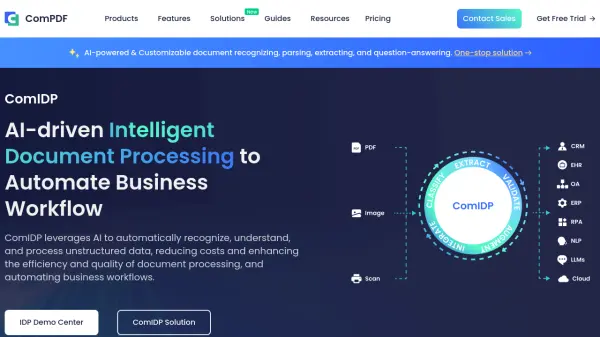
Beyond core PDF manipulation, ComPDFKit provides advanced capabilities like content editing (text, images, paths), document structuring (merging, splitting, page management), and conversion to and from various formats with high accuracy, often utilizing AI-based OCR. Its ComIDP (Intelligent Document Processing) solution further extends functionality with AI-powered document recognition, data extraction (text, tables, images), and question-answering, facilitating the automation of complex document workflows for businesses across diverse industries.
Features
- Cross-Platform SDKs: Libraries available for Web, Windows, Android, iOS, Mac, Server, React Native, Flutter, and more.
- PDF Viewing & Rendering: High-speed, accurate PDF display with navigation, zoom, and display modes.
- Annotation & Markup: Tools for adding notes, highlights, shapes, freehand ink, stamps, and managing annotations.
- PDF Editing: Edit text, images, and paths; manage pages (merge, split, insert, delete, rotate).
- Form Handling: Create, fill, edit, and flatten PDF forms; support for various field types.
- Signatures: Support for both electronic and digital signatures.
- AI-Powered Conversion: Convert PDFs to/from Office formats, images, TXT, HTML, CSV, etc., with high accuracy using OCR.
- Intelligent Document Processing (ComIDP): AI-driven recognition, parsing, data extraction (text, tables, stamps), and Q&A for unstructured data.
- Security Features: Encryption, decryption, permissions, watermarking, redaction.
- Advanced Tools: Document comparison, measurement tools, PDF compression, color separation.
Use Cases
- Integrating PDF viewing and annotation capabilities into web applications.
- Developing mobile apps (Android/iOS) requiring PDF editing and form filling.
- Building desktop software for document management with conversion features.
- Creating server-side applications for batch PDF processing and conversion.
- Automating document workflows using AI-powered data extraction (invoices, contracts, reports).
- Enhancing enterprise systems (e.g., Salesforce, SharePoint) with integrated PDF tools.
- Developing applications for specific industries like construction (drawing markup), education (e-learning materials), or finance (report processing).
FAQs
-
How will I receive my license key?
Upon successful payment, your license key is automatically delivered to the provided email address. For free trial submissions, the trial license key is sent to your inbox as well. -
Where can I download the product?
The SDK download link will also be automatically sent to the provided email address along with the license key. -
How to add the license key to my project?
Please follow our detailed developer guides to apply the license key to Web, Android, iOS, Flutter, React Native. -
Can I make a feature request?
Yes! While we cannot add every feature, customer feedback helps improve ComPDFKit. Please email us or submit a request to make feature requests. -
Can I get support during the trial period?
Yes! Our support teams will be glad to assist. We provide free technical support and will contact you in one business day.