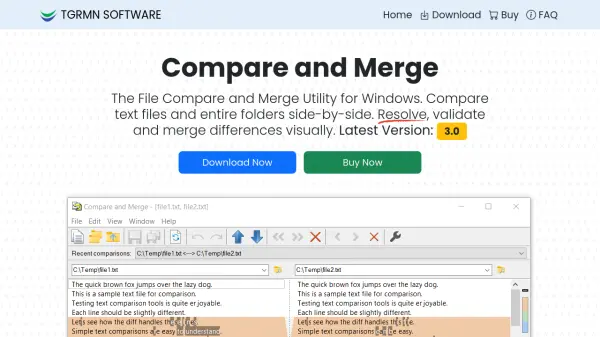
What is Compare and Merge?
Compare and Merge serves as a specialized Windows utility designed for detecting and merging differences between text files and entire folders. It provides side-by-side comparison functionality with character-level difference highlighting within lines, enabling precise identification of changes. The tool supports in-place editing with dynamic re-comparison, allowing users to edit text directly while differences refresh automatically.
This utility offers flexible merging options through one-click or drag-and-drop operations, along with multi-level undo/redo capabilities for both files and folders. It includes various customization options, keyboard shortcuts, and a dockable user interface to enhance workflow efficiency. The software integrates with version control systems and supports command-line automation for continuous integration and validation tasks.
Features
- File & Folder Compare: Side-by-side comparison for files and entire folders with character-level difference highlighting and overview/summary bar
- Edit & Merge: In-place editing with instant re-comparison and merge lines or blocks in one click or drag-and-drop
- For Developers: Integrates with version control workflows and command-line automation for CI/validation tasks
- Compatibility: Works on Windows 11, 10, 8, 7, Vista, ARM, and Windows Server with compact 2MB installer
Use Cases
- Source code reviews and comparisons
- Document comparisons and validation
- Program output validation and analysis
- Folder synchronization and difference resolution
FAQs
-
What operating systems does Compare and Merge support?
Compare and Merge works on Windows 11, 10, 8, 7, Vista, Windows on ARM, and Windows Server 2025, 2022, 2019, 2016, 2012, 2008 (32/64-bit). It does not run on macOS, Linux or other operating systems. -
How does the free trial work?
The free trial is fully functional and allows up to 50 file comparisons during the evaluation period. Users can try the software free of charge before purchasing. -
What is the cost of a license?
A standard license costs US $39.95 per computer, with instant delivery via email upon purchase completion.