New hires get AI tool access on day three from a well-meaning manager's credit card. Departing employees keep chatbot admin keys in a shared vault nobody rotates. SSO covers half the stack while the other half uses personal Gmail signups that IT discovers during an audit.
An access provisioning workflow for AI tool accounts standardizes request, approval, provision, verify, and deprovision across SSO and native auth. This guide covers group mapping, periodic reviews, and edge cases for teams deploying API-connected platforms and automation tools.
New tool onboarding should include provisioning playbooks: IdP group names, SCIM mappings, API key issuance steps, and deprovision test cases. Playbooks live in the service catalog entry created when steering approves the tool.
Shadow discovery workflows should feed provisioning: when security finds unapproved accounts, open provision retroactive tickets or deprovision with migration plan. Discovery without provisioning follow-up repeats every audit cycle.
Log all provisioning actions to SIEM where available. Correlation with data exfiltration investigations requires attribution of which identity held automation admin rights at incident time.
Request, Approve, Provision, Verify
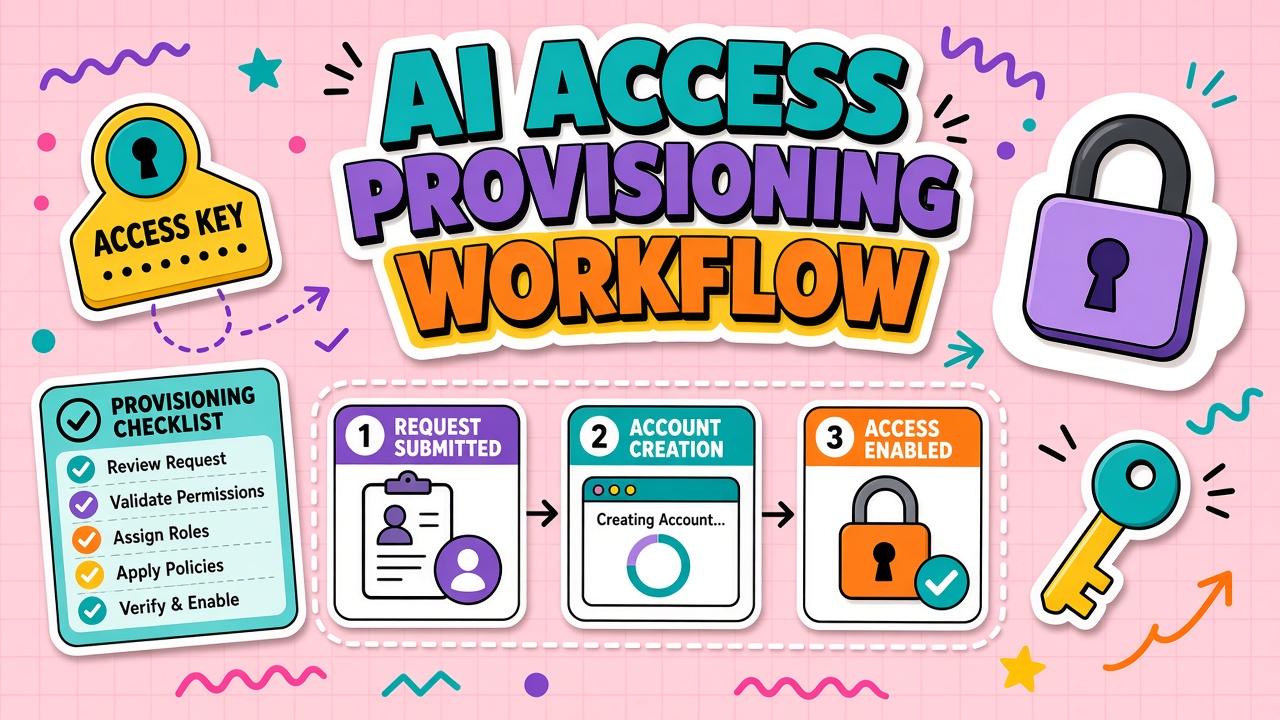
Every account should flow through four steps with ticket IDs. Ad-hoc invites are exceptions requiring security approval and a 48-hour expiration.
- Request: Employee or manager submits form with role, data tier needed, and business justification
- Approve: Manager plus program admin or security for tiers above internal-only
- Provision: IT assigns SSO group or creates native account from service catalog
- Verify: Requester confirms login, correct role, and training completion before production use
Automate provisioning where API keys are involved: issue scoped keys per environment, never share org-wide admin tokens in chat.
Standard turnaround SLAs help requesters plan: two business days for standard tier, five for elevated tiers requiring security workshop. Publish SLA exceptions (executive demo accounts) and their expiration rules so temporary access does not become permanent seats.
Group Mapping for Roles and Data Tiers
Map IdP groups to vendor roles and data access tiers. Example: ai-writer-internal vs
ai-writer-customer-data with different tool sets and logging requirements.
| IdP group | Vendor role | Data tier |
|---|---|---|
| ai-user-standard | Member | Public and internal docs only |
| ai-user-confidential | Member plus approved connectors | Customer data with DPA-covered tools |
| ai-admin | Admin, billing, SSO config | All tiers; MFA and break-glass required |
Document group-to-role mapping in the service catalog. When automation tools embed in CRM or ERP, connector scopes follow the same groups.
Test group mappings quarterly with a synthetic user in each tier. Vendors silently add new roles or permissions; IdP groups that mapped cleanly last year may over-provision today. Document exceptions where native admin roles cannot map 1:1 and require manual attestation.
Deprovision on Role Change or Exit
HRIS events should trigger deprovision within 24 hours: termination, transfer to role without AI need, or downgrade in data clearance. Disable SSO, revoke API keys, remove from vendor admin console, and rotate shared secrets the user accessed.
- Termination: immediate disable all AI accounts and keys
- Role change: remap groups; drop elevated tiers same day
- Leave of absence: optional suspend vs read-only per policy
- Contractor end date: auto-expire in provisioning system
Periodic Access Reviews
Quarterly, managers certify that direct reports still need each AI entitlement. Security samples admin accounts monthly. Orphan detection compares IdP groups to vendor seat lists; discrepancies become tickets.
Reviews should include service accounts and integration bots, not only humans. Document owners and rotation schedule for each non-human identity.
Provisioning Checklist
Before marking provision complete: SSO login works, role matches request, training assigned, acceptable use policy each non-human identity.
Joiner-Mover-Leaver Automation
Wire HRIS events to provisioning workflows where possible. Joiners receive standard tier after training completion, not automatically on day one unless role requires it. Movers drop old groups before adding new ones to prevent accumulation of API access from prior roles. Leavers trigger immediate disable plus key rotation checklist.
Contractors need end-date automation in the identity system. Calendar reminders at 14 and 7 days before expiry give managers time to extend with approval or confirm shutdown. Orphan contractor accounts are a common finding in AI tool audits.
Exception Handling for Urgent Access
Break-glass and demo accounts require ticket linkage, sponsor approval, and automatic expiry. Post-incident review within 72 hours recertifies or disables exceptions. Never create shared "team admin" logins as a workaround for slow provisioning; they evade attribution when prompts leak data.
Urgent access for automation incidents may need read-only vendor roles first; write access follows after scope confirmation. Document what was accessed during the exception for security log review.
Publish a self-service catalog page listing approved tools, required training links, and request forms. Self-service reduces shadow IT born from provisioning mystery. Each catalog entry shows data tier, typical approval time, and IdP group names.
Provisioning Metrics and Audit Trail
Track median provision time, deprovision SLA compliance, and orphan account count monthly. Spikes in emergency exceptions signal process friction or incident response gaps. Audit trails should tie every account to ticket ID and approver identity.
Integration bots and service accounts require the same ticket discipline as humans. Quarterly reviews should list every non-human identity with last rotation date and business owner attestation.
Access Reviews for Privileged AI Roles
Admin and API-key holders require monthly attestation, not only quarterly standard user reviews. Prompt injection and data exfiltration often exploit over-privileged accounts left from early pilots. Break-glass accounts appear in every review with last use timestamp and justification.
Automated diff reports between IdP groups and vendor seat exports should ticket discrepancies within 24 hours. Manual quarterly spreadsheets fail at scale above a few hundred seats across multiple AI vendors.
Provisioning workflows for merged acquisitions need explicit mapping from legacy identities to new IdP groups. Duplicate accounts during integration windows are a top source of orphaned AI admin access.
Vendor-Native Account Hygiene
SSO does not always cover all vendor surfaces. Billing portals, developer consoles, and community forums may use separate credentials. Inventory non-SSO surfaces quarterly and map each to owners and deprovision steps.
Personal email signups discovered during audits require migration to corporate SSO or shutdown. Migration tickets should include data export and confirmation that customer content does not remain on consumer accounts.
Frequently Asked Questions
How do shared mailboxes get access?
Prefer delegated access under a named human owner rather than shared passwords. If the vendor lacks delegation, use a service account with MFA on a hardware token stored in break-glass procedure.
What about service accounts for integrations?
Issue dedicated service accounts per integration with least privilege. Review quarterly; rotate credentials on schedule and after any engineer with access departs.
What if the vendor has no SSO?
Require unique corporate emails, MFA, and password manager entries. Flag as higher risk in steering committee; limit data tier or pursue enterprise tier with SAML.
Emergency access during incidents?
Break-glass accounts live in vault with logging. Post-incident review must recertify or disable within 72 hours.
Integration With Steering and DPA
Provisioning tickets should verify steering approval ID and signed DPA before elevated tiers activate. IT should not provision customer-data groups because a manager asked in Slack. Automated checks against the approved-tool registry reduce friendly bypass.
Vendor admin roles require separate approval path with MFA hardware requirements documented. Quarterly admin reviews compare vendor admin console users to IdP API key owners and remove orphans.
Chargeback tags applied at provision time help finance reconcile seat growth with department budgets. Access without cost center attribution becomes invisible spend until renewal shock.
Lifecycle Events Beyond HR
Security incidents involving compromised accounts trigger emergency deprovision across all AI tools, not only the system where compromise was detected. Playbooks list parallel revoke steps for SSO, API keys, and vendor-native accounts because attackers may pivot across auth modes.
Role changes that expand rather than reduce access still require approval. Promotion to manager should not silently inherit prior individual contributor AI tiers without review of new data scope. Approval tickets document why expanded access is necessary.
Audit Export for Access Reviews
Generate quarterly exports joining IdP username, AI tool seats, last login, data tier group, and ticket ID that granted access. Managers certify against exports, not against memory. Exports stored immutably support auditor requests without rebuilding spreadsheets under deadline.
Include API key metadata: creation date, last use, scopes, and owning service. Unused keys older than 90 days should auto-ticket for revocation unless exception approved.
Document provisioning SLAs in service catalog entries so requesters know expected wait times by tier. Unclear SLAs drive shadow IT when teams assume official process is too slow without data.
Integrate offboarding checklists with IT asset management so laptops returned still trigger AI account reviews. Mobile-only tools are easy to forget during exit interviews focused on laptop collection.
Run tabletop exercises for provisioning failures: SSO misconfiguration, delayed HRIS feed, vendor SCIM outage. Exercises produce runbook updates and backup approvers before real joiner spikes.
Program admin should review provisioning metrics monthly with security: median time to provision, deprovision failures, break-glass usage count. Metrics feed steering reports alongside seat utilization.
Deprovision tickets should confirm removal from all vendor admin consoles, not only SSO disable. Native accounts left active after SSO cutover are a recurring audit finding when early pilots used email signup before SSO rollout.
Native vendor accounts created before SSO rollout should appear on quarterly orphan reports until migrated or deleted. Hybrid auth environments hide residual access from IdP-only reviews.
Provision and Deprovision With Intent
AI access should follow the same discipline as CRM or code repo access. Wire request to verify, map groups to data tiers, deprovision on HR events, and review quarterly. Teams scaling API tools and automation should publish the workflow before seat count exceeds what security can manually audit.