What is AvaHR?
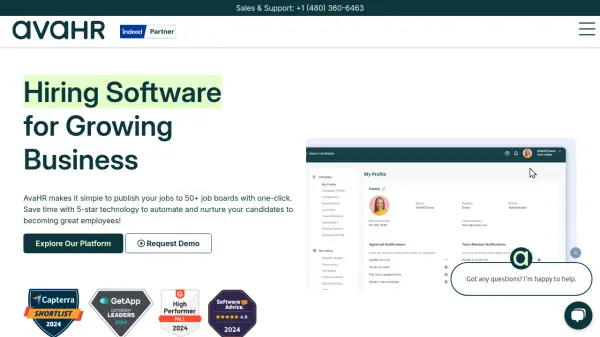
AvaHR is a comprehensive hiring solution that leverages AI-powered automation to streamline every stage of the recruitment process. Businesses can easily distribute job listings to over 50 popular job boards, ensuring maximum reach and visibility to a diverse pool of candidates. The platform provides customizable hiring pipelines, automated candidate communications, and robust analytics to enable smarter decision-making based on real-time insights.
With features such as Culture Profiles, employee referrals, and team collaboration tools, AvaHR fosters effective employer branding and cohesive teamwork. Its intuitive onboarding support, phone and chat support, and extensive hiring resources further enhance the hiring experience, helping organizations attract, evaluate, and retain top talent effortlessly.
Features
- AI Hiring Assistant: Automates and optimizes recruitment workflows
- One-Click Job Distribution: Publishes job listings to 50+ job boards instantly
- Customizable Candidate Scorecards: Evaluates candidates with job-specific criteria
- Automated Email and Text Communication: Streamlines candidate interactions
- Hiring Pipelines: Customizable pipelines for tracking candidate progress
- Real-Time Analytics: Provides insights into hiring performance and bottlenecks
- Culture Profiles: Showcases company culture with multimedia content
- Employee Referral Portal: Simplifies and tracks employee referrals
- Custom User Roles: Manages roles and access levels securely
- eSignature Integrations: Enables paperless document signing and onboarding
Use Cases
- Automating multi-platform job postings for rapid outreach
- Filtering and evaluating candidates with AI-powered scorecards
- Engaging applicants via automated and personalized email/text communication
- Centralizing the recruitment workflow for teams with collaborative tools
- Building employer brand visibility with culture profiles and branded career pages
- Improving candidate sourcing through employee referrals
- Optimizing recruitment strategies with real-time analytics and reports
FAQs
-
What is included in the 7-day free trial?
The 7-day free trial provides full access to all AvaHR features, allowing users to experience the platform's complete capabilities before committing. -
How can AvaHR help my business?
AvaHR offers tools for recruiting, engaging, evaluating, and collaborating, making the hiring process streamlined and efficient for businesses. -
How does the job board distribution feature work?
AvaHR enables users to distribute job listings to over 50 popular job boards with one click, maximizing job visibility and attracting a diverse pool of candidates. -
What resources are available to assist businesses using AvaHR?
AvaHR provides over 600 resources, including articles, templates, and guides, to help businesses throughout their hiring journey. -
Can I view a demo before signing up?
Yes, users can watch a demo of AvaHR to see the platform in action before committing.