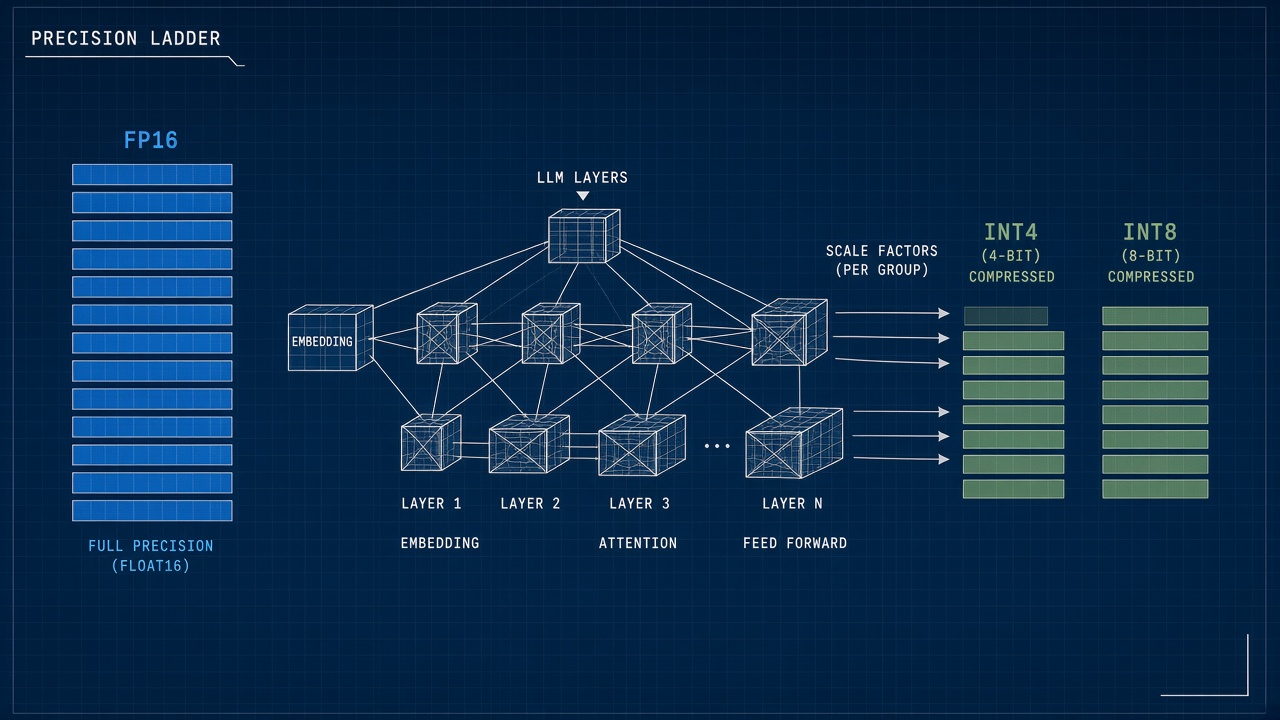
A 70 billion parameter chat model stored at full 16-bit precision can exceed 140 GB of VRAM, far beyond a typical laptop GPU. Quantization stores the same weights in 8-bit, 4-bit, or mixed formats so a AI chatbot runs locally or on cheaper cloud instances. LLM quantization explained simply: replace high-precision floating point numbers with smaller integers plus scale factors, trading a little accuracy for large memory and latency savings. The technique sits behind many fast API tiers, on-device assistants, and AI writing tools that advertise "instant" responses on consumer hardware.
What Is the Difference Between Floating Point and Quantized Weights?
Floating point weights use 16-bit or 32-bit formats with wide dynamic range; quantized weights map each value into a small integer grid (often 8-bit or 4-bit) using per-tensor or per-group scale and zero-point parameters. BF16 and FP16 are standard in training and full-precision inference. INT8 stores 256 levels per weight group; INT4 stores 16 levels. The model architecture stays the same; only storage and math precision change. Activations may stay in higher precision while weights compress, or both may quantize in aggressive deployments.
Group-wise quantization (GPTQ, AWQ, and GGUF family formats) assigns separate scales to blocks of weights so outliers in a layer do not destroy entire tensors. Mixed-precision schemes leave sensitive layers (often attention output projections) in 8-bit while compressing MLP blocks to 4-bit. Users see format names like Q4_K_M or AWQ in local model filenames; each signals bit width and calibration recipe.
| Format | Bits per weight (typical) | Memory vs FP16 | Quality risk |
|---|---|---|---|
| FP16 / BF16 | 16 | Baseline (1x) | Lowest |
| INT8 | 8 | Roughly half | Small on many tasks |
| INT4 (GPTQ, AWQ) | 4 | Roughly quarter | Noticeable on hard reasoning |
| Extreme 3-bit or 2-bit | 3 to 2 | Smallest footprints | Often visible degradation |
How Do Post-Training Quantization and QAT Compare?
Post-training quantization (PTQ) calibrates scales on a sample dataset after training finishes; quantization-aware training (QAT) simulates low precision during training so weights adapt to rounding error. PTQ is faster to ship: take a released checkpoint, run hundreds to thousands of calibration tokens, emit a quantized artifact. QAT demands retraining or continued pretraining with fake-quant nodes, costing GPU weeks but recovering accuracy on 4-bit and below. Most consumer downloadable models use PTQ (GPTQ, AWQ, GGUF quant scripts).
Calibration data matters for PTQ. Generic Wikipedia-style snippets may misrepresent code or medical domains. Enterprise quant pipelines run calibration on in-house prompts mirroring production traffic. Outlier suppression techniques clip extreme weights before grouping. QAT shines when a vendor owns the full training stack and needs maximum quality at minimum bit width for edge deployment.
When to choose PTQ or QAT
- PTQ: Open-weight releases, rapid local inference builds, good enough chat and summarization.
- QAT: Custom silicon targets, strict accuracy SLAs, sub-4-bit research production paths.
- Hybrid: PTQ first, evaluate benchmarks, escalate to QAT only if regression fails thresholds.
Which Quality Benchmarks Should You Watch?
Compare quantized models to FP16 baselines on task-specific benchmarks (MMLU subsets, GSM8K, HumanEval, MT-Bench) and on your own golden prompts; aggregate leaderboard scores hide failures on coding or long context. A 4-bit model may match FP16 on trivia while stumbling on multi-step math or JSON formatting. Perplexity on held-out text is a coarse signal; interactive evals catch tone drift and refusals breaking.
Watch for calibration-sensitive behaviors: tool calling schema adherence, function argument types, non-English fluency, and retrieval-augmented pipelines where small logit changes alter ranking. Regression suites should include edge tokens (rare Unicode, long URLs, nested lists). Document model hash, quant method, and calibration set version beside benchmark results so comparisons stay reproducible.
| Benchmark type | What quant stress reveals | Red flag |
|---|---|---|
| Knowledge (MMLU-style) | Factual recall under noise | Large drop in STEM subsets |
| Reasoning (GSM8K-style) | Multi-step arithmetic stability | Correct setup, wrong final digit |
| Code (HumanEval-style) | Syntax and API name fidelity | Broken brackets, hallucinated libs |
| Golden business prompts | Brand tone and policy compliance | New refusals or unsafe shortcuts |
Which Hardware Supports Which Quant Formats?
NVIDIA GPUs accelerate INT8 and FP8 tensor cores on recent datacenter cards; Apple Silicon uses mixed precision and specialized kernels in MLX and Core ML; CPUs via llama.cpp run GGUF quants with AVX and AMX optimizations where available. Not every 4-bit format runs equally fast on every chip. CUDA kernels for GPTQ differ from AWQ kernels; picking a quant matched to your hardware matters as much as bit width.
Cloud API providers rarely disclose exact quant formats per tier, but latency and price correlations often imply aggressive compression on "fast" models. Edge phones may cap context length when using 4-bit on-device models to avoid thermal throttling. AMD ROCm and Intel GPU stacks mature at different rates; verify release notes before standardizing a quant pipeline across heterogeneous fleets.
Compatibility checklist for buyers
- Confirm inference engine lists your quant format (vLLM, TensorRT-LLM, llama.cpp, Ollama).
- Match GPU generation to FP8 or INT8 support before buying reserved instances.
- Test long-context prompts; some kernels fall back to slow paths above certain sequence lengths.
- Validate batch size limits; quantized serving still scales KV cache memory with context.
When Is Quantization Invisible to Users?
Quantization fades into the background when tasks are short, prompts are generic, latency targets are loose, and the vendor hides model internals behind a stable API; users notice when reasoning depth, formatting, or multilingual quality slips on hard prompts. Casual summarization, subject-line suggestions, and FAQ bots often run indistinguishably at 8-bit. Agentic workflows with tool loops amplify small errors across steps.
Symptom patterns hint at aggressive quant: repeated self-contradiction within one answer, garbled table columns, dropped negation, sudden verbosity collapse, or code that compiles only after one retry at higher precision. A/B testing FP16 against 4-bit on production logs surfaces regressions faster than public benchmarks. Transparent products label "fast" vs "quality" tiers with guidance on which to pick for coding or compliance tasks.
How Does Quantization Fit the Inference Stack?
Quantization is one layer in a stack that also includes KV cache layout, batching, speculative decoding, and flash-attention kernels; savings compound when weight memory drops enough to raise batch size or context on the same GPU. Serving frameworks fuse quant matmuls with activation layouts chosen per chip. A model that quantizes cleanly in llama.cpp may need different export steps for TensorRT-LLM in production.
Operators should profile end-to-end tokens per second, not weight file size alone. Cold start time includes loading gigabyte-scale checkpoints from disk; memory-mapped GGUF files help laptops but datacenters prefer preloaded replicas. Mixed deployments route easy queries to 4-bit replicas and escalate hard tickets to FP16 pools based on classifier confidence or user-selected quality mode.
Quantization and fine-tuning pipelines
Teams that fine-tune with LoRA often merge adapters, run PTQ calibration on merged weights, then ship a single quantized artifact to edge devices. Skipping calibration after merge is a common failure mode: specialty tokens introduced during fine-tune sit in outlier-heavy rows that 4-bit grids truncate. Re-calibrate whenever vocabulary, system prompt templates, or tool schemas change materially.
What Should Tool Buyers Ask Vendors?
Procurement should request precision tier documentation, benchmark deltas against FP16 on domain-specific tasks, and rollback paths when a quant upgrade regresses production traffic. Ask whether fast tiers share GPUs with quality tiers, how context length caps differ by tier, and if fine-tuned customer models receive independent calibration. Security reviews should cover whether quantized weights at rest meet encryption policies even though files are smaller.
- Which bit width and algorithm (GPTQ, AWQ, FP8) powers each public model name?
- What calibration corpus was used for post-training quant?
- Can we pin a model version and quant build for 90 days?
- How do you detect and roll back quality regressions after kernel updates?
- Are tool-calling and JSON modes tested separately from chat benchmarks?
Frequently Asked Questions
Should I run quantized models locally?
Local quantized models suit privacy-sensitive drafts, offline travel, and experimentation without API spend. Choose GGUF or AWQ builds matched to llama.cpp or Ollama on your RAM and GPU VRAM budget. Expect manual updates when base checkpoints rev. Legal and support responsibility stays with you, not a hosted vendor.
Do API "fast" tiers always mean quantization?
Providers seldom publish internal precision. Fast tiers usually combine smaller base models, quantization, speculative decoding, and shorter default max tokens. Compare tier latency and error rates on your workloads rather than assuming naming alone. Enterprise contracts can sometimes request FP16 or dedicated capacity.
Can I quantize a fine-tuned model safely?
Fine-tuned adapters often quantize well when calibration includes domain prompts. Full fine-tunes need fresh PTQ calibration; reusing base-model scales skews specialty layers. Evaluate golden sets after quant, especially for regulated wording and structured outputs. LoRA merges before quant require checking for adapter interference in sensitive layers.
When is 4-bit enough vs when do I need 8-bit?
4-bit fits large models into single-GPU setups and enables longer context headroom. Pick 8-bit for coding agents, contract review, multilingual support desks, and any workflow where a 2 percent benchmark drop equals revenue risk. Mixed K-quants (GGUF naming) balance size and quality for general chat on 16 to 24 GB cards.
Does quantization affect context window size?
Quantization primarily shrinks weight memory, freeing VRAM for KV cache and longer contexts on the same card. Activation and cache buffers still grow linearly with sequence length. Extreme quants can indirectly limit usable context if numerical noise accumulates over very long prompts, so test your actual document lengths.
What is mixed-precision serving in practice?
Mixed-precision serving keeps sensitive operations in FP16 or BF16 while running bulk matrix multiplies in INT4 or FP8. Frameworks pick kernels per layer based on offline profiling. Users rarely configure this manually; they pick a model bundle (for example Q4_K_M) that encodes vendor choices. When latency spikes after an engine upgrade, ask whether mixed-precision fusion changed rather than assuming network issues alone.
Conclusion
LLM quantization explained for tool buyers: compress weight precision to cut memory and speed inference, using PTQ for fast deployment or QAT when accuracy at low bit width is critical. Benchmark on your tasks, match formats to hardware kernels, and treat invisible quant as a hypothesis until golden prompts prove it. Whether you deploy a local AI chatbot or subscribe to a hosted AI writing API, ask vendors about precision tiers, calibration practices, and regression testing before you bet compliance workflows on the cheapest fast model.