What is TalentLMS?
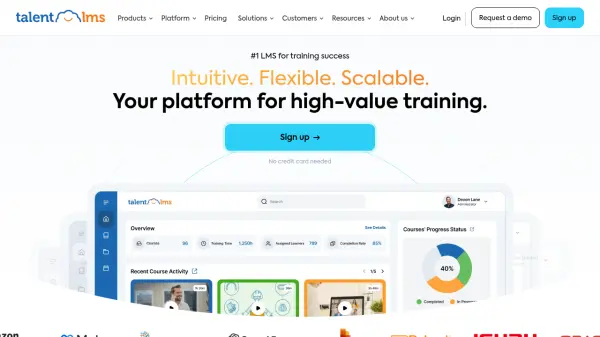
TalentLMS offers a versatile and user-friendly Learning Management System (LMS) tailored for growing businesses and enterprises requiring customizable training solutions. Its intuitive interface ensures that both administrators and learners can navigate the platform easily, regardless of technical expertise. The platform supports various training scenarios, including employee onboarding, compliance, sales, partner, and customer training, facilitating comprehensive learning and development programs across different audiences.
Leveraging Artificial Intelligence, the system includes tools like an AI course creator and AI-driven skills-based learning features, enabling rapid development of in-depth training content with text, images, and tests generated from simple prompts. It integrates seamlessly with existing tools and supports various content standards like SCORM and Tin Can. Additionally, features like custom branding, mobile accessibility, gamification, and detailed reporting enhance the training experience and allow organizations to track progress effectively.
Features
- AI Course Creator: Generate comprehensive training courses, including text, images, and tests, using AI prompts.
- AI Skills-Based Learning: Utilize AI for skill identification, assessment, and personalized learning paths.
- TalentLibrary™: Access a library of over 1000 ready-made courses covering essential soft skills.
- Integrations: Sync seamlessly with various business tools and platforms.
- Customization: Tailor the platform's appearance, domain, and homepage to match company branding.
- Mobile Accessibility: Learners can access training anytime, anywhere via a responsive design.
- Reporting & Analytics: Build custom reports to track learner progress and training effectiveness.
- Gamification: Engage learners through points, badges, and leaderboards.
- Automations: Automate tasks like course assignments and user management.
- Branches: Create independent training portals for different teams or audiences within one account.
Use Cases
- Onboarding new employees efficiently.
- Delivering compliance and regulatory training.
- Training sales teams for improved performance.
- Educating customers on product usage.
- Providing training to external partners.
- Developing employee skills through continuous learning.
- Implementing cybersecurity awareness training.
- Creating and managing training for nonprofits.
FAQs
-
How does the Flex add-on work?
The Flex add-on allows registering an unlimited number of users, with pricing based on the monthly count of unique logged-in users. It includes soft limits, meaning users aren't blocked immediately if the plan limit is reached. -
What is the difference between annual and monthly pricing?
Annual pricing provides a 20% discount compared to monthly pricing and secures the plan for a full year. -
Do you offer plans with greater user limits than listed?
Yes, the Enterprise plan can be tailored for any number of users (typically starting above 500-1000). Contact sales for details. -
Can I upgrade, downgrade, or cancel my plan at any time?
Yes, you can change or cancel your plan anytime. If canceled, the portal remains active until the end of the current billing cycle. -
Is TalentLibrary available on all plans?
Yes, TalentLibrary is available as an add-on for all plans, providing unlimited access to its full catalog of ready-made courses.