What is tagtog?
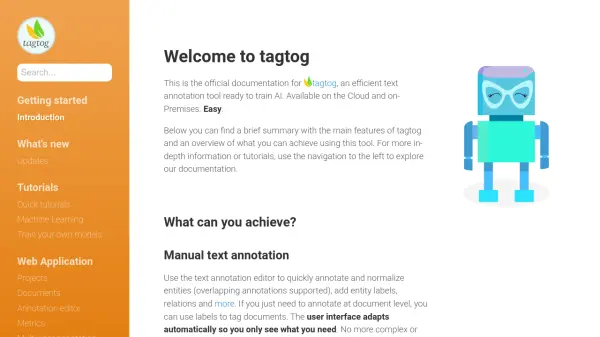
tagtog provides an efficient solution for text annotation, enabling users to prepare data for training Artificial Intelligence models. It supports both manual and automatic annotation processes, streamlining the task of identifying and labeling entities, relationships, and document-level tags within text. The platform is designed with a focus on user experience, featuring a minimalist interface to enhance annotator focus and productivity, especially when dealing with large volumes of text. Collaboration is facilitated through features allowing multiple users to work on the same documents, manage roles and permissions, track quality via Inter-Annotation Agreement (IAA), and adjudicate differing annotations.
The tool offers flexibility by supporting various annotation types, including overlapping entities, normalizations, entity labels, relations, and document labels. It uniquely handles native PDF annotation, allowing teams to work with PDF documents directly within the platform. tagtog also supports customizable annotation layouts using 'tagtog blocks' for diverse content formats like conversations or multi-column tasks. For enhanced efficiency, users can leverage dictionaries, tagtog's built-in machine learning capabilities, or integrate their own models for automatic pre-annotation, significantly speeding up the annotation workflow. The platform is available both as a cloud service and an on-premises installation for organizations with strict privacy or data requirements.
Features
- Manual Text Annotation: Annotate entities, relations, labels, and normalize text with support for overlapping annotations.
- Automatic Text Annotation: Speed up annotation using dictionaries, tagtog ML, or custom ML model integration.
- PDF Annotation Tool: Annotate native PDF documents directly within the web interface.
- Team Collaboration: Supports multiple users, roles, permissions, versioning, adjudication, and quality tracking (IAA).
- Custom Annotation Layouts: Build powerful layouts using tagtog blocks for different content types (e.g., conversations, multi-column).
- AI Model Training Support: Facilitates iterative AI training by exporting annotations and importing model predictions for correction.
- Concept Search: Index annotated data and use a search engine (UI or API) to find insights.
- Flexible Deployment: Available as a cloud service or an on-premises installation (Docker image).
Use Cases
- Creating training data for custom AI/ML models.
- Annotating text for Named Entity Recognition (NER) and Relation Extraction.
- Classifying documents based on content.
- Normalizing entities for disambiguation.
- Analyzing and annotating PDF documents.
- Collaboratively building high-quality annotated datasets.
- Indexing text data with meta-information for enhanced search.
- Generating insights automatically from text using trained models.
FAQs
-
What types of annotations does tagtog support?
tagtog supports annotating entities (including overlapping ones), entity normalizations, entity labels (attributes), relations between entities, and document-level labels for text classification. -
Can I annotate PDF documents with tagtog?
Yes, tagtog includes a dedicated PDF Annotation tool that allows you to annotate native PDF documents directly within the platform. -
Does tagtog support collaborative annotation projects?
Yes, tagtog is designed for team collaboration. It offers features like user roles, permissions, document versioning per annotator, adjudication methods, and quality tracking (Inter-Annotation Agreement). -
Can tagtog help automate the annotation process?
Yes, tagtog supports automatic annotations using pre-selections, dictionaries, its own machine learning models, or by allowing you to plug in your custom ML models to pre-annotate text. -
Is tagtog available for on-premises installation?
Yes, besides the cloud version, tagtog offers an on-premises version distributed as a Docker image for installation within your own infrastructure, ensuring data privacy.