What is QuickChart?
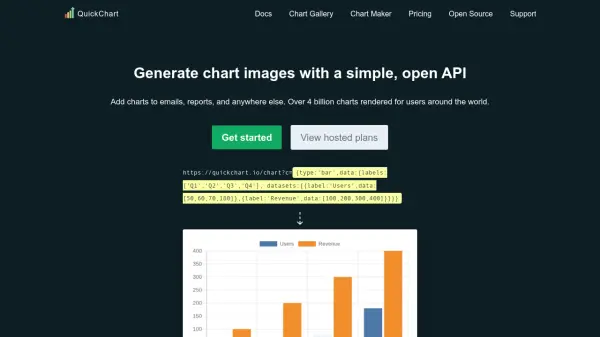
QuickChart enables users to create and embed highly customizable chart images and QR codes through a simple, robust API built on Chart.js. Designed for both developers and non-technical users, it allows seamless embedding of data visualizations in emails, reports, dashboards, and across multiple platforms. The service supports a variety of chart types and customization options to suit any data presentation requirement, ensuring charts can be rendered in any supported language or workflow with ease.
Offering robust integrations, QuickChart enables efficient chart generation without requiring complex setup or proprietary formats, and delivers high reliability with scalable infrastructure. Its open-source nature ensures transparency and avoids vendor lock-in, making it ideal for businesses, educators, and anyone seeking dynamic visual reporting.
Features
- API-Based Rendering: Instantly generate chart images and QR codes via URL or HTTP requests
- Chart.js Compatibility: Supports full Chart.js configurations and customizations
- Multiple Programming Languages: Integrates with Python, JavaScript, Java, C#, Ruby, PHP, Go, and more
- No-Code Chart Maker: Easily create charts using a visual interface or automation platforms like Zapier and Make
- Open-Source Flexibility: Avoids vendor lock-in and permits self-hosting under AGPL v3 or commercial license
- Hosted Solutions: Offers scalable chart rendering with commercial licenses and on-premise options
- Customizable Design: Personalize charts with custom fonts, backgrounds, and plugins
- High Reliability: Delivers fast, distributed rendering with global CDN and performance monitoring
Use Cases
- Embedding dynamic charts in transactional or marketing emails
- Adding charts and graphs to business reports or presentations
- Generating custom data visualizations for dashboards and web applications
- Automating chart creation in spreadsheets and no-code platforms
- Integrating QR code generation into applications or marketing material
- Including analytics visualizations in client communications
- Enabling technical and non-technical teams to visualize data efficiently
FAQs
-
Does QuickChart require users to learn proprietary chart formats?
No, QuickChart uses standard Chart.js configurations, so users can leverage their existing knowledge without learning a new format. -
What programming languages does QuickChart support?
QuickChart can be used in any language that can make HTTP requests, with specific integrations for Python, JavaScript, Java, C#, Ruby, PHP, and Go. -
Is it possible to use QuickChart without any coding?
Yes, QuickChart offers a no-code Chart Maker and integrations with platforms like Zapier and Make for easy visual chart creation. -
What kind of customization options are available for charts?
Users can customize chart types, axes, fonts, backgrounds, plugins, and integrate advanced features offered by Chart.js. -
What type of license does QuickChart offer?
QuickChart is open-source under the GNU AGPL v3 license and also provides commercial licensing options for full commercial usage.