Qlone favicon

Qlone
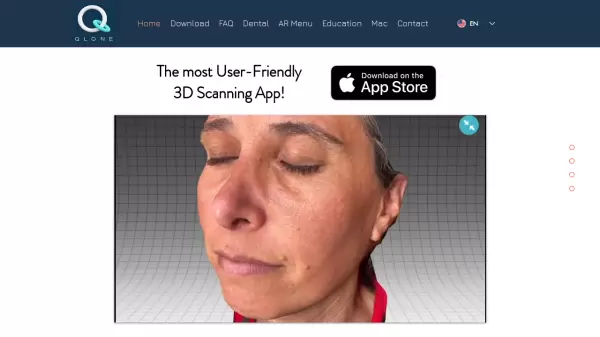
The most User-Friendly 3D Scanning App

What is Qlone?

Qlone revolutionizes 3D scanning technology by offering a user-friendly mobile application that transforms real-world objects into detailed 3D models. With specialized features for dental professionals, the platform enables precise face scanning capabilities essential for modern dentistry practices.

The application stands out through its seamless integration capabilities with leading 3D platforms, facilitating efficient workflows for printing, sharing, and commercializing 3D models. Its intuitive interface and professional-grade scanning technology make it accessible to both beginners and experienced users in various industries.

Features

  • Dental Pro Scanning: Specialized 3D face scanning for dental applications
  • Platform Integration: Seamless connection with leading 3D printing and sharing platforms
  • User-Friendly Interface: Intuitive design for easy operation
  • Multi-Platform Support: Available for mobile devices and Mac

Use Cases

  • Dental impressions and face scanning
  • Professional 3D model creation
  • 3D printing preparation
  • Educational purposes
  • 3D model marketplace selling

Related Tools:

Blogs:

  • Top AI tools for Teachers

    Top AI tools for Teachers

    Explore the top AI tools designed for teachers, revolutionizing the education landscape. These innovative tools leverage artificial intelligence to enhance teaching efficiency, personalize learning experiences, automate administrative tasks, and provide valuable insights, empowering educators to create engaging and effective educational environments.

  • Top 6 AI note-taking tools for 2026: in-person, online, and hybrid use cases

    Top 6 AI note-taking tools for 2026: in-person, online, and hybrid use cases

    Most AI note-taking lists are really lists of meeting bots, which join your video call and transcribe it. That's useful, but it's half the picture. Decisions happen in hallway conversations, client dinners, on-site visits, and hybrid rooms where nobody is on a video link. This guide covers different parts of the note-taking workflow: hardware capture for in-person settings, platform-native tools for online calls, and AI layers for organizing and synthesizing what you've captured. It compares six tools by capture context, workflow fit, pricing, and limitations.

  • Best AI tools for Lawyers

    Best AI tools for Lawyers

    streamline legal processes, enhance research capabilities, and improve overall efficiency in the legal profession.

Didn't find tool you were looking for?

Be as detailed as possible for better results