What is Print Conductor?
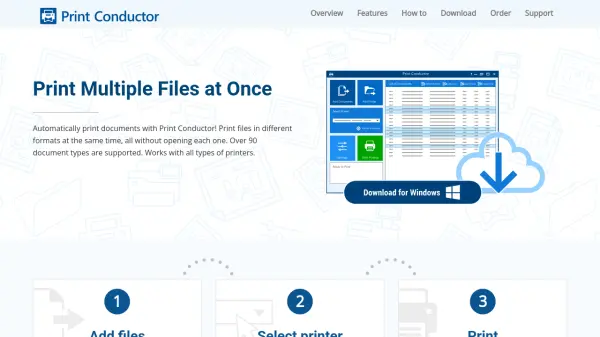
Print Conductor is a specialized software solution designed to automate the printing of multiple documents in various formats without requiring users to open each file individually. The tool supports over 90 document types, including PDFs, Word documents, images, Excel spreadsheets, PowerPoint presentations, technical drawings, and Zebra ZPL labels, making it versatile for diverse printing needs. It works with all types of printers, including local, network, and virtual printers, and offers advanced features such as cover pages, print reports, and customizable settings for individual files or entire batches.
The software simplifies the printing process through a three-step workflow: add files via drag-and-drop or file selection, choose a printer, and start printing. It includes smart document processing that selects the most effective method based on requirements, such as using Microsoft Word API for direct printing or converting to PDF for grayscale or pagination needs. With options for batch printing from folders or archives, configurable print settings, and support for multiple languages, Print Conductor enhances productivity by reducing manual effort and optimizing document workflows.
Features
- Batch Printing: Print multiple files in over 90 formats without opening each one individually
- Smart Processing: Automatically selects the most effective method (e.g., Word API or PDF conversion) based on printing requirements
- Advanced Settings: Configure over 100 print options, including color mode, page range, duplex printing, and watermarks
- File Support: Handles PDFs, Word documents, images, Excel files, PowerPoint presentations, CAD drawings, and Zebra ZPL labels
- Workflow Integration: Print from folders, archives, or saved lists, with options for pre-print operations and post-print actions
Use Cases
- Printing large volumes of documents like reports or invoices in batch mode
- Automating printing of technical drawings or CAD files for engineering projects
- Batch printing labels or barcodes in Zebra ZPL format for logistics or retail
- Printing multiple image files with consistent settings for photography or design work
- Streamlining office workflows by printing Word, Excel, and PDF documents from folders or archives
FAQs
-
What file formats does Print Conductor support?
Print Conductor supports over 90 document types, including PDF, DOC, DOCX, JPG, PNG, TIFF, XLS, XLSX, PPT, PPTX, DWG, DXF, and Zebra ZPL files. -
Does Print Conductor work with network printers?
Yes, Print Conductor is compatible with all types of printers, including local, network, and virtual printers. -
Can I print files from compressed archives like ZIP or RAR?
Yes, Print Conductor allows printing documents directly from RAR, ZIP, or 7ZIP archives without extracting them first. -
Is there a free version of Print Conductor available?
Print Conductor offers a free trial version for testing and evaluation, with full functionality to automate document printing. -
How does Print Conductor handle password-protected files?
Print Conductor can print password-protected PDFs and Word files by allowing users to specify passwords during the print setup process.