

What is Pocket Lists?
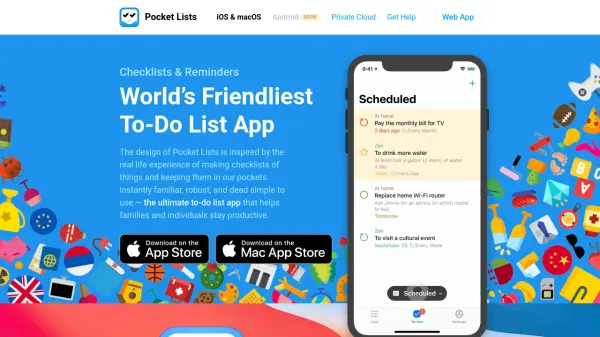
Pocket Lists is a to-do list and checklist app designed to feel as simple as a paper list while offering powerful features for families and individuals. The app provides free cloud sync, sharing, and collaboration across iOS, iPadOS, macOS, and web platforms. With support for reminders, subtasks, hashtags, file attachments, and 400+ list icons, Pocket Lists balances ease of use with advanced functionality. It includes location-based reminders, repeating to-dos, calendar view, natural language input, and dynamic filters. The app prioritizes privacy with no ads and optional private cloud hosting via an open-source server app. Pocket Lists offers a family subscription for up to six members, providing premium features like activity logs and to-do assignments.
Features
- Free Cloud Sync: Syncs to-do lists and checklists across devices without any subscription.
- List Sharing & Collaboration: Share lists and collaborate with family or team members for free.
- Comprehensive Reminders: Supports date, time, location-based, and repeating reminders.
- 400+ List Icons & 70+ Cover Images: Personalize lists with a wide variety of icons and covers.
- Subtasks & #Hashtags: Organize tasks with nested subtasks and hashtag-based filtering.
- Natural Language Input: Quickly add tasks using natural language parsing for dates and times.
- Calendar View: View tasks and deadlines in a calendar format.
- File Attachments: Attach files to tasks for additional context.
- Privacy-Focused: No ads, no data selling, and optional private cloud deployment.
- Family Subscription: Supports up to six family members with premium features like activity log and assignments.
Use Cases
- Family grocery lists and shared chore tracking
- Personal task management and daily to-do lists
- Project planning with subtasks and deadlines
- Event planning with checklists and location reminders
- Team collaboration on shared projects
- Habit tracking with repeating reminders
- Shopping lists with icons and categories
- Work task management with priorities and file attachments
FAQs
-
Is Pocket Lists free to use?
Yes, Pocket Lists offers free cloud sync, sharing, and collaboration for mobile apps. Premium features like web access and advanced sync are available via subscription starting from $1.99/month. -
Can I use Pocket Lists on Android?
Currently, Pocket Lists is available on iOS, iPadOS, macOS, and web. Android support is coming soon. -
How does family sharing work?
Family subscription allows up to six members to access all premium features. You can share lists, control permissions, and use the family tab with activity log and assignments. -
Is my data private?
Pocket Lists values your privacy. It does not sell ads or your data. You can also set up a private cloud using the open-source Webasyst app.