
What is Pinning?
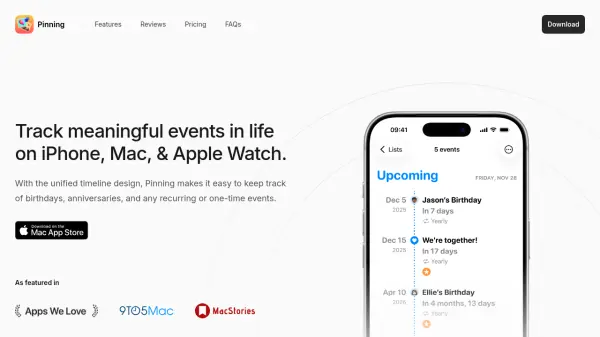
Pinning is an event tracking application designed for iPhone, Mac, and Apple Watch users to manage and monitor meaningful events in their lives. It features a unified timeline design that simplifies tracking of birthdays, anniversaries, and other recurring or one-time events. The app includes built-in lists such as "Birthdays" and "Anniversaries" for automatic organization, along with customizable notebooks to categorize events.
With iCloud sync, events stay updated across all devices, and users can share notebooks with friends and family for collaboration. Pinning also offers widgets for home screen display, calendar and scheduled reminder synchronization, list view for easy management, and customization options for events and notebooks. It supports shortcuts for faster event creation and provides various pricing plans, including a free trial.
Features
- Built-in Lists & Notebooks: Automatically organizes events with lists like "Birthdays" and "Anniversaries" and allows creation of customizable notebooks.
- iCloud Sync & Collaboration: Keeps events updated across all devices and enables sharing of notebooks with others for collaborative event management.
- Widgets: Displays upcoming events on the home screen with multiple sizes and styles for customization.
- Sync Calendars: Shows days left for calendar events by integrating calendars into the app.
- Sync Scheduled Reminders: Displays scheduled reminders to ensure important tasks are not missed.
- Customize Events: Allows personalization of events with custom images, colors, and emojis.
- Shortcuts: Enables building custom shortcuts for faster event creation.
Use Cases
- Tracking birthdays and anniversaries for personal or family events.
- Managing calendar events and scheduled reminders for productivity.
- Organizing recurring events like holidays or meetings.
- Collaborating on event planning with friends or family through shared notebooks.
- Customizing event displays with images and emojis for visual appeal.
FAQs
-
What devices is Pinning available on?
Pinning is available on iPhone, Mac, and Apple Watch. -
Is there a free trial for Pinning Pro?
Yes, a 7-day free trial starts automatically when you open the app for the first time. -
Do I need to pay separately for each device?
No, one purchase of Pinning Pro grants access on all supported devices. -
How does Family Sharing work in Pinning?
Family members can access Pinning Pro by hitting the "Restore Purchase" button on their device. -
What features are included in the Pro plans?
Pro plans include unlimited events, calendar sync, and scheduled reminder display.