What is Picit AI?
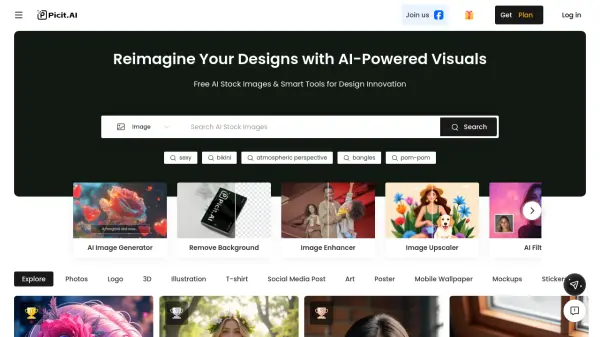
Picit AI provides users with access to a collection of free AI stock images and a variety of intelligent tools designed for enhancing design projects. It leverages artificial intelligence to offer capabilities such as generating unique visuals, removing backgrounds from images, enhancing photo quality, and upscaling image resolution. The platform aims to simplify the design process and inspire creativity through AI-powered visual solutions.
The service includes specialized tools like an AI Image Generator, AI Filter, AI PFP Generator, and AI Portrait creation. It also offers practical editing features like background removal and watermark removal. Picit AI supports various design needs, providing assets and tools for creating logos, illustrations, social media posts, mockups, and more, catering to diverse creative requirements.
Features
- AI Image Generator: Create unique visuals based on prompts.
- Remove Background: Automatically removes backgrounds from images.
- Image Enhancer: Improves the quality and details of photos.
- Image Upscaler: Increases image resolution without losing quality.
- AI Filter: Apply artistic and stylistic filters to images.
- Remove Watermark: Erases watermarks from images.
- AI PFP Generator: Create profile pictures using AI.
- AI Portrait: Generate portraits using AI.
- Free AI Stock Images: Access a library of AI-generated stock photos.
Use Cases
- Generating unique stock images for projects.
- Creating marketing materials and social media posts.
- Designing logos, illustrations, and mockups.
- Enhancing and upscaling existing images for better quality.
- Removing backgrounds for product photos or graphic design.
- Creating personalized avatars and profile pictures.
- Applying artistic filters for creative visuals.
- Removing unwanted watermarks from images.
FAQs
-
What payment methods are accepted?
Payments via PayPal and Stripe are accepted, including major credit/debit cards like Visa, MasterCard, American Express, and UnionPay. -
Is my payment information secure?
Yes, industry-standard encryption is used, and transactions are processed through trusted payment gateways. -
Can I cancel or change my subscription plan?
Yes, subscriptions can be cancelled or changed anytime via account settings. Cancellations are effective at the end of the current billing cycle. -
Will my subscription automatically renew?
Yes, subscriptions auto-renew unless cancelled before the renewal date. -
What happens to unused credits on a subscription plan?
Unused credits roll over as long as the subscription is active, up to a limit of 5 months of accumulation, depending on the plan details regarding rollover limits.