Phabricator
A comprehensive software development platform for code review, repository hosting, and project management.

What is Phabricator?

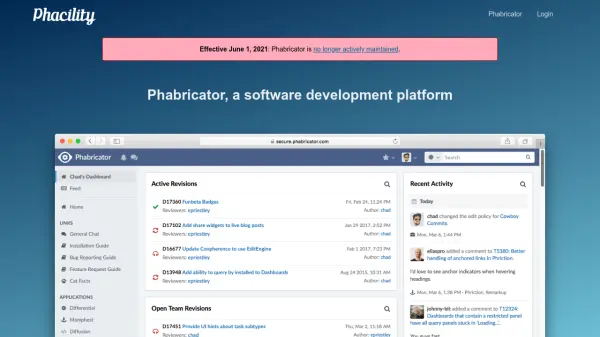
Phabricator is a software development platform designed to streamline the development process through integrated applications. It offers a suite of tools that facilitate code review, repository hosting, bug tracking, and project management, enabling teams to collaborate effectively on software projects.

As an open-source solution, Phabricator allows users to download and install it on their own hardware at no cost, providing flexibility and control over the development environment. However, it is important to note that as of June 1, 2021, the platform is no longer actively maintained, which may impact ongoing support and updates.

Features

  • Code Review: Facilitates collaborative code inspection and feedback
  • Repository Hosting: Manages and stores code repositories
  • Bug Tracking: Tracks and manages software issues and defects
  • Project Management: Organizes and oversees development projects

Use Cases

  • Managing software development projects in teams
  • Conducting code reviews to improve code quality
  • Hosting and versioning code repositories
  • Tracking bugs and issues in software applications

Blogs:

  • AI thumbnail maker tools

    AI thumbnail maker tools

    Automatically generate visually appealing and optimized thumbnails for various digital content, streamlining the design process and enhancing visual engagement

  • Best text to speech AI tools

    Best text to speech AI tools

    Text-to-speech (TTS) AI tools are designed to convert written or text-based content into natural-sounding spoken audio. These tools utilize various deep learning and neural network architectures to generate human-like speech from textual input.

  • Top 6 AI note-taking tools for 2026: in-person, online, and hybrid use cases

    Top 6 AI note-taking tools for 2026: in-person, online, and hybrid use cases

    Most AI note-taking lists are really lists of meeting bots, which join your video call and transcribe it. That's useful, but it's half the picture. Decisions happen in hallway conversations, client dinners, on-site visits, and hybrid rooms where nobody is on a video link. This guide covers different parts of the note-taking workflow: hardware capture for in-person settings, platform-native tools for online calls, and AI layers for organizing and synthesizing what you've captured. It compares six tools by capture context, workflow fit, pricing, and limitations.

Didn't find tool you were looking for?

Be as detailed as possible for better results