What is Pallet Analyzer Pro?
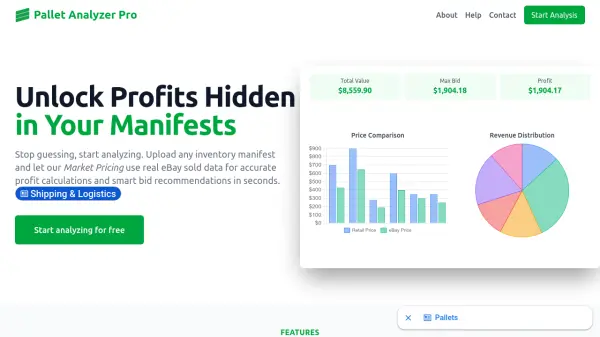
Pallet Analyzer Pro enables resellers and liquidation buyers to upload inventory manifests and get instant market pricing based on real eBay sold data. The tool automatically parses manifest files in .xlsx or .csv formats, handling column variations from sources like DirectLiquidation and B-Stock. It calculates profit margins, recommends maximum bids, and accounts for shipping costs, marketplace fees, and desired profit margins.
With real-time market data, smart search optimization, and intelligent filtering of outliers, Pallet Analyzer Pro helps users avoid overpaying and identify high-value items. Results are viewable online or downloadable as a CSV export for record-keeping and deeper analysis.
Features
- Intelligent Manifest Upload: Upload .xlsx or .csv files with automatic column detection for various sources.
- Market Pricing: Accurate pricing based on real-time eBay sold data with outlier filtering.
- Real-Time Market Data: Up-to-minute sold prices with smart search using manufacturer, model, and UPCs.
- Comprehensive Profit Calculator: Calculates max bid, gross/net revenue, and per-item profitability considering fees and shipping.
- Flexible Analysis: Works for liquidation auctions, wholesale purchases, or existing stock valuation.
- Detailed Reporting: Online results and CSV export for item-by-item breakdowns.
Use Cases
- Analyzing liquidation pallet manifests to determine profitable bids.
- Valuing wholesale inventory before purchase.
- Evaluating existing stock for optimal pricing.
- Identifying hidden gems and avoiding bad buys in bulk lots.
FAQs
-
What file formats are supported for manifest upload?
Pallet Analyzer Pro supports .xlsx and .csv formats and handles column variations from sources like DirectLiquidation and B-Stock. -
How does the tool calculate market prices?
It uses real-time eBay sold data, combining manufacturer, model, and UPCs for precise matching, and filters out outliers to provide reliable averages. -
Can I export the analysis results?
Yes, you can view results online or download a CSV export with item-by-item breakdowns for record-keeping.