What is uBuyFirst?
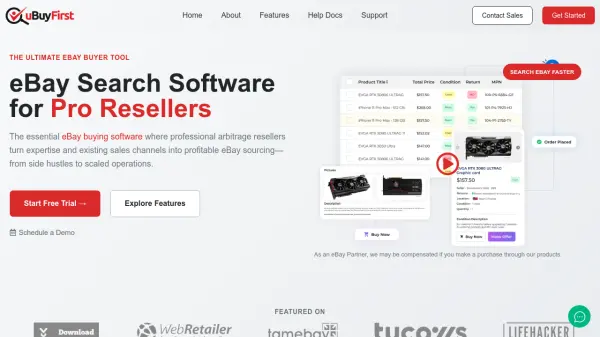
uBuyFirst is a specialized eBay buying software created for professional resellers who need advanced tools to source inventory efficiently. The platform provides real-time streaming results through a direct eBay feed, ensuring users receive sub-second notifications for new listings to beat competitors to profitable deals. It features customizable search parameters and filter options that eliminate problematic listings while matching specific business criteria.
The software offers a fully customizable workspace where users can review complete listing details without navigating actual eBay pages. It includes integration capabilities with business data through Google Sheets sync or CSV imports, enabling intelligent profit calculations and automated opportunity scoring. With features like streamlined checkout and multi-device activation, uBuyFirst transforms eBay into a serious revenue channel for resellers operating at scale.
Features
- Real-time eBay Alerts: Receive sub-second notifications for new listings through direct API access
- Smart Searches: Advanced filtering capabilities with custom parameters to eliminate problematic listings
- Customizable Workspace: Drag-and-drop field arrangement for personalized data views in search results and previews
- Business Data Integration: Sync with Google Sheets or CSV files to apply custom buying rules and profit calculations
- Streamlined Checkout: Purchase items directly from the dashboard with commit-to-buy functionality
Use Cases
- Finding profitable eBay deals for resale through arbitrage
- Automating eBay search alerts for specific product categories
- Analyzing listing profitability with custom business rules
- Streamlining the purchasing process for bulk eBay buying
- Monitoring eBay for time-sensitive deals with real-time notifications
FAQs
-
What devices and operating systems are compatible with uBuyFirst?
The core uBuyFirst application runs on Windows devices only. There is currently no version available for Mac, Linux, or mobile devices, though a Lite version offers alternate device compatibility. -
How many devices can I activate my license on simultaneously?
You can activate your license on up to three computers at the same time. If you reach the three-device limit, you can request a reset by contacting support. -
What happens after the free trial period ends?
After the trial period ends, your account converts to the free version with limited functionality, which includes restricted search terms, limited external data connectivity, and lower priority during peak times. -
Can I upgrade or downgrade my subscription plan?
Currently, there is no built-in way to upgrade or downgrade a subscription. Users must cancel their current plan and sign up for a new one, though an easier method is in development. -
What features are available in the Enterprise license that aren't in the free version?
The Enterprise license includes enhanced speed, external data connectivity, Telegram/Pushbullet integrations, commit-to-buy functionality, and access to all custom rules features, which are restricted in the free version.